

Emulsion: RAW Film Camera
Daniel de la Lastra Photo & Video iPhoneiPadiPod touch
Emulsion: RAW Film Camera is a free Photo & Video app for iPhone and iPad by Daniel de la Lastra. Requires iOS 17.0. Updated November 10, 2026.
- Price
- Free
- on the App Store
- Size
- 75 MB
- Age 4+
- Updated
- Nov 10
- 2026 · v1.5.0
Screenshots


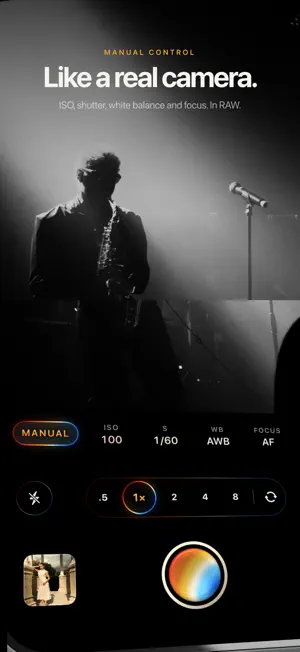
About Emulsion: RAW Film Camera
Emulsion turns your iPhone into a film camera. Shoot RAW, load a roll and see the result in the viewfinder before you press the shutter, with the grain, color and light of analog photography. TWELVE FILMS, TWELVE CITIES Every look is named after a city and has its own character: Havana, Mexico City, Marrakech, Barcelona, Kyoto, Tokyo, Seoul, Lisbon, Oslo, Berlin, New York and Hong Kong, plus Natural. Warm color, cool cinema tones or contrasty and toned black and white. Swipe through the film canisters and each one previews live in the viewfinder. TRUE RAW Emulsion captures RAW (DNG) when your iPhone supports it and develops it with its own pipeline, skipping the computational processing that flattens phone photos. The result looks more natural, with soft highlights and textured shadows. REAL FILM EFFECTS Grain, halation around highlights, bloom and wear are computed with physical models, not overlays. Dial in each effect photo by photo. FULL MANUAL CONTROL • ISO, shutter speed, white balance and manual focus • Exposure compensation by dragging on the viewfinder • AE/AF lock with a long press • Focus peaking and highlight clipping warning • Level that turns yellow when straight • 3 and 10 second timer • Shoot with the volume buttons or Camera Control • Formats: 3:4, 4:5, 1:1, 9:16 and 3:1 panoramic SHOOT WITHOUT UNLOCKING Open Emulsion from the Lock Screen, Control Center or Camera Control, with your film already loaded. Your photos appear in the gallery when you return to the app. DARKROOM Tap Develop on any photo to redevelop it whenever you like: switch films, adjust RAW exposure, temperature and tint, rotate, mirror and crop, add a frame or background blur, and compare versions. Import photos from Photos or Files too: DNG, Apple ProRAW, HEIF and JPEG. RECIPES AND ROLLS Save your favorite settings as recipes and apply them in one tap, or share them over AirDrop. Organize shoots into rolls, batch edit and copy and paste settings between photos. YOUR PHOTOS STAY ON YOUR IPHONE All developing happens on device. Emulsion keeps the original so you can develop it again, and saving to Photos stores your edit without duplicating the photo. EMULSION PRO Natural, Apple ProRAW, Havana, Kyoto and Berlin are free. Emulsion Pro unlocks every city, recipes and batch editing. You can try any film in the viewfinder and the darkroom before you buy. Choose a monthly subscription, a yearly subscription with a special price for the first year, or a one-time lifetime purchase. Subscriptions renew automatically unless cancelled at least 24 hours before the end of the period, and you can manage them in your Apple ID settings. Terms of Use: https://www.apple.com/legal/internet-services/itunes/dev/stdeula/ Privacy: https://emulsion-privacy.vercel.app
What’s new
Version 1.5.0 · Updated November 10, 2026
Emulsion 1.5 opens faster and makes developing easier. • Shoot without unlocking: open Emulsion from the Lock Screen, Control Center or Camera Control, with your film already loaded. Photos appear in your library when you return to the app. • Redesigned film canisters, with a new label for every film and a roll sheet tinted in its colour. • Two new films: Seoul, with cool cinema mid-tones, and New York, a toned black and white. • A Develop button in the photo viewer takes you straight to the darkroom. • Rotate 90° and mirror photos in the darkroom's Crop tab. • Formats: frame in 3:4, 4:5, 1:1, 9:16 or 3:1 panoramic before you shoot. • New auto exposure, without pumping, and RAW now respects your exposure compensation. • Get closer: the main camera focuses up close at 2×. • The trash empties itself after 7, 30 or 90 days, or never. You choose. • New monthly plan, and a special price for the first year of the yearly plan. • Performance improvements and fixes.
App privacy
The developer, Daniel de la Lastra, reported these privacy practices to Apple.
Data Not Linked to You
The following data, which may be collected but is not linked to your identity, may be used for the following purposes:
- Usage Data: Product Interaction
Used for: Analytics
Alternatives to Emulsion: RAW Film Camera
Looking for apps like Emulsion: RAW Film Camera? Here are 6 similar apps on the App Store. The highest rated is zerotake (5.0/5), and all 6 are free to download.
-
 CMRA - A Camera, Kept Simple
-
 Grana: Film Camera
-
 zerotake
5.0
-
 NeoFilm - Vintage Film Camera
-
 Razr - Street Camera
4.4
-
 DiscCam: CD & Vinyl Camera
4.6
| App | Rating | Price | Last updated | Compare |
|---|---|---|---|---|
| Emulsion: RAW Film Camera | – | Free | November 10, 2026 | |
| CMRA - A Camera, Kept Simple | – | Free | Oct 27, 2026 | Compare |
| Grana: Film Camera | – | Free | Nov 2, 2026 | Compare |
| zerotake | 5.0 / 5 (8) | Free | Sep 28, 2026 | Compare |
| NeoFilm - Vintage Film Camera | – | Free | Nov 9, 2026 | Compare |
| Razr - Street Camera | 4.4 / 5 (5) | Free | Nov 7, 2026 | Compare |
| DiscCam: CD & Vinyl Camera | 4.6 / 5 (9) | Free | Oct 31, 2026 | Compare |