

Razr - Street Camera
Muhammad Afif Maruf Photo & Video iPhoneiPadiPod touch
Razr - Street Camera is a free Photo & Video app for iPhone and iPad by Muhammad Afif Maruf. Rated 4.4/5 from 5 ratings. Requires iOS 16.6.
- Rating
- 4.4
- 5 ratings
- Price
- Free
- on the App Store
- Size
- 140 MB
- Age 4+
- Updated
- Oct 10
- 2026 · v2.0
Screenshots
About Razr - Street Camera
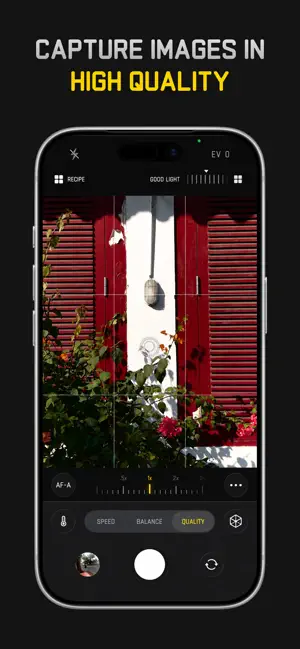
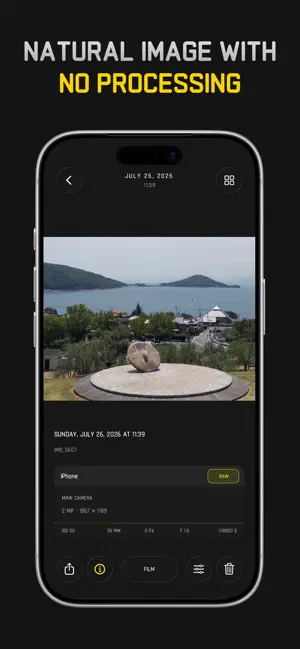
Razr is an iPhone camera for street and travel photography, combining film-inspired color, Snap Focus and reusable recipes. Preview your look before the shot, save your settings as a recipe, and choose RAW when you want more room to edit. From a morning walk to a busy night market, build a shooting setup around the scenes you notice. Explore a different color palette, prepare a focus distance, or return to a saved recipe as you find your own approach to photography. Take a familiar route with a new look, and give ordinary moments a different perspective. SEE YOUR LOOK BEFORE THE SHOT Choose a film-inspired look and adjust its intensity directly in the viewfinder. See how the palette works with the scene in front of you, then fine-tune it before pressing the shutter. Keep the effect subtle or give the photograph a strong color direction. Shape the texture and glow with separate grain, halation, and bloom controls. Pair a gentle look with daylight, add atmosphere to bright lights, or create a treatment for an entire series of photographs. BRING YOUR OWN COLOR Import compatible .cube LUTs to extend your color library. Use a palette you already enjoy or explore a new look for a particular location. Adjust the strength to suit the light and subject instead of treating every frame the same way. MAKE RECIPES YOU WILL USE AGAIN Combine a LUT with your preferred effects, give the combination a name, and save it as a recipe. Build one for afternoon walks, another for night scenes, or a signature look for a trip. Return to the combination without rebuilding every slider setting. Share a recipe as a card so you can show others the look and settings behind your photograph. Your recipes keep creative choices close at hand while you concentrate on framing the next shot. SET FOCUS BEFORE THE MOMENT Snap Focus lets you choose a focus distance before you shoot. Prepare for a subject passing through a doorway, a person approaching a patch of light, or a scene you are waiting to unfold. Lens calibration helps refine the distance setting for your device. Choose a distance that suits your subject and composition; the result still depends on the lens, light, and where your subject stands. MAKE COLOR PART OF THE STORY Try a warm palette for afternoon light or a softer look for quieter scenes. Use LUT intensity to balance the treatment with the colors already in your frame. Watch how your chosen look affects skin tones, bright areas, and shadows, then save a combination you would like to use again. CHOOSE A PHOTOGRAPHIC STARTING POINT Use Standard for a neutral base, explore Negative or Positive for a different color response, or choose a black-and-white profile. Work with gentle tones or stronger monochrome contrast to suit shapes, shadows, architecture, and portraits. These image profiles give developed photos a starting character. Combine your choices thoughtfully, using the viewfinder to judge the scene as you compose. KEEP ROOM FOR THE EDIT Capture HEIF or JPEG for a developed image, or select RAW DNG and Apple ProRAW on supported devices for later editing. Choose the format around how you plan to use the photograph, from sharing a finished frame to refining exposure and color afterward. LAYER TWO MOMENTS Explore double exposure with Lighten and Darken blending. Combine a silhouette with texture, place light across a shadow, or bring two compositions into one photograph. Experiment with the relationship between the layers to find a result that feels your own. ACCESS AND COMPATIBILITY Some features require a paid upgrade. Yearly subscription and lifetime purchase options are available; see the app for current local pricing and included features. Capture formats and controls vary by device, lens, and iOS version. Apple ProRAW requires a compatible device. Privacy Policy: https://razr-street.lovable.app/privacypolicy Terms of Use: https://www.apple.com/legal/internet-services/itunes/dev/stdeula/
Ratings & reviews
4.4
5 ratings
What’s new
Version 2.0 · Updated October 10, 2026
- Improved White Balance: Manual controls are more consistent. - Fast Mode: Apply Recipes after capture to reduce GPU load while using the viewfinder. - Introducing 5 new Looks: Color Burst, Color Rush, Hard Noir, Heatwave, and Radiant Punch.
App privacy
The developer, Muhammad Afif Maruf, reported these privacy practices to Apple.
Data Not Collected
The developer does not collect any data from this app.
Alternatives to Razr - Street Camera
Looking for apps like Razr - Street Camera? Here are 6 similar apps on the App Store. The highest rated is theLAB - Mobile (5.0/5), and all 6 are free to download.
-
 Campera - Point & Shoot Camera
4.9
Campera - Point & Shoot Camera
4.9
-
 theLAB - Mobile
5.0
theLAB - Mobile
5.0
-
 FilmFold - Vintage Camera
4.4
FilmFold - Vintage Camera
4.4
-
 HeyDazz
-
 Henshu — Photo Editor
5.0
Henshu — Photo Editor
5.0
-
 Lumencam | Pocket Camera
4.7
Lumencam | Pocket Camera
4.7
| App | Rating | Price | Last updated | Compare |
|---|---|---|---|---|
| Razr - Street Camera | 4.4 / 5 (5 ratings) | Free | October 10, 2026 | |
| Campera - Point & Shoot Camera | 4.9 / 5 (19) | Free | Oct 10, 2026 | Compare |
| theLAB - Mobile | 5.0 / 5 (12) | Free | Oct 10, 2026 | Compare |
| FilmFold - Vintage Camera | 4.4 / 5 (7) | Free | Oct 10, 2026 | Compare |
| HeyDazz | – | Free | Sep 24, 2026 | Compare |
| Henshu — Photo Editor | 5.0 / 5 (2) | Free | Oct 10, 2026 | Compare |
| Lumencam | Pocket Camera | 4.7 / 5 (3) | Free | Oct 10, 2026 | Compare |