

Ashigrain: Film Emulation
Red Phoenix Team OU Photo & Video iPhoneiPadiPod touch
Ashigrain: Film Emulation is a free Photo & Video app for iPhone and iPad by Red Phoenix Team OU. Requires iOS 26.0. Updated November 11, 2026.
- Price
- Free
- on the App Store
- Size
- 128 MB
- Age 4+
- Updated
- Nov 11
- 2026 · v1.1.0
Screenshots
Save to Pinterest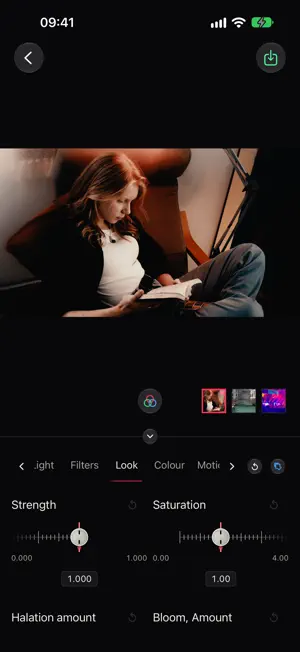


About Ashigrain: Film Emulation
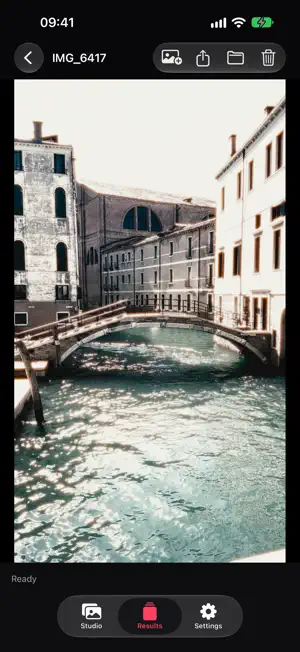
Ashigrain gives your videos and photos the colour, grain and glow of motion picture and still film. Most looks are modelled on each film's published data: curves, spectral sensitivity, dye density, sharpness and grain; the rest are reconstructed from handbooks. Everything is processed on your iPhone or iPad. HOW IT WORKS • Studio: browse your library by album, select videos and photos, then tap Edit. • Edit: choose a film and shape the look on your own footage. Give each clip its own look, or apply one look to all of them. • Render: play back, save to Photos or Files, share or delete your renders in Results. An interrupted render can be resumed. FILMS • 94 films and 37 print films. In the app: 12 films (Essentials) and every print film. 82 more come in 6 bundles you download when you want them: 2006 onward, 2000–2005, 1990s, Vintage, Experimental and Black & white. Colour negative, colour reversal and black-and-white. • Negatives are printed onto a print film, as for a cinema release print. Choose a print, previewed on your frame, or scan the negative as shot. • Film formats from Super 8 to 35 mm set grain size, glow and sharpness relative to the frame. • Download a bundle from Manage films when you want it, and remove it to free the space. Downloaded films work offline. CONTROLS • Light: exposure, push and pull, light source. Filters: conversion, warming, cooling, diffusion, star, streak and graduated filters. • Look: strength, saturation, halation, bloom, grain, sharpness, vignette. Colour: tint and tone. Motion: gate weave, flicker. Age: fading, stain, fog. • Slide a ruler under a fixed handle, or tap a value to enter it precisely. Light sources are searchable lamp cards, and filters are illustrated cards. • Tint and tone cards are previewed on your own frame. Gate weave and flicker each have a compact Auto, On and Off switch. VIDEO AND PHOTOS • Renders HEVC (H.265) video in SDR, keeping the original audio, rotation, capture date and location. Trim clips and render several in one go. • Accepts SDR video and HDR video recorded on iPhone; HDR is converted to SDR. Apple Log, PQ (HDR10) and ProRes RAW are not supported. • Opens HEIC and JPEG photos and renders HEIC, keeping orientation, capture date and location. RENDERING • On iPhone, renders pause if you leave the app and continue when you return; on iPad with an M3 chip or later they continue in the background. A render also pauses while the device is too hot. PRIVACY • No account, no sign-in, and the app collects no data. • Studio shows your library only with your permission, which you can limit to selected items. FREE AND PRO • Choose the quality of each render: Low, Medium, High or Original. Low (long edge up to 854 pixels) is always free, and no render is watermarked. • Your first five renders at Medium, High or Original are free; a free render is used only when it finishes. After that, subscribe to Ashigrain Pro, or keep rendering at Low. • Ashigrain Pro is a monthly or yearly auto-renewing subscription; the yearly plan starts with a 7-day free trial for eligible users. The App Store shows the price before you buy. • Payment is charged to your Apple Account. A subscription renews automatically unless it is cancelled at least 24 hours before the end of the current period. Manage or cancel it in your Apple Account settings. Restore Purchases is in Settings. REQUIREMENTS • iPhone or iPad with an A13 Bionic chip or later, running iOS 26 or later. Terms of Use: https://www.apple.com/legal/internet-services/itunes/dev/stdeula/ Privacy Policy: https://ashigrain.com/legal/privacy/#ashigrain-for-iphone-and-ipad
What’s new
Version 1.1.0 · Updated November 11, 2026
A big update. • 94 films and 37 print films, including Essentials, a curated place to start, and Experimental, with instant, infrared and early colour processes. • Choose a print film for each negative, previewed on your frame, or scan the negative as shot. • 12 films and all 37 print films are in the app. Download the other 82, in 6 bundles, when you want them. • Studio is now an in-app gallery: browse your library by album and select items in order. • New editor tabs: Light, Filters, Look, Colour, Motion and Age, with camera filters, light sources, tint and tone, and fading, stain and fog. • Redesigned controls: sliding rulers with precise value entry, searchable lamp cards for light sources, illustrated filter cards, tint and tone previewed on your own frame, and compact Motion switches. • Choose the quality of each render: Low is always free, and your first five renders at Medium, High or Original are free.
App privacy
The developer, Red Phoenix Team OU, reported these privacy practices to Apple.
Data Not Collected
The developer does not collect any data from this app.
Alternatives to Ashigrain: Film Emulation
Looking for apps like Ashigrain: Film Emulation? Here are 6 similar apps on the App Store. The highest rated is Nostalgia: Y2K Digicam & Film (5.0/5), and all 6 are free to download.
-
 Glowplume
-
 AeroAnimate: Travel Map Video
4.7
-
 CreepyCam: Horror Camera
-
 VHS Studio: Home Video Camera
4.6
-
 Nostalgia: Y2K Digicam & Film
5.0
-
 Splatcatcher: LiDAR Capture
3.8
| App | Rating | Price | Last updated | Compare |
|---|---|---|---|---|
| Ashigrain: Film Emulation | – | Free | November 11, 2026 | |
| Glowplume | – | Free | Oct 8, 2026 | Compare |
| AeroAnimate: Travel Map Video | 4.7 / 5 (3) | Free | Jul 25, 2026 | Compare |
| CreepyCam: Horror Camera | – | Free | Mar 24, 2026 | Compare |
| VHS Studio: Home Video Camera | 4.6 / 5 (11) | Free | Sep 6, 2026 | Compare |
| Nostalgia: Y2K Digicam & Film | 5.0 / 5 (10) | Free | Nov 12, 2026 | Compare |
| Splatcatcher: LiDAR Capture | 3.8 / 5 (6) | Free | Oct 17, 2026 | Compare |