

Splatcatcher: LiDAR Capture
Warpgate LLC Photo & Video iPhoneiPadiPod touch
Splatcatcher: LiDAR Capture is a free Photo & Video app for iPhone and iPad by Warpgate LLC. Rated 4.4/5 from 5 ratings. Requires iOS 26.0.
- Rating
- 4.4
- 5 ratings
- Price
- Free
- on the App Store
- Size
- 16 MB
- Age 4+
- Updated
- Oct 11
- 2026 · v1.3
Screenshots

About Splatcatcher: LiDAR Capture
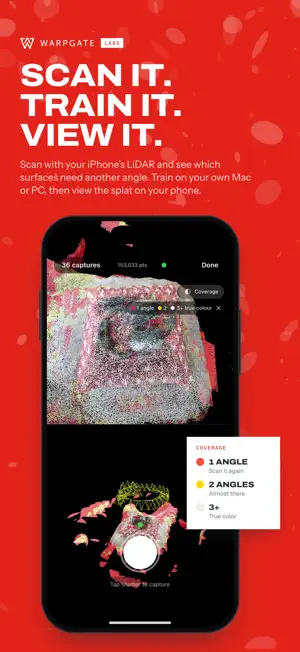
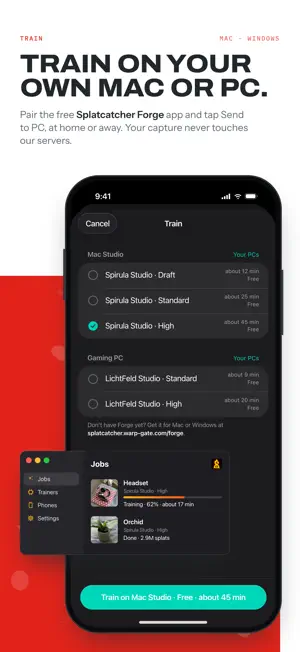
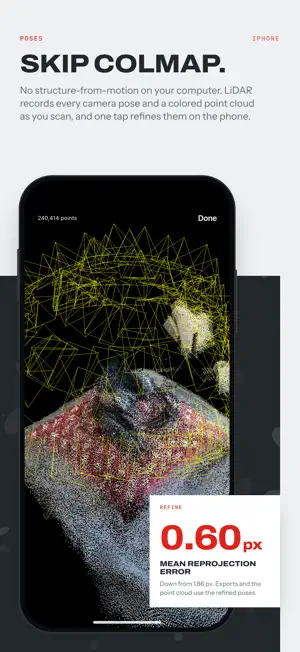
Splatcatcher captures everything you need for 3D Gaussian Splatting training in a single session — images, camera poses, and a dense colored point cloud — using your iPhone's LiDAR sensor. IMPORTANT: Capturing requires the LiDAR scanner, which is only available on iPhone Pro models (iPhone 12 Pro and later Pro / Pro Max). Non-Pro iPhones do not have LiDAR and cannot capture. Walk around any object or scene and Splatcatcher handles the rest. Each capture records the camera frame, full intrinsic and extrinsic parameters, and accumulates a spatially-deduplicated point cloud from the LiDAR depth buffer in real time. When you're done, export a ready-to-train COLMAP dataset — cameras.bin, images.bin, a colored points3D.bin, and your images — without ever running COLMAP or any other SfM pipeline on a desktop. Just load the folder into LichtFeld Studio (free), Postshot (paid), or any other COLMAP-based trainer and you're good to go. Or skip the copying altogether: pair Splatcatcher with Forge, our free companion app for Mac and Windows, and tap Send to PC. Your capture goes straight to your own computer over your network — never through our servers — Forge trains the splat with Spirula Studio or LichtFeld Studio, and the finished splat comes back to your iPhone to view. Get Forge at splatcatcher.warp-gate.com/forge. Features: - Real-time dense point cloud accumulation from LiDAR depth with spatial deduplication - Manual shutter mode with volume button trigger - Continuous auto-capture mode with distance/angle thresholds and blur rejection - Live camera-perspective and overhead point cloud preview during capture - Tracking quality indicator with motion and feature warnings - Loop closure guidance to improve reconstruction accuracy - On-device pose refinement — an optional one-tap optimization pass tightens camera poses and re-aligns the point cloud for sharper training results, no desktop SfM needed - Exports a standard COLMAP dataset with per-frame camera intrinsics and extrinsics, so autofocus shifts are carried through to training instead of averaged away - Colored COLMAP point cloud (points3D.bin), written in the same world frame as the cameras for splat initialization - One-tap export to Dropbox, AirDrop, Files, etc for transport to PC for processing - Train on your own Mac or PC: pair with the free Forge app by scanning a QR code, send a capture, and follow training from your phone. Close the app once the upload finishes; training carries on - Built-in splat viewer: orbit, pan and zoom around your trained splats on iPhone (iOS 27 or later; earlier versions show a preview image) Output is directly compatible with LichtFeld Studio, Postshot, and other trainers that read the standard COLMAP images + sparse/0 format. Requires an iPhone Pro model with the LiDAR scanner (iPhone 12 Pro or later Pro / Pro Max). Non-Pro iPhones are not supported for capture.
Ratings & reviews
4.4
5 ratings
What’s new
Version 1.3 · Updated October 11, 2026
- Train splats on your own computer: pair a Mac or PC running Forge, our free companion app (splatcatcher.warp-gate.com/forge), then tap Send to PC. Your capture goes straight to your computer, never through our servers, and the finished splat comes back to your phone. Once it's uploaded you can close the app; training carries on. - View your splats: orbit, pan and zoom around a finished splat right on your iPhone. The interactive viewer needs iOS 27; on iOS 26 you'll see the preview your computer rendered. - Object or Area scans: pick what you're scanning before you start. Area turns off the depth clip, spaces auto-captures out to 30 cm, and keeps a coarser point cloud that suits a room. Each project remembers its type. - Blur rejection learns your scene: each shot is compared with sharp frames taken from nearby viewpoints instead of one fixed threshold. - See what still needs another angle: the live preview tints points red until a surface has been seen from two angles and yellow until three, then shows its true colour.
App privacy
The developer, Warpgate LLC, reported these privacy practices to Apple.
Data Not Collected
The developer does not collect any data from this app.
Alternatives to Splatcatcher: LiDAR Capture
Looking for apps like Splatcatcher: LiDAR Capture? Here are 6 similar apps on the App Store. The highest rated is Scantic (5.0/5), and all 6 are free to download.
-
 Gaussian SplatKing
4.3
Gaussian SplatKing
4.3
-
 Scantic
5.0
Scantic
5.0
-
 Solaya: 3D Scanner Pro
5.0
Solaya: 3D Scanner Pro
5.0
-
 Spatial Lens - Real Horizons
1.6
Spatial Lens - Real Horizons
1.6
-
 Teleport by Varjo
5.0
Teleport by Varjo
5.0
-
 LCC Scan
5.0
LCC Scan
5.0
| App | Rating | Price | Last updated | Compare |
|---|---|---|---|---|
| Splatcatcher: LiDAR Capture | 4.4 / 5 (5 ratings) | Free | October 11, 2026 | |
| Gaussian SplatKing | 4.3 / 5 (12) | Free | Aug 6, 2026 | Compare |
| Scantic | 5.0 / 5 (3) | Free | Sep 5, 2026 | Compare |
| Solaya: 3D Scanner Pro | 5.0 / 5 (5) | Free | Sep 17, 2026 | Compare |
| Spatial Lens - Real Horizons | 1.6 / 5 (5) | Free | Aug 8, 2026 | Compare |
| Teleport by Varjo | 5.0 / 5 (5) | Free | Aug 27, 2026 | Compare |
| LCC Scan | 5.0 / 5 (5) | Free | Sep 28, 2026 | Compare |