

Phone Checkup - Device Test
3810 Production Utilities iPhoneiPadiPod touch
Phone Checkup - Device Test is a free Utilities app for iPhone and iPad by 3810 Production. Requires iOS 17.0. Updated October 21, 2026.
- Price
- Free
- on the App Store
- Size
- 10 MB
- Age 4+
- Updated
- Oct 21
- 2026 · v1.1.0
Screenshots


About Phone Checkup - Device Test
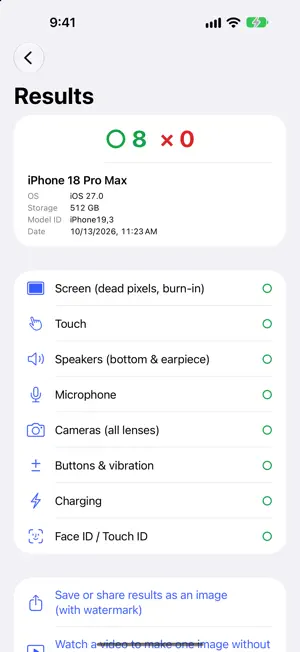
Phone Checkup tests your phone or tablet from top to bottom. It walks you through the screen, touch, sound, cameras, buttons and charging one step at a time, so anyone can finish a full check in about 3 minutes. WHEN TO USE IT - Right after buying a used iPhone or iPad, while the warranty or return period lasts - Before selling, to confirm everything works and attach the results - After a drop, or whenever something feels off FREE CHECKS (8 ITEMS) - Screen (dead pixels, burn-in) - Touch (response all the way to the edges) - Speakers (bottom and earpiece) - Microphone - Cameras (every lens) - Buttons and vibration - Charging - Face ID / Touch ID BEFORE YOU BUY A checklist of what to look for on the price tag (SIM lock, battery maximum capacity, warranty and return rules) and which screens to ask the seller to show you. RESULTS AS ONE IMAGE Save or share one image with the model, OS, storage, date and a pass/fail mark for each item (watermarked in the free version). DETAILED TESTS (one-time purchase, or watch one video ad to use it once) - Clean result image without watermark - Speaker buzz sweep - Heat, throttling and battery drain (5 minutes) - Touch sampling rate (Hz) - Color and brightness uniformity - Sensors (accelerometer, gyroscope, compass, proximity) The one-time purchase unlocks everything with no time limit and removes ads. Use "Restore Purchase" when you change devices. THINGS AN APP CANNOT READ Battery maximum capacity, parts and repair history, and Activation Lock cannot be read by apps. The app shows you where to find them in Settings. Results are stored only on your device and are never sent anywhere. Privacy Policy: https://3810.pro/privacy-policy/kenpin Contact: https://3810.pro/contact
What’s new
Version 1.1.0 · Updated October 21, 2026
- Added "Other checkers" to the About this app screen. Jump to the right app or page to check screen smoothness, earbud latency (audio lag) or a game controller.
App privacy
The developer, 3810 Production, reported these privacy practices to Apple.
Data Not Linked to You
The following data, which may be collected but is not linked to your identity, may be used for the following purposes:
- Identifiers: Device ID
- Usage Data: Product Interaction, Advertising Data
- Diagnostics: Crash Data, Performance Data
Used for: Third-Party Advertising, Analytics
Alternatives to Phone Checkup - Device Test
Looking for apps like Phone Checkup - Device Test? Here are 6 similar apps on the App Store. The highest rated is Touchscreen Pro: Phone Test (5.0/5), and all 6 are free to download.
-
 UTCTime: UTC and Unix Time
-
 Hardwise: Phone Test & Checker
-
 Screen Test: Dead Pixel Check
-
 Pocket Ruler - Gauge on Screen
-
 Touchscreen Pro: Phone Test
5.0
-
 Steer: OBD2 Car Scanner
| App | Rating | Price | Last updated | Compare |
|---|---|---|---|---|
| Phone Checkup - Device Test | – | Free | October 21, 2026 | |
| UTCTime: UTC and Unix Time | – | Free | Oct 13, 2026 | Compare |
| Hardwise: Phone Test & Checker | – | Free | Oct 14, 2026 | Compare |
| Screen Test: Dead Pixel Check | – | Free | Oct 21, 2026 | Compare |
| Pocket Ruler - Gauge on Screen | – | Free | Jul 2, 2026 | Compare |
| Touchscreen Pro: Phone Test | 5.0 / 5 (9) | Free | Oct 16, 2026 | Compare |
| Steer: OBD2 Car Scanner | – | Free | Oct 8, 2026 | Compare |