

Screen Test: Dead Pixel Check
Yunus Gunduz Utilities iPhoneiPadiPod touch
Screen Test: Dead Pixel Check is a free Utilities app for iPhone and iPad by Yunus Gunduz. Requires iOS 16.0. Updated October 21, 2026.
- Price
- Free
- on the App Store
- Size
- 11 MB
- Age 4+
- Updated
- Oct 21
- 2026 · v1.1.2
Screenshots


About Screen Test: Dead Pixel Check
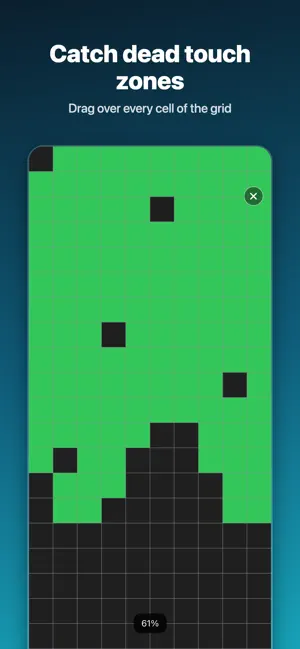
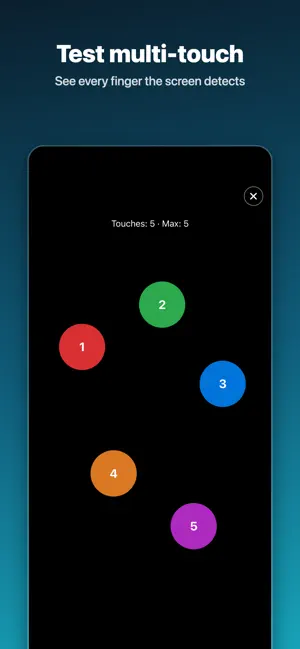
Check your iPhone display in seconds. Screen Test fills the screen with pure colors so dead, stuck or faded pixels stand out, and helps you test touch, burn-in and uniformity before you buy or sell a phone. Free: • Color test: white, black, red, green, blue, yellow, cyan and magenta at full brightness. Tap for the next color, long press to see its name. Premium (one-time purchase, no subscription): • No ads • Touch grid: drag over every cell to find dead touch zones • Multi-touch: see how many fingers the screen detects at once • Gradients, gray levels and checkerboard: spot burn-in, banding and uneven panels • Custom color: fill the screen with any color • Stuck pixel fixer: rapid color cycling, with a photosensitivity warning • Used iPhone check: run the tests in order, mark pass or problem with a note, share a PDF report and keep a history on your device Who it is for: • Checking a used or new iPhone before you buy it • Finding dead pixels, stuck pixels and OLED burn-in • Finding dead touch zones after a drop or a screen repair • Repair shops checking a display before and after a repair Bought Screen Test before it became free? Premium is already yours. Use "Restore purchases" in Settings if needed. Tips: clean the screen first, test dark colors in a dim room and light colors in a bright room. Languages: English, Turkish, German, Spanish, Portuguese, Japanese, French, Arabic, Ukrainian, Russian and Chinese (Simplified). To change the language, open iOS Settings, scroll to Screen Test and choose Language. Privacy: no account, no camera or microphone access. Reports stay on your device. Ads are served by Google AdMob; you can choose whether to allow tracking. The stuck pixel fixer flashes colors rapidly and is not suitable for people with photosensitive epilepsy. Terms of Use (EULA): https://www.apple.com/legal/internet-services/itunes/dev/stdeula/ Privacy Policy: https://yunusgunduz.com/pp/ScreenTester-PrivacyPolicy.html
What’s new
Version 1.1.2 · Updated October 21, 2026
New: watch a short video to try a Premium feature once (up to 3 a day). Premium is a one-time purchase that removes ads and unlocks every feature. Bug fixes and improvements.
App privacy
The developer, Yunus Gunduz, reported these privacy practices to Apple.
Data Used to Track You
The following data may be used to track you across apps and websites owned by other companies:
- Identifiers: Device ID
- Usage Data: Advertising Data
Data Not Linked to You
The following data, which may be collected but is not linked to your identity, may be used for the following purposes:
- Identifiers: Device ID
- Usage Data: Advertising Data
- Purchases: Purchase History
- Diagnostics: Crash Data
Used for: Third-Party Advertising, App Functionality
Alternatives to Screen Test: Dead Pixel Check
Looking for apps like Screen Test: Dead Pixel Check? Here are 6 similar apps on the App Store. The highest rated is Spacetime Clock (2.8/5), and all 6 are free to download.
-
 Slabox - PTCG/PSA Card Vault
1.0
Slabox - PTCG/PSA Card Vault
1.0
-
 Nauticus - Map for Subnautica
-
 Spacetime Clock
2.8
Spacetime Clock
2.8
-
 TouchGap: Touch Screen Test
-
 Element Hider
-
 The Homeowners Bible AI
| App | Rating | Price | Last updated | Compare |
|---|---|---|---|---|
| Screen Test: Dead Pixel Check | – | Free | October 21, 2026 | |
| Slabox - PTCG/PSA Card Vault | 1.0 / 5 (1) | Free | Oct 26, 2026 | Compare |
| Nauticus - Map for Subnautica | – | Free | Jun 22, 2026 | Compare |
| Spacetime Clock | 2.8 / 5 (4) | Free | Oct 20, 2026 | Compare |
| TouchGap: Touch Screen Test | – | Free | Aug 4, 2026 | Compare |
| Element Hider | – | Free | Sep 15, 2026 | Compare |
| The Homeowners Bible AI | – | Free | Oct 12, 2026 | Compare |