

Bengala: Projection Mapping
Igal Daniels Entertainment iPhoneiPadiPod touch
Bengala: Projection Mapping is a free Entertainment app for iPhone and iPad by Igal Daniels. Rated 5.0/5 from 1 ratings. Requires iOS 16.4.
- Rating
- 5.0
- 1 ratings
- Price
- Free
- on the App Store
- Size
- 80 MB
- Age 9+
- Updated
- Oct 29
- 2026 · v1.1.0
Screenshots



About Bengala: Projection Mapping
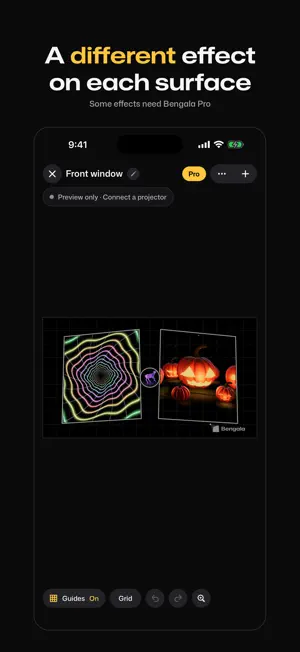
Bengala is a projection mapping studio for iPhone and iPad. Connect a projector, drag the corners of a shape onto a window, a door, a pumpkin or a wall, and choose what plays inside it. The first setup takes a few minutes. HOW IT WORKS 1. Plug in a projector with an HDMI adapter, or start AirPlay screen mirroring. 2. Add a shape: rectangle, circle or stencil. A rectangle takes extra corners for odd surfaces. 3. Drag its corners until it sits on the real object. The picture bends to fit, so a flat video still looks straight when the projector sits at an angle. 4. Pick an effect, a photo, a video or a color. The preview on your phone shows what the projector shows. You can build everything before you plug anything in. EFFECTS SORTED BY THEME Effects are grouped by theme: animals, illusions for doors and windows, party, fire and nature, space, neon and abstract. Christmas goes first from mid November to early January. Every animal is rendered in 3D, and so are some Halloween effects. Effects download when you tap them, so the app stays small and new ones arrive without an update. You need a connection the first time you use an effect. After that it plays offline. WHAT A SHAPE CAN SHOW - A looping effect - A music effect that moves with the sound around the phone - Your own photo or video - A plain color or an animated color - One shape at a time, or the whole canvas Use one shape per surface: the window, the door, the pumpkin on the porch. Each keeps its own content. PROJECTING THROUGH A WINDOW? Projecting from behind frosted film or a shower curtain flips the picture. Turn on Mirror output and it reads the right way for the people outside. IN THE EDITOR - A new project opens with an effect already playing - Pinch to zoom in and nudge a corner into place - Undo and redo - Guides: while you move a shape, the projector shows its grid. A second after you let go it fades. Tap the empty canvas to hide the outlines too - Present mode: the phone goes dark, the projector keeps playing - Stencils: pick a silhouette, or bring a PNG with a transparent background (Pro) and its outline becomes the shape WORKS WITH Any projector with an HDMI input, through a Lightning or USB-C adapter, or any projector or TV that supports AirPlay. HDMI is sharper and has less delay. Use a dark room. For windows, we suggest at least 300 ANSI lumens. A color lamp in Apple Home, if you want one. Effects with a lamp icon change its color at the right moment. A NOTE ON FLASHING Some effects flash or strobe. If you or someone watching is sensitive to flashing light, check each effect on your phone first. FREE AND PRO Free: 1 project, a set of free effects (Light Drop lights a lamp), the Pulse music effect, and a small Bengala watermark that drifts across the projection. Pro: unlimited projects, every effect, no watermark, every stencil shape and your own PNG stencils, every animated color, and import from the Files app. New 3D effects are added regularly, and Pro includes them. Bengala Pro is available as a weekly subscription at $5.99 per week, a yearly subscription at $39.99 per year with a 3-day free trial for new subscribers, or a one-time lifetime purchase at $89.99 with no renewal. Prices are for the United States and may differ in other countries. Payment is charged to your Apple Account at confirmation of purchase. Subscriptions renew automatically unless canceled at least 24 hours before the end of the current period. Your account is charged for renewal within 24 hours before the end of the current period. You can manage or cancel subscriptions in your Apple Account settings after purchase. Any unused part of a free trial is forfeited when you buy a subscription. Terms of Use: https://bengala.app/terms Privacy Policy: https://bengala.app/privacy
What’s new
Version 1.1.0 · Updated October 29, 2026
New: music effects. Pulse, Bricks, Mosaic, Bars, Rings and Scan move with the music your phone hears. Find them in the new Music tab. Pulse is free, the rest come with Pro. The microphone is used only while one is on screen, and sound never leaves your phone. Also new: some effects can light a color lamp in Apple Home. Look for the lamp icon. Light Drop is free. You can now turn a shape: twist two fingers on it. Christmas effects are in the library and move to the front on November 15. Privacy: the app now also sends your first answers (what you want to light up, whether you have a projector, the look you like, where you heard about us) to RevenueCat with a random id, and uses Apple's ad attribution code. Details in the privacy policy. We read every email at [email protected].
App privacy
The developer, Igal Daniels, reported these privacy practices to Apple.
Data Not Linked to You
The following data, which may be collected but is not linked to your identity, may be used for the following purposes:
- Usage Data: Advertising Data
- Purchases: Purchase History
- Identifiers: User ID, Device ID
- Other Data: Other Data Types
Used for: Developer’s Advertising or Marketing, Analytics, App Functionality
Alternatives to Bengala: Projection Mapping
Looking for apps like Bengala: Projection Mapping? Here are 6 similar apps on the App Store. The highest rated is LumiCanvas (5.0/5), and all 6 are free to download.
-
 LumiCanvas
5.0
LumiCanvas
5.0
-
 Light mapping - Projection
2.3
Light mapping - Projection
2.3
-
 Framespace
5.0
Framespace
5.0
-
 Imposter Game: Spy Word Party
5.0
Imposter Game: Spy Word Party
5.0
-
 Epson Creative Projection
4.3
Epson Creative Projection
4.3
-
 ART.AUGMENTED
3.0
ART.AUGMENTED
3.0
| App | Rating | Price | Last updated | Compare |
|---|---|---|---|---|
| Bengala: Projection Mapping | 5.0 / 5 (1 rating) | Free | October 29, 2026 | |
| LumiCanvas | 5.0 / 5 (1) | Free | Oct 6, 2026 | Compare |
| Light mapping - Projection | 2.3 / 5 (3) | Free | Aug 10, 2026 | Compare |
| Framespace | 5.0 / 5 (2) | Free | Feb 28, 2026 | Compare |
| Imposter Game: Spy Word Party | 5.0 / 5 (1) | Free | Oct 26, 2026 | Compare |
| Epson Creative Projection | 4.3 / 5 (3) | Free | Oct 31, 2025 | Compare |
| ART.AUGMENTED | 3.0 / 5 (1) | Free | Aug 21, 2026 | Compare |