
LumiCanvas
Leigh Amor, LLC Entertainment iPhoneiPadiPod touch
LumiCanvas is a free Entertainment app for iPhone and iPad by Leigh Amor, LLC. Rated 5.0/5 from 1 ratings. Requires iOS 18.0. Updated October 6, 2026.
- Rating
- 5.0
- 1 ratings
- Price
- Free
- on the App Store
- Size
- 12 MB
- Age 4+
- Updated
- Oct 6
- 2026 · v1.1
Screenshots
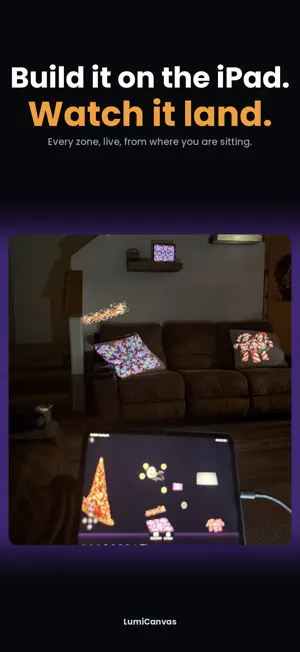

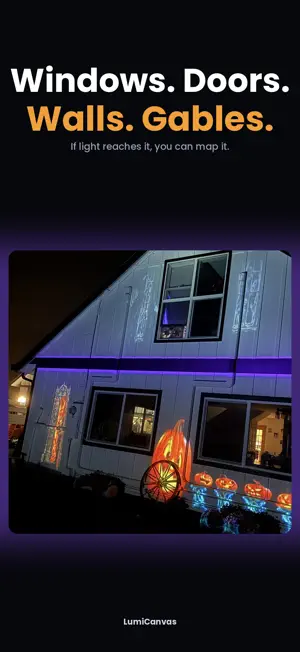

About LumiCanvas
LumiCanvas makes projection mapping easy for everyone. Connect your iPhone or iPad to any projector and map video, photos, and glowing shapes onto real-world surfaces — your house, your windows, your Halloween graveyard, your Christmas display. No expensive software. No learning curve. Just drag four corners and watch your video bend perfectly onto any surface. HOW IT WORKS • Connect to any projector (HDMI adapter or AirPlay) • Add a surface and drag its corners to match your wall, window, or object • Fill it with your own videos and photos — or grab ready-made loops • Layer multiple surfaces for complex displays POWERFUL TOOLS, ZERO EXPERIENCE NEEDED • Custom Trace: outline any shape — an arch, a pumpkin, a window frame — and fill it with light • Mask packs: hearts, stars, holiday shapes, and more • Crop any video to show exactly the slice you want • Test grid for fast, precise projector alignment • Show scheduler: set each surface to appear at its own time for choreographed displays • Fixed 1080p canvas: build on your phone, run on your iPad — projects work everywhere BUILT FOR HOLIDAY MAGIC Haunted houses, spooky window ghosts, snowfall on your roofline, dancing lights — if you can point a projector at it, LumiCanvas can map it. BUILD A SHOW, NOT JUST A PICTURE With LumiCanvas Pro's Show Timeline, each surface gets its own track. Lay clips along them and your display changes as the evening goes on — a figure that appears in an upstairs window, a door that opens on its own, trim lights running the whole time underneath. LumiCanvas Pro (optional subscription) removes the watermark and unlocks everything: unlimited surfaces, all mask packs, and every new feature as it ships. Privacy Policy: https://www.leighamor.com/lumicanvas/privacy Terms of Use: https://www.apple.com/legal/internet-services/itunes/dev/stdeula/
What’s new
Version 1.1 · Updated October 6, 2026
THE SHOW TIMELINE Your house can now change through the night. Give every surface its own track — the wall, each window, the door, the trim — and lay clips along it. A background loop, a figure that appears in the window at eight o'clock, trim lights that chase the whole time. Up to ten zones, each playing something different, each on its own schedule. TRIM AND SPEED Shorten a clip, or run it faster. Set an eight-second loop to double speed and it plays the whole thing in four, so you can fit a clip to the moment instead of the other way round. CURVED AND UNEVEN SURFACES New mesh warping. Four corners can only describe a flat plane, and houses are not flat — siding steps, garage doors bow, stucco curves into the corners. Bend the projection to match the wall you actually have. EXPORT THAT MATCHES WHAT YOU BUILT Export has been rebuilt from the ground up. It now renders through the same engine as the live preview, so layered windows, masks and lighting effects come out exactly as you see them on screen. FASTER, ON MORE iPADS The hardware renderer is now standard rather than an option, and this release supports iPad models going back several generations. The Show Timeline is part of LumiCanvas Pro.
App privacy
The developer, Leigh Amor, LLC, reported these privacy practices to Apple.
Data Not Collected
The developer does not collect any data from this app.
Alternatives to LumiCanvas
Looking for apps like LumiCanvas? Here are 6 similar apps on the App Store. The highest rated is Omega EMU: Retro Emulator (5.0/5), and all 6 are free to download.
-
 Light mapping - Projection
2.3
Light mapping - Projection
2.3
-
 Bengala: Projection Mapping
-
 Party Games Box - Offline
-
 Omega EMU: Retro Emulator
5.0
Omega EMU: Retro Emulator
5.0
-
 NEX - Retro Games
4.0
NEX - Retro Games
4.0
-
 Framespace
5.0
Framespace
5.0
| App | Rating | Price | Last updated | Compare |
|---|---|---|---|---|
| LumiCanvas | 5.0 / 5 (1 rating) | Free | October 6, 2026 | |
| Light mapping - Projection | 2.3 / 5 (3) | Free | Aug 10, 2026 | Compare |
| Bengala: Projection Mapping | – | Free | Oct 29, 2026 | Compare |
| Party Games Box - Offline | – | Free | Mar 21, 2026 | Compare |
| Omega EMU: Retro Emulator | 5.0 / 5 (1) | Free | Sep 25, 2026 | Compare |
| NEX - Retro Games | 4.0 / 5 (3) | Free | Oct 16, 2026 | Compare |
| Framespace | 5.0 / 5 (2) | Free | Feb 28, 2026 | Compare |
Compare LumiCanvas with the top alternatives: ratings, updates, ASO score and keyword gaps →