

Calendaria
Jorge Cohen Productivity iPhoneiPadiPod touchApple Watch
Calendaria is a paid Productivity app for iPhone and iPad by Jorge Cohen. Requires iOS 27.0. Updated November 9, 2026.
- Price
- 4.99 USD
- on the App Store
- Size
- 101 MB
- Age 4+
- Updated
- Nov 9
- 2026 · v1.1.4
Screenshots


About Calendaria
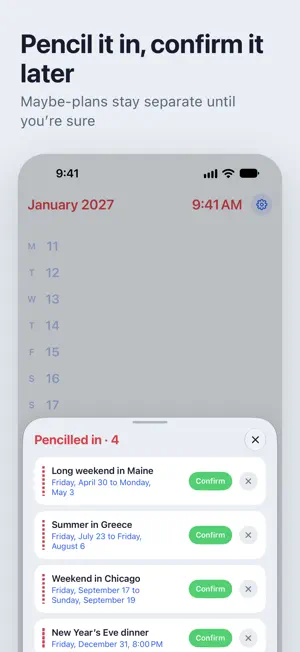
Calendaria shows your calendar as one continuous list, from January to December, and helps you plan it. Scroll through the year and the days that matter stand out, each with its most notable event next to the date. SEE THE YEAR Drag across the screen or tap the tabs to move between three levels. Months shows the highlights of each month and a bar for every week, so busy weeks and free ones stand out. Days shows every date and what's on it. Hours shows each day in full, with longer events drawn as a single block. Pull past the end of the year to go to the next. PLAN IT YOUR WAY • Write plans the way you'd say them: "Lisbon with the kids April 2 to 10, then pizza night every third Wednesday". With Apple Intelligence, Calendaria reads whole paragraphs in any of its languages, right on your iPhone. • Pencil in the maybes. They show dashed in your year until you confirm them, even from a widget. • Find your free weeks. Calendaria shows the longest free stretch ahead; hold and drag across days to plan a trip and see what's already on. • Add a set in one go: bank holidays for England and Wales, new and full moons, birthdays from Contacts, or school term dates pasted from your school's website. CHOOSE YOUR LOOK • Lume: bright color on black, inspired by the Apple Watch. • StandBy: big, easy-to-read type, with a red night mode after dark. • Duet: soft paper tones with a large numeral of the day you're looking at. • Battersea: clean and familiar, in light and dark. Each look has its own options, and Calendaria can switch between two of them to follow your iPhone's light and dark setting. WIDGETS See today, your year in dots, what's coming up or your next free stretch on the Home Screen and Lock Screen, and add a plan from Control Center. MADE FOR IPHONE DUO Open it like a book: your days on one page, the hours of whichever day you pick on the other. See which weeks are filling up, and exactly when, without switching views. Fold it shut and the whole year is still there on the cover screen. PRIVATE BY DESIGN Calendaria reads the calendars you already use, including iCloud, Google and Exchange accounts added in Settings, and you choose which ones appear. Your events stay on your iPhone, and reading your plans happens on your iPhone too. No accounts, no tracking.
What’s new
Version 1.1.4 · Updated November 9, 2026
See the year a season at a time. Turn on Quarters, and Months gathers your plans into four, with the free weekends left in each and room for more of what's coming. Months and Days now each choose their own highlights. Color events by their calendar, pick a softer accent, and keep your next plan in the line above the Lock Screen clock. Penciling in works with Google calendars too.
App privacy
The developer, Jorge Cohen, reported these privacy practices to Apple.
Data Not Collected
The developer does not collect any data from this app.
Alternatives to Calendaria
Looking for apps like Calendaria? Here are 6 similar apps on the App Store. The highest rated is Marko: Markdown Viewer (5.0/5), and 3 of the 6 are free to download.
-
 Pelican: AI Chat Assistant
4.7
-
 Marko: Markdown Viewer
5.0
-
 DropTask
5.0
-
 TypeDraw
4.5
-
 Kan Do: Project Management
4.5
-
 Parchment: Agenda & Daily Note
4.8
| App | Rating | Price | Last updated | Compare |
|---|---|---|---|---|
| Calendaria | – | 4.99 USD | November 9, 2026 | |
| Pelican: AI Chat Assistant | 4.7 / 5 (3) | Free | Nov 10, 2026 | Compare |
| Marko: Markdown Viewer | 5.0 / 5 (4) | Free | Oct 19, 2026 | Compare |
| DropTask | 5.0 / 5 (3) | Free | Nov 18, 2026 | Compare |
| TypeDraw | 4.5 / 5 (95) | 4.99 USD | Nov 14, 2026 | Compare |
| Kan Do: Project Management | 4.5 / 5 (22) | 2.99 USD | Nov 17, 2026 | Compare |
| Parchment: Agenda & Daily Note | 4.8 / 5 (326) | 4.99 USD | Nov 18, 2026 | Compare |
Compare Calendaria with the top alternatives: ratings, updates, ASO score and keyword gaps →