

Netwatch: WiFi & LAN Scanner
Evren Bayrak Utilities iPhoneiPadiPod touch
Netwatch: WiFi & LAN Scanner is a free Utilities app for iPhone and iPad by Evren Bayrak. Requires iOS 17.0. Updated November 27, 2026.
- Price
- Free
- on the App Store
- Size
- 12 MB
- Age 4+
- Updated
- Nov 27
- 2026 · v2.0
Screenshots
Save to Pinterest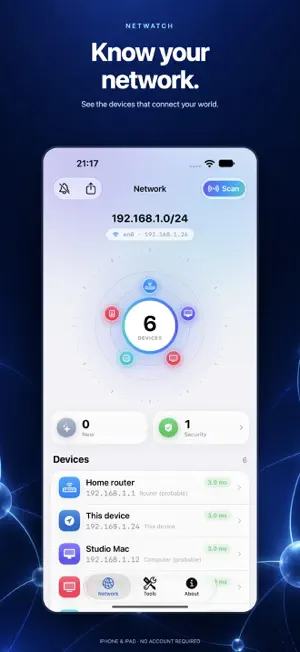


About Netwatch: WiFi & LAN Scanner
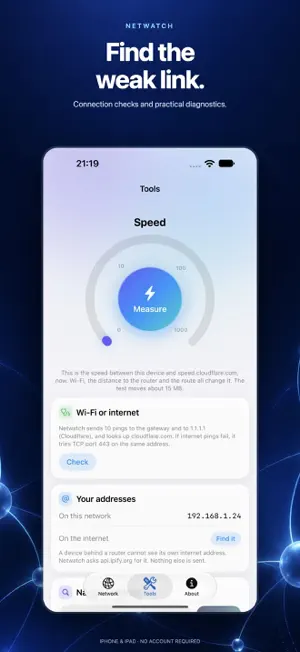
Understand your network with Netwatch, a practical toolkit for iPhone and iPad. SEE WHAT IS CONNECTED Explore your local network in the redesigned radar view. Find devices, their addresses, advertised names, device types, and available services. Open a device to investigate its details and response time. REMEMBER YOUR NETWORK Recognize devices from earlier scans, see new or absent devices, and give devices names that make sense to you. Correct a device type, export scan results as CSV, or share a PDF report of your scan and security review. INVESTIGATE CONNECTION PROBLEMS Check your router, internet reachability, and DNS together. Run download and upload speed tests, ping a host, trace a route, inspect custom TCP port lists, look up DNS records, and query WHOIS. Keep speed test history for each network. LOOK CLOSER Review exposed services and supported security checks, inspect HTTPS certificates, and use Wake-on-LAN with a compatible device and its known hardware address. Findings are diagnostic clues, not a guarantee that a device or network is secure. LOCAL BY DESIGN No Netwatch account is required. Your device inventory and scan history are stored on your device. Internet tools contact the relevant remote services only when you run them. Optional background checks are scheduled by iOS and are not continuous monitoring. MADE FOR IPHONE AND IPAD A native interface with support for English, Turkish, German, French, Spanish, Italian, Portuguese (Brazil), Russian, Japanese, Korean, and Simplified Chinese. On iOS 27 and later, Netwatch can read hardware addresses when the system makes them available. Earlier iOS versions restrict access to most hardware addresses. Some devices do not respond to discovery. Netwatch explains these limits. Local device discovery requires a local network connection and permission. Scan only networks you own or are authorized to assess.
What’s new
Version 2.0 · Updated November 27, 2026
• Use Stay Check to see which other devices are visible on hotel or rental Wi-Fi. You can also check for nearby Bluetooth devices. • Measure local Wi-Fi speed between two devices running Netwatch or with an iPerf3 server on your network. • Map latency and packet loss room by room, then share the Wi-Fi map as a PNG. • Check network status or wake a compatible device from a Home Screen widget. Follow scans and pings on the Lock Screen with Live Activities.
App privacy
The developer, Evren Bayrak, reported these privacy practices to Apple.
Data Not Collected
The developer does not collect any data from this app.
Alternatives to Netwatch: WiFi & LAN Scanner
Looking for apps like Netwatch: WiFi & LAN Scanner? Here are 6 similar apps on the App Store. The highest rated is NetProbe: LAN Scanner (5.0/5), and all 6 are free to download.
-
 NetProbe: LAN Scanner
5.0
-
 NetBlade: IP & Network Scanner
-
 Clean Up: Clear Storage App
4.6
-
 BlueNox BLE Scan
4.6
-
 Netwatch Network & Security
-
 FreeVNC
| App | Rating | Price | Last updated | Compare |
|---|---|---|---|---|
| Netwatch: WiFi & LAN Scanner | – | Free | November 27, 2026 | |
| NetProbe: LAN Scanner | 5.0 / 5 (1) | Free | Nov 15, 2026 | Compare |
| NetBlade: IP & Network Scanner | – | Free | Nov 23, 2026 | Compare |
| Clean Up: Clear Storage App | 4.6 / 5 (7) | Free | Nov 2, 2026 | Compare |
| BlueNox BLE Scan | 4.6 / 5 (16) | Free | May 3, 2026 | Compare |
| Netwatch Network & Security | – | Free | Nov 18, 2026 | Compare |
| FreeVNC | – | Free | Oct 26, 2026 | Compare |