

Clean Up: Clear Storage App
Shant Harbedian Utilities iPhoneiPadiPod touch
Clean Up: Clear Storage App is a free Utilities app for iPhone and iPad by Shant Harbedian. Rated 5.0/5 from 1 ratings. Requires iOS 13.0.
- Rating
- 5.0
- 1 ratings
- Price
- Free
- on the App Store
- Size
- 37 MB
- Age 4+
- Updated
- Jul 9
- 2026 · v1.0.1
Screenshots
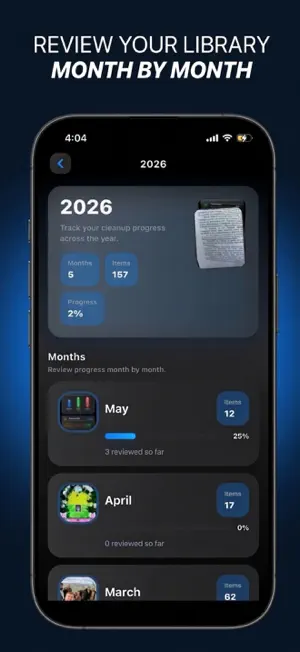

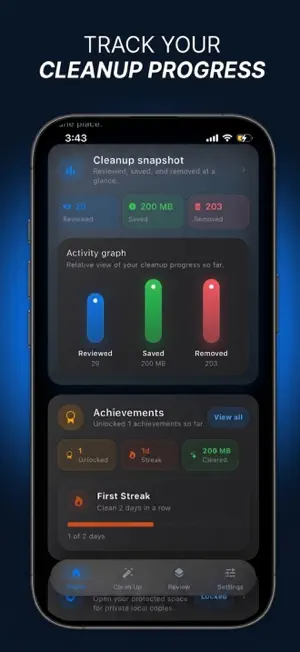

About Clean Up: Clear Storage App
Clean up — Photo & Video Cleaner Your iPhone camera never stops. Burst shots, duplicate saves, screenshots you forgot about, videos from years ago — they pile up silently until your storage is full and your library feels like a mess. Clean up is built to fix that, feature by feature, at whatever pace works for you. Swipe to Review The fastest way to clear out your camera roll. Go through your library one photo at a time and swipe to keep, delete, or save to favorites. Your progress is saved automatically so you can pick up exactly where you left off. Duplicate Detection Clean up scans your library for exact duplicates and near-identical shots — burst sequences, edited copies, re-saved images — and groups them together. Review each group and keep only the best one. Large Photos A fast size scan surfaces your heaviest photos ranked from largest to smallest, so you get the biggest storage wins first without scrolling through thousands of images. Large Videos Videos are one of the biggest storage drains on any iPhone. Clean up finds and ranks large videos in your library so you can review, select, delete, or compress the ones you no longer need. Video Compression Shrink large videos directly inside the app. Choose your compression level, keep the original or replace it, and reclaim space without deleting anything. Screenshots Your native iOS Screenshots album, directly in the app. Browse saved receipts, instructions, and memes you captured and never needed again. Large Files Pick any folder from your Files app and Clean up will rank everything inside it by size — photos, videos, documents, and other files — so you know what is taking up space. Album Management Create new albums, rename existing ones, delete albums you no longer use, and add photos to any album without leaving the app. Browse your full album library with search, thumbnails, and item counts. Secure Folder Lock private photos behind Face ID or Touch ID. Photos in the secure folder are stored locally on your device and are never uploaded, synced, or shared. Favorites Save the photos that matter most with a single swipe. Your favorites are collected in one place so they are easy to find, share, or back up. Bin Deleted photos go to your bin first. Review what is there, restore anything you want back, or clear the bin when you are ready. Achievements Clean up tracks your progress over time — photos reviewed, space freed, sessions completed — and rewards milestones as you go. Built for Privacy Every scan, review, compression, and deletion happens on your device. Clean up does not upload your photos, does not require an account, and does not connect to any server for media cleanup. Your library is yours. Subscription Information Clean up may offer auto-renewable subscriptions that unlock premium features. Subscription plans, duration, and pricing are shown clearly on the purchase screen before confirmation. Payment will be charged to your Apple ID account at confirmation of purchase. Subscriptions automatically renew unless canceled at least 24 hours before the end of the current period. Your account may be charged for renewal within 24 hours before the end of the current period. You can manage or cancel your subscription anytime in your App Store account settings. Privacy Policy: https://clean-up-site.lovable.app/privacy Terms of Use (EULA): https://www.apple.com/legal/internet-services/itunes/dev/stdeula/
What’s new
Version 1.0.1 · Updated July 9, 2026
Bug fixes.
App privacy
The developer, Shant Harbedian, reported these privacy practices to Apple.
Data Not Collected
The developer does not collect any data from this app.
Alternatives to Clean Up: Clear Storage App
Looking for apps like Clean Up: Clear Storage App? Here are 6 similar apps on the App Store. The highest rated is PrimeClear (5.0/5), and all 6 are free to download.
-
 PrimeClear
5.0
PrimeClear
5.0
-
 VeloClean: Photo Cleaner
5.0
VeloClean: Photo Cleaner
5.0
-
 StorageCleaner: Safe Clean
5.0
StorageCleaner: Safe Clean
5.0
-
 Photo Cleaner AI: Smart Clean
5.0
Photo Cleaner AI: Smart Clean
5.0
-
 Cleaner Master & AI Cleaner
5.0
Cleaner Master & AI Cleaner
5.0
-
 CleanShot: Clean Photos Fast
5.0
CleanShot: Clean Photos Fast
5.0
| App | Rating | Price | Last updated | Compare |
|---|---|---|---|---|
| Clean Up: Clear Storage App | 5.0 / 5 (1 rating) | Free | July 9, 2026 | |
| PrimeClear | 5.0 / 5 (1) | Free | Jun 4, 2026 | Compare |
| VeloClean: Photo Cleaner | 5.0 / 5 (1) | Free | Sep 14, 2026 | Compare |
| StorageCleaner: Safe Clean | 5.0 / 5 (1) | Free | Oct 7, 2026 | Compare |
| Photo Cleaner AI: Smart Clean | 5.0 / 5 (1) | Free | Apr 20, 2026 | Compare |
| Cleaner Master & AI Cleaner | 5.0 / 5 (1) | Free | Sep 16, 2026 | Compare |
| CleanShot: Clean Photos Fast | 5.0 / 5 (1) | Free | Apr 24, 2026 | Compare |