

FilCut: Video Highlight Maker
Cheol Kim Photo & Video iPhoneiPadiPod touch
FilCut: Video Highlight Maker is a free Photo & Video app for iPhone and iPad by Cheol Kim. Requires iOS 26.0. Updated November 13, 2026.
- Price
- Free
- on the App Store
- Size
- 18 MB
- Age 4+
- Updated
- Nov 13
- 2026 · v1.4
Screenshots

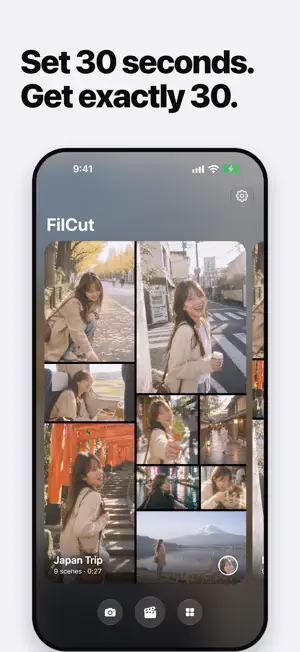


About FilCut: Video Highlight Maker
Find the moments worth showing, and turn them into one short video. FilCut looks through the videos you choose and finds who's in them, which scenes stand out, and what was said. Then it cuts those moments together into a short video you can save and share. No editing needed. MAKE A VIDEO • Choose videos and FilCut cuts the best parts together • Motion templates with animated titles and dates • Set the total length with one slider, limit how long each clip plays, reorder the parts, add a transition • Every video you make is kept as a version: replay, share or delete it any time • Save to Photos or share SHOOT WITH MUSIC • The camera reads the scene and suggests songs from Apple Music that fit it • Trending: songs that are popular on Instagram Reels right now • The song keeps playing while you record FIND ANY MOMENT • Highlights: standout scenes chosen from the picture, even when nobody is talking • People: photos and videos grouped by who's in them • Caption: search every video by the words spoken in it and jump to that exact moment • Calendar: browse your videos by date PICK WHAT YOU LIKE • While watching, pick the parts you want: a line someone said, a highlight, or the moments one person appears • Picked parts go straight into your next video • Your original videos are never changed PRIVACY • People, scene highlights and speech-to-text are all analyzed on your device • Your videos, photos and transcripts never leave your iPhone • No account, no sign-up, no ads GOOD TO KNOW • Speech recognition supports Korean, English, Japanese and Chinese. The first time you use a language, iOS may download its speech model • People and scene highlights require iOS 27 or later • Songs come from Apple Music. Full songs play with an Apple Music subscription; otherwise 30-second previews play FILCUT PRO • Export up to 3 videos free each day in Smaller File or Standard quality. Choosing, analyzing and previewing videos and the camera stay free • FilCut Pro includes High Quality and unlimited exports: $29.99 per year with a 3-day free trial, or $4.99 per month. Prices vary by country • Payment is charged to your Apple Account. The subscription renews automatically unless you cancel at least 24 hours before the end of the current period. Manage or cancel it in your Apple Account settings • Terms of Use: https://www.apple.com/legal/internet-services/itunes/dev/stdeula/ • Privacy Policy: https://docs.google.com/document/d/1S35cg5wJqBy-zzVyEoQosBkHSa57d-6Le5JQSsiNKFg/edit?usp=sharing
What’s new
Version 1.4 · Updated November 13, 2026
• New home: the videos in each saved video now play together in a mosaic, with a different layout every time • Share from the home card: export the Template Video or the Grid Video (the mosaic as one video) • Versions: every video you make from a saved video is kept. Open Versions to replay, share or delete it
App privacy
The developer, Cheol Kim, reported these privacy practices to Apple.
Data Not Collected
The developer does not collect any data from this app.
Alternatives to FilCut: Video Highlight Maker
Looking for apps like FilCut: Video Highlight Maker? Here are 6 similar apps on the App Store.
-
 DosCam: Dual Camera Video
-
 File Monster: Photo Resize
-
 PhotoSSD
-
 HiFi Camera: Manual Pro Camera
-
 PicReady: Compress & Resize
-
 Polacard
| App | Rating | Price | Last updated | Compare |
|---|---|---|---|---|
| FilCut: Video Highlight Maker | – | Free | November 13, 2026 | |
| DosCam: Dual Camera Video | – | Free | Oct 19, 2026 | Compare |
| File Monster: Photo Resize | – | Free | Nov 14, 2026 | Compare |
| PhotoSSD | – | Free | Nov 11, 2026 | Compare |
| HiFi Camera: Manual Pro Camera | – | Free | Nov 6, 2026 | Compare |
| PicReady: Compress & Resize | – | Free | Oct 30, 2026 | Compare |
| Polacard | – | Free | Nov 1, 2026 | Compare |