

File Monster: Photo Resize
Shintaro Uehara Photo & Video iPhoneiPadiPod touch
File Monster: Photo Resize is a free Photo & Video app for iPhone and iPad by Shintaro Uehara. Requires iOS 16.4. Updated November 14, 2026.
- Price
- Free
- on the App Store
- Size
- 45 MB
- Age 4+
- Updated
- Nov 14
- 2026 · v1.2.1
Screenshots

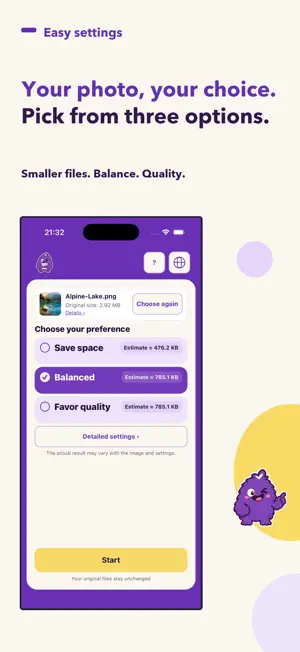

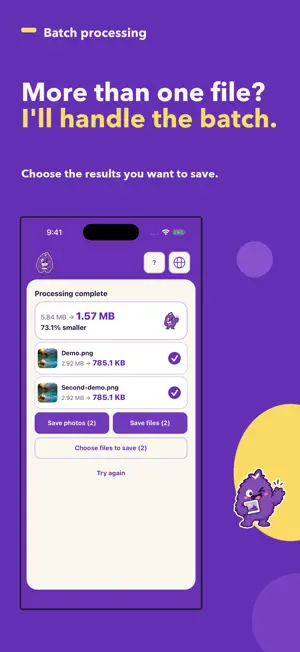
About File Monster: Photo Resize
Make photos, images and PDFs smaller, together. Choose a size goal or finish, check the results, then save. Files are processed on your device. Your originals stay unchanged. What you can do • Open JPEG, PNG, HEIC, HEIF and WebP images, and PDFs • Process multiple photos and PDFs with the same settings • For image-only selections, adjust size goals, dimensions and JPEG or PNG output • Press and hold a result image to preview it before saving • Choose the results to keep: save images to Photos, or images and PDFs to Files How to use 1. Choose photos or files 2. Choose a finish, compress, and check the results 3. Select the results you want and save them Before you start With images only, use Advanced settings to change file size, dimensions, and format. JPEG turns transparent areas white; PNG keeps them transparent. Quality and file size may change. Supported PDFs keep their text and links. Use Save files to save them. Image quality inside a PDF may change. Results above the size goal can also be saved. Some PDFs, including signed or encrypted files, cannot be processed. Working files are stored temporarily on your device and may not be removed immediately. Save results you want to keep to Photos or Files. Retrieving cloud files or syncing saved files may cause your operating system to use the internet. Shared files are passed to the app you choose. Ads and the one-time ad removal purchase All photo and PDF tools are free. Ad removal is optional. Ads appear only at the bottom. There are no forced full-screen ads. Advertising and store purchases use the internet. Google’s ad services may collect your IP address, approximate location, ad interactions and diagnostic information. Photo and PDF contents, names, file locations, sizes and thumbnails are never sent to ads. Remove Ads is a one-time purchase. The Japan price is ¥260; the purchase screen shows the current store price. Previous paid-app buyers keep ad-free access at no extra charge. To restore purchases, use the same store account used for the purchase. Compression and purchase-screen usage counts, review request dates and similar records stay on your device and are not sent externally. Store ratings, ads and purchases use the internet. Privacy policy https://file-monster.pages.dev/en/privacy.html
What’s new
Version 1.2.1 · Updated November 14, 2026
Open ad removal purchases and restore from the shopping basket at the top right. The bottom area is now reserved for banner ads. The basket and ads are hidden for users who have already purchased. Added requests for the store’s standard review prompt after successful compression, based on app usage. Frequency is managed on your device. Immediately before asking the OS, the app checks that no task or purchase screen is active.
App privacy
The developer, Shintaro Uehara, reported these privacy practices to Apple.
Data Linked to You
The following data, which may be collected and linked to your identity, may be used for the following purposes:
- Location: Coarse Location
- Identifiers: Device ID
- Usage Data: Product Interaction, Advertising Data
- Diagnostics: Performance Data
Used for: Third-Party Advertising, Analytics, App Functionality
Data Not Linked to You
The following data, which may be collected but is not linked to your identity, may be used for the following purposes:
- Diagnostics: Crash Data, Other Diagnostic Data
Used for: Analytics, App Functionality
Alternatives to File Monster: Photo Resize
Looking for apps like File Monster: Photo Resize? Here are 6 similar apps on the App Store.
-
 FilCut: Video Highlight Maker
-
 HiFi Camera: Manual Pro Camera
-
 DosCam: Dual Camera Video
-
 PhotoSSD
-
 Polacard
-
 inTelePrompter
| App | Rating | Price | Last updated | Compare |
|---|---|---|---|---|
| File Monster: Photo Resize | – | Free | November 14, 2026 | |
| FilCut: Video Highlight Maker | – | Free | Nov 13, 2026 | Compare |
| HiFi Camera: Manual Pro Camera | – | Free | Nov 6, 2026 | Compare |
| DosCam: Dual Camera Video | – | Free | Oct 19, 2026 | Compare |
| PhotoSSD | – | Free | Nov 11, 2026 | Compare |
| Polacard | – | Free | Nov 1, 2026 | Compare |
| inTelePrompter | – | Free | Nov 2, 2026 | Compare |