

MapRoll: Photo Map & GPS
refactor979 Inc. Photo & Video iPhoneiPadiPod touch
MapRoll: Photo Map & GPS is a free Photo & Video app for iPhone and iPad by refactor979 Inc. Requires iOS 17.0. Updated November 24, 2026.
- Price
- Free
- on the App Store
- Size
- 11 MB
- Age 4+
- Updated
- Nov 24
- 2026 · v1.0.8
Screenshots
Save to Pinterest

About MapRoll: Photo Map & GPS
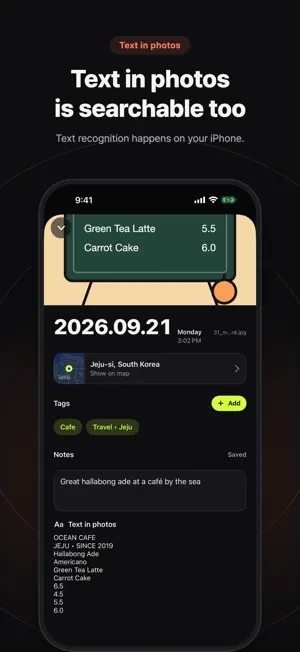
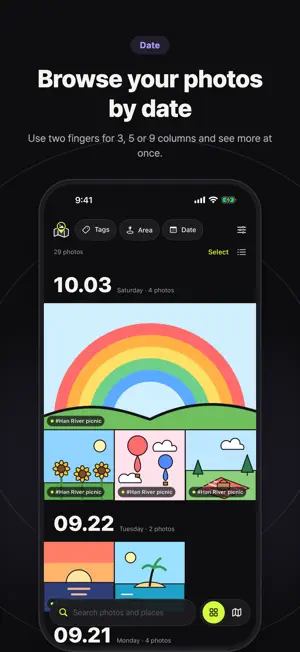
Find a photo with a clue you remember: where or when you took it, a tag, a note, or words in the image. MapRoll searches your iPhone photo library. Your photos stay in your library, and MapRoll only reads them. BROWSE PHOTOS ON A MAP See photos with location information grouped into photo pins. Tap a pin to browse photos taken there. Keep your place as you switch between the map and the list. Search for a place or move the map to choose a location. Filter photos within a radius of 100 m to 100 km. When you choose a location on the map, moving the map updates the search around its new center. Location filters include only photos with location information. SEARCH PHOTOS AND PLACES Use one search bar to search filenames, dates taken, tags, notes and recognized text, as well as places on Apple Maps. Select a place to move the map there. FILTER BY DATE Browse photos grouped by date. Choose a date range, Last 7 days, Last 30 days or This year, and filter for Favorites only. Use a two-finger gesture to switch between 3, 5 or 9 columns of thumbnails. ADD TAGS AND NOTES Tag multiple photos at once. Create nested tags such as Travel/Beach. Select a parent tag to see photos with its subtags, too. Add notes with details you want to remember and search for them later. SEARCH TEXT IN PHOTOS Select up to 30 photos and tap Recognize text to make Korean and English text in those photos searchable. You can also recognize text in a single photo from its detail view. Text recognition runs on your iPhone. MapRoll uses only images already on your iPhone and doesn't download originals from iCloud. BACK UP TAGS AND NOTES Save your tags and notes to a file and restore them later. Merge them with existing data or replace existing data with the backup. These backups contain tags and notes, not the original photos. Tags and notes are stored in MapRoll and are deleted if you delete the app. MAKE IT YOURS Choose from five app colors. MapRoll supports dark mode and larger text. No account required. Available for iPhone only, with iOS 17 or later. FREE AND PRO The free version includes up to 3 tags, notes on up to 3 photos and date ranges of up to 1 month, and shows ads. MapRoll Pro, an optional monthly or yearly subscription with a 3-day free trial, removes these limits and the ads shown when the app opens and in the photo list and detail view. MapRoll Pro is an auto-renewing monthly or yearly subscription with a 3-day free trial. Payment is charged to your Apple Account, and the subscription renews automatically unless canceled at least 24 hours before the end of the current period. Manage or cancel it in your App Store account settings. Terms of Use (Apple Standard EULA): https://www.apple.com/legal/internet-services/itunes/dev/stdeula/ Privacy Policy: https://ref979factor.com/fps/privacy.html
What’s new
Version 1.0.8 · Updated November 24, 2026
Free users are now asked once whether to allow ads based on their interests. Everything works the same if you don't allow it, and your photos and locations are never used for ads. Stability improvements.
App privacy
The developer, refactor979 Inc., reported these privacy practices to Apple.
Data Used to Track You
The following data may be used to track you across apps and websites owned by other companies:
- Identifiers: Device ID
Data Not Linked to You
The following data, which may be collected but is not linked to your identity, may be used for the following purposes:
- Location: Coarse Location
- Identifiers: Device ID
- Usage Data: Product Interaction, Advertising Data
- Diagnostics: Crash Data, Performance Data, Other Diagnostic Data
Used for: Third-Party Advertising, Analytics
Alternatives to MapRoll: Photo Map & GPS
Looking for apps like MapRoll: Photo Map & GPS? Here are 6 similar apps on the App Store. The highest rated is TrimRoll: AI Photo Cleaner (5.0/5), and all 6 are free to download.
-
 Maplapse: Photo Travel Map
-
 Tripfolio: Travel Photos
-
 EXIF Remover & Photo Metadata
-
 EasyGeotag: Geotag Photos
-
 TrimRoll: AI Photo Cleaner
5.0
-
 GeoStamp: Metadata Overlay
| App | Rating | Price | Last updated | Compare |
|---|---|---|---|---|
| MapRoll: Photo Map & GPS | – | Free | November 24, 2026 | |
| Maplapse: Photo Travel Map | – | Free | Nov 7, 2026 | Compare |
| Tripfolio: Travel Photos | – | Free | Jun 24, 2026 | Compare |
| EXIF Remover & Photo Metadata | – | Free | Nov 25, 2026 | Compare |
| EasyGeotag: Geotag Photos | – | Free | Nov 15, 2026 | Compare |
| TrimRoll: AI Photo Cleaner | 5.0 / 5 (4) | Free | Nov 16, 2026 | Compare |
| GeoStamp: Metadata Overlay | – | Free | Nov 1, 2026 | Compare |