

Maplapse: Photo Travel Map
Matthias Baumann Photo & Video iPhoneiPadiPod touch
Maplapse: Photo Travel Map is a free Photo & Video app for iPhone and iPad by Matthias Baumann. Requires iOS 18.0. Updated November 7, 2026.
- Price
- Free
- on the App Store
- Size
- 17 MB
- Age 4+
- Updated
- Nov 7
- 2026 · v1.2
Screenshots


About Maplapse: Photo Travel Map
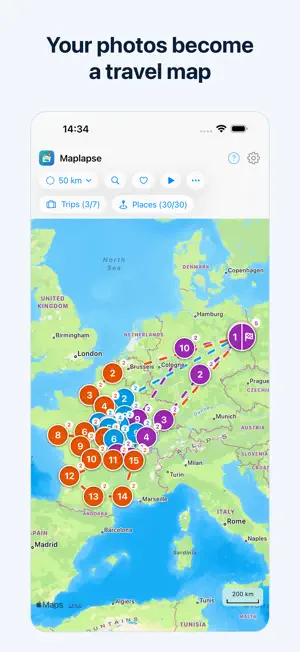
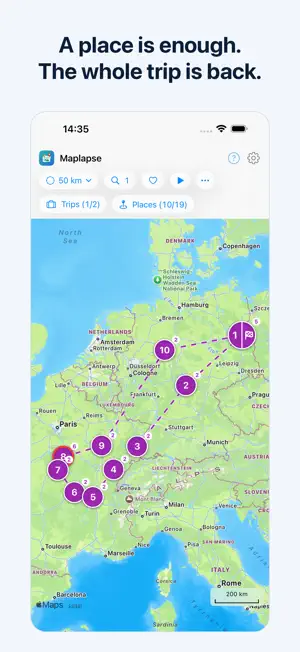
Maplapse turns your photos into a map of your travels, built retroactively from the library you already have. Above all the trips you took long ago, but brand-new ones too: Maplapse reads the location and time stored in your photos and draws your trips with every stop onto a beautiful map.¹ No tagging, no sorting. Open the app and your memories appear right where they happened. Whether you're touring in your camper, cycling from town to town, hiking a long-distance trail or backpacking across countries, Maplapse turns the photos you take along the way into a map of your journey, stop by stop. YOUR PRIVACY STAYS YOURS The analysis runs entirely on your iPhone, and no Maplapse server receives or stores your photos, travel data or notes. There are no trackers and no ads. Maplapse itself sends data only to your own iCloud, and only when you choose to sync or to share a trip. If you wish, you can pass on a single photo through the iOS share sheet. WHAT YOU CAN DO WITH MAPLAPSE • Detect trips automatically: the location and time of your photos become trips and individual stops on the map. • Explore stops: tap a place and see every photo you took there. • Add notes: capture memories at each stop, with simple one-tap formatting. • Play a trip as a slideshow: watch a trip from start to finish, with your photos, the map and your notes. Three trips are free without Pro. • Hide photos: remove individual photos that don't belong on the map. • Search: find places, trips or dates instantly; results land straight on the map. OPTIONAL & YOUR CHOICE • iCloud sync: keep your notes and map in sync across your devices through your own iCloud account. • View together: if you use a shared iCloud photo library, you can view and edit your trips together. • Share a trip as a link: send a single trip as a link. The recipient sees it as a slideshow; the photos travel along as smaller copies in your own iCloud. Three links are free without Pro. All of this is off by default. You decide. MAPLAPSE PRO (SUBSCRIPTION) Without Pro, you can share three trip links and play three trips as a complete slideshow. Maplapse Pro lifts both limits and adds iCloud sync, sharing your whole Maplapse, advanced search and assigning photos without a location. It is available as a monthly or yearly subscription. The price is shown in the app before you buy. The subscription renews automatically until canceled. You can cancel anytime in your iOS settings under Apple Account › Subscriptions. Terms of Use: https://www.apple.com/legal/internet-services/itunes/dev/stdeula/ Privacy Policy: https://www.maplapse.de/en-us/l/privacy Maplapse is available for iPhone and iPad. ¹ Maplapse uses the location your camera saves in each photo. This needs Location Services turned on and the Camera allowed to use them: Settings › Privacy & Security › Location Services › Camera › "While Using the App". Without Pro, photos without a location can't be placed on the map. With Pro, you can assign them to a stop afterwards by their capture time. For future trips, just turn this on once.
What’s new
Version 1.2 · Updated November 7, 2026
Without Pro, you can now share three trip links and watch three trips as a full slideshow. You also get sharper photos in the full-screen view and a map that stays smooth even with a large library. Sharing: - A trip can now have several links, for example “Family” and “Friends”, each with its own name and its own photos. Sending a link again doesn't use up one of the three free links. - A link is prepared in the background while you keep using Maplapse. The status line shows the progress, and when the link is ready, tap “Send” there. If the app is in the background, you get a notification. - Without internet, or when the connection to iCloud is disrupted, the link waits and carries on by itself, even after you close the app. If you need to do something yourself, such as check your iCloud sign-in, Maplapse tells you. - Tap a trip link in Mail or Messages and the trip plays as a slideshow in full screen, even if something else is open in Maplapse. - The lists “Trips you shared” and “Trips shared with you” now live in Settings under “More data”. Photos and map: - Without Pro, the slideshow now plays from start to finish instead of stopping partway as a preview. Watching the same trip again doesn't count twice. If a photo from iCloud doesn't arrive in time, the slideshow shows it blurry at first instead of skipping it. Notes now sit above the place name, and a tap shows them in full. - The full-screen view loads the photo you are looking at first, at your screen’s resolution, and the original when you zoom in. While full quality is still loading from iCloud, a small icon shows the progress, and a note tells you when iCloud is taking longer than usual. - When you share a photo from the full-screen view, the options open without a long wait, and “Copy”, “Print” and “Save to Files” work reliably. - Even with many thousands of photos, Maplapse responds right away when you open it, and the map stays responsive when you zoom in on a stop. - While Maplapse is still working through your photos, an hourglass shows which trips can still get more photos. Your current or latest trip is the first to be complete. - When you select individual places, the stops keep their numbers. Trips come in shades that are easier to tell apart, and photos taken in portrait now rotate reliably. Also new: - Search now finds the same things everywhere, including your trip names and dates like “May 2024”. With a filter like “France”, you see every place across all your matching trips. - When you reinstall Maplapse with Pro, the app first checks whether your data is in iCloud and offers to restore it. - If processing your photos or the first iCloud backup takes a while, tap “Notify me when done” in the status line. - Deleting in Settings now works the same everywhere: swipe a row to the left or press and hold it and choose “Delete”. - The photo library details in the Help menu now add up in plain sight: “Photos with GPS” and “Photos without GPS” make up “Photos in total”. - Dates and times now follow the language you chose in the app and your iPhone’s region. English spelling is now consistent: British, or American if your iPhone is set to “English (US)”. The request for access to your photos now also appears in French, Spanish, Italian, Portuguese, Dutch and Polish. - Fine-tuning of dates and translations in several languages.
App privacy
The developer, Matthias Baumann, reported these privacy practices to Apple.
Data Not Collected
The developer does not collect any data from this app.
Alternatives to Maplapse: Photo Travel Map
Looking for apps like Maplapse: Photo Travel Map? Here are 6 similar apps on the App Store. The highest rated is Unfold: Reels & Story Maker (4.9/5), and all 6 are free to download.
-
 PhotoTrail Photo Map&Organizer
-
 Unfold: Reels & Story Maker
4.9
-
 Synology Photos
3.0
-
 Canlı Türk TV Kanalları
4.6
-
 Timestamp Camera -AI Timestamp
4.6
-
 Canon Camera Connect
4.8
| App | Rating | Price | Last updated | Compare |
|---|---|---|---|---|
| Maplapse: Photo Travel Map | – | Free | November 7, 2026 | |
| PhotoTrail Photo Map&Organizer | – | Free | Apr 27, 2026 | Compare |
| Unfold: Reels & Story Maker | 4.9 / 5 (158,637) | Free | Oct 26, 2026 | Compare |
| Synology Photos | 3.0 / 5 (594) | Free | Oct 1, 2026 | Compare |
| Canlı Türk TV Kanalları | 4.6 / 5 (637) | Free | Oct 3, 2024 | Compare |
| Timestamp Camera -AI Timestamp | 4.6 / 5 (836) | Free | Nov 15, 2026 | Compare |
| Canon Camera Connect | 4.8 / 5 (154,191) | Free | Oct 7, 2026 | Compare |