

Ordo Mail: Calm Email Inbox
Alejandro Garcia Productivity iPhoneiPadiPod touch
Ordo Mail: Calm Email Inbox is a free Productivity app for iPhone and iPad by Alejandro Garcia. Requires iOS 27.0. Updated October 20, 2026.
- Price
- Free
- on the App Store
- Size
- 12 MB
- Age 4+
- Updated
- Oct 20
- 2026 · v1.0.0
Screenshots
Save to Pinterest

About Ordo Mail: Calm Email Inbox
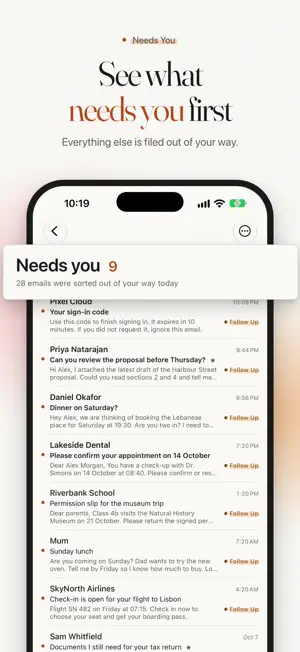
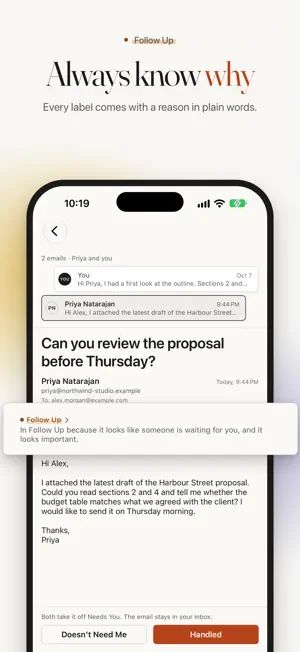
Ordo Mail is a fast, native mail app for iPhone and iPad that keeps your inbox quiet. It is the same app as on the Mac, with your accounts, labels and settings carried over through iCloud. THE MAIL APP IS FREE • Works with Gmail, iCloud Mail, Fastmail, Yahoo Mail, GMX, WEB.DE and other IMAP mailboxes • Read, search, write, reply, delete and move mail • Create your own labels and file mail by hand • Mail is checked when you open Ordo Mail and when you pull the list down • With Auto Sort on your Mac, your iPhone and iPad can get a notification within seconds when an email needs you • Remote images stay blocked until you allow them, so senders cannot see when you open a message • Needs only your mail account. No Ordo Mail account, no time limit AUTO SORT (OPTIONAL SUBSCRIPTION) • Every new inbox email gets one of your labels, chosen by an AI service. Sorting runs while Ordo Mail is open, or on your Mac, and each email is sorted only once across your devices • Learns from what you correct • A label review proposes clearer labels from time to time. You accept or dismiss each proposal • Try it first: your first 500 emails are sorted free TRY IT WITHOUT A MAILBOX Choose "Try with Sample Mail" on the welcome screen to explore the app with fictional emails. No account and no network connection are needed. WHAT YOU NEED • iOS 27 or iPadOS 27 or later • A mail account that mail apps can sign in to with a password. Gmail, iCloud Mail, Fastmail and Yahoo Mail need an app password, which requires two-step verification; GMX and WEB.DE need IMAP switched on in their settings. Some work, school and Advanced Protection accounts do not allow this. Outlook and Microsoft 365 accounts are not supported yet • Ordo Mail shows the newest mail of your Inbox, Sent, Drafts and Archive. Older mail and Trash stay in your mail provider's own apps PRIVACY • Your mail passwords stay in your iPhone's or iPad's Keychain and go only to your mail provider. iCloud carries your accounts without their passwords • The free mail app sends nothing to us • Auto Sort asks for your permission first. Then it sends the sender, subject, how many other people it was addressed to (never their addresses) and first 1,000 characters (with sign-in codes and link parameters removed) of each email it sorts through our server to the AI service. Every request asks the AI service not to keep the extract and not to use it to train AI; the full list of what is sent and who receives it is in the Privacy Policy. Attachments are never sent • You can withdraw the permission in Settings at any time • No ads, no tracking AUTO SORT SUBSCRIPTION • Auto Sort, monthly or yearly, renews automatically. The price is shown before you subscribe • Fair use: each paid month, also on the yearly plans, includes up to 3,000 sorted emails across all your mailboxes (mail already in your inbox when you start counts) and up to 2 label reviews. Before subscribing, your first 500 emails are sorted free, with no label review • When a limit is reached, new mail still arrives, unsorted, until the next month begins. You are never charged extra • Payment is charged to your Apple Account at confirmation of purchase. The subscription renews automatically unless it is cancelled at least 24 hours before the end of the current period. Manage or cancel it in your App Store account settings Privacy Policy: https://ordomail.app/privacy Terms of Use: https://ordomail.app/terms Support: https://ordomail.app/support Gmail is a trademark of Google LLC. iCloud is a trademark of Apple Inc. Other product names are trademarks of their owners. Ordo Mail is an independent app and is not affiliated with Google or any other mail provider.
App privacy
The developer, Alejandro Garcia, reported these privacy practices to Apple.
Data Linked to You
The following data, which may be collected and linked to your identity, may be used for the following purposes:
- Purchases: Purchase History
- User Content: Other User Content
- Identifiers: User ID, Device ID
- Usage Data: Product Interaction
Used for: App Functionality
Data Not Linked to You
The following data, which may be collected but is not linked to your identity, may be used for the following purposes:
- User Content: Emails or Text Messages
Used for: App Functionality
Alternatives to Ordo Mail: Calm Email Inbox
Looking for apps like Ordo Mail: Calm Email Inbox? Here are 6 similar apps on the App Store. The highest rated is CogClear (5.0/5), and all 6 are free to download.
-
 Omnio Mail
-
 CogClear
5.0
-
 Capsule - Capture what matters
-
 Template Mail
5.0
-
 Libraesva Email Archiver
-
 Mail and calendar
| App | Rating | Price | Last updated | Compare |
|---|---|---|---|---|
| Ordo Mail: Calm Email Inbox | – | Free | October 20, 2026 | |
| Omnio Mail | – | Free | Nov 6, 2026 | Compare |
| CogClear | 5.0 / 5 (4) | Free | Nov 6, 2026 | Compare |
| Capsule - Capture what matters | – | Free | Jul 27, 2026 | Compare |
| Template Mail | 5.0 / 5 (1) | Free | Nov 20, 2026 | Compare |
| Libraesva Email Archiver | – | Free | Oct 6, 2026 | Compare |
| Mail and calendar | – | Free | Sep 8, 2024 | Compare |