

Template Mail
Robert Van Deutekom Productivity iPhoneiPadiPod touchMac
Template Mail is a free Productivity app for iPhone and iPad by Robert Van Deutekom. Rated 5.0/5 from 1 ratings. Requires iOS 26.0. Updated October 5, 2026.
- Rating
- 5.0
- 1 ratings
- Price
- Free
- on the App Store
- Size
- 12 MB
- Age 4+
- Updated
- Oct 5
- 2026 · v3.1
Screenshots


About Template Mail
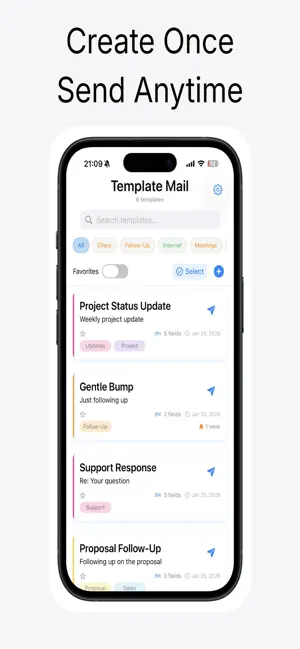
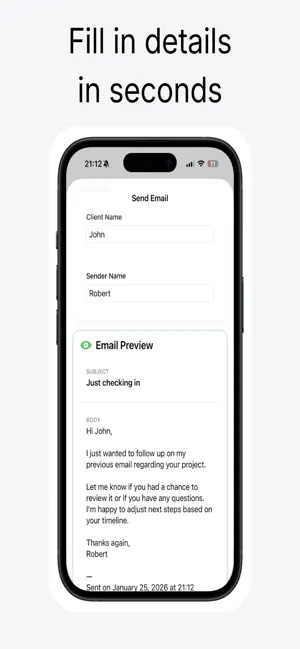
Template Mail turns your most-repeated emails into one-tap sends. If you find yourself typing the same follow-up, intro, invoice reminder, or thank-you note over and over, Template Mail gives you a faster way. Build a library of email templates once — then send a personalized version to anyone in seconds, without opening Mail and starting from scratch. WHY YOU'LL LOVE IT • Save Time on Repetitive Emails Turn your most-used messages into reusable templates with subject, body, and formatting already set up. • Personalize in Seconds Use smart placeholders to swap in a recipient's name, company, or custom details before you hit send — no copy-paste, no typos. • Send From Anywhere Launch a template straight from your Home Screen widget — perfect for quick replies between meetings. • Stay Organized With Tags Group templates by client, project, or category so you can find the right message instantly, even with a growing library. • Attach Files Instantly Keep documents, images, or PDFs linked to a template so recurring attachments go out with a single tap. • Sync Across Your Devices Your templates stay up to date on iPhone, iPad, and Mac with seamless iCloud sync. • Built for Speed A clean, distraction-free interface gets you from "I need to send this" to "sent" faster. PERFECT FOR • Freelancers and consultants sending proposals, invoices, and follow-ups • Small business owners handling customer support and inquiries • Recruiters and hiring managers sending interview and offer emails • Students and professionals who send the same request emails again and again • Anyone tired of retyping (or hunting for) the same email content HOW IT WORKS 1. Create a template with your subject, message, and any placeholders 2. Tag it so it's easy to find later 3. Tap to send — fill in the personalized details and go 4. Reuse it forever, from your phone, tablet, or computer Template Mail isn't another inbox — it's the fastest way to send the emails you already know you're going to write. Download now and stop starting from a blank page.
What’s new
Version 3.1 · Updated October 5, 2026
Updated support link.
App privacy
The developer, Robert Van Deutekom, reported these privacy practices to Apple.
Data Linked to You
The following data, which may be collected and linked to your identity, may be used for the following purposes:
- Contact Info: Email Address, Name
Used for: App Functionality
Alternatives to Template Mail
Looking for apps like Template Mail? Here are 6 similar apps on the App Store. The highest rated is Incognito Mail - Temp Mail (5.0/5), and 5 of the 6 are free to download.
-
 Incognito Mail - Temp Mail
5.0
Incognito Mail - Temp Mail
5.0
-
 My Ministry Lists
4.0
My Ministry Lists
4.0
-
 Jolly Job Journal
5.0
Jolly Job Journal
5.0
-
 Shift Scheduler App
5.0
Shift Scheduler App
5.0
-
 HVAC Ladder: Wiring Diagrams
5.0
HVAC Ladder: Wiring Diagrams
5.0
-
 PDF Compressly
| App | Rating | Price | Last updated | Compare |
|---|---|---|---|---|
| Template Mail | 5.0 / 5 (1 rating) | Free | October 5, 2026 | |
| Incognito Mail - Temp Mail | 5.0 / 5 (1) | Free | Jul 18, 2026 | Compare |
| My Ministry Lists | 4.0 / 5 (2) | Free | May 3, 2026 | Compare |
| Jolly Job Journal | 5.0 / 5 (2) | Free | Jan 5, 2026 | Compare |
| Shift Scheduler App | 5.0 / 5 (1) | Free | Nov 4, 2025 | Compare |
| HVAC Ladder: Wiring Diagrams | 5.0 / 5 (1) | 9.99 USD | Aug 1, 2026 | Compare |
| PDF Compressly | – | Free | May 19, 2026 | Compare |
Compare Template Mail with the top alternatives: ratings, updates, ASO score and keyword gaps →