

Pecking Order: Priority To-Do
RUEI HUNG SHIU Productivity iPhoneiPadiPod touch
Pecking Order: Priority To-Do is a free Productivity app for iPhone and iPad by RUEI HUNG SHIU. Requires iOS 26.0. Updated November 3, 2026.
- Price
- Free
- on the App Store
- Size
- 59 MB
- Age 4+
- Updated
- Nov 3
- 2026 · v1.0.0
Screenshots
Save to Pinterest


About Pecking Order: Priority To-Do
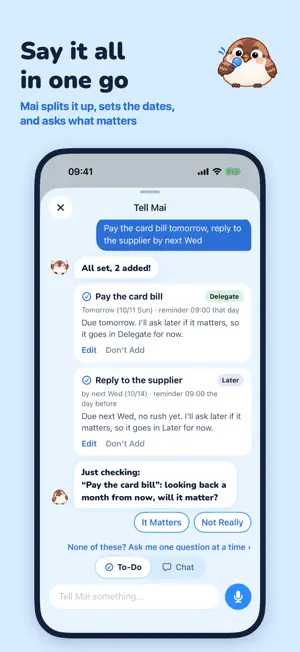
Too many to-dos and no idea where to start? Pecking Order sorts them into four boxes and shows you what to do first. • Do Now: important and urgent. Get it done today. • Schedule: important, not urgent. Set a time to do it right. • Delegate: urgent, not important. Hand it off, or knock it out fast. • Later: neither urgent nor important. Let it sit for now. JUST TELL MAI Every tab has a bar at the bottom: type, tap the mic and talk, or tap the pencil to fill in a form. Say "Pay the card bill tomorrow, then reply to the supplier's quote by next Wednesday," and Mai, a round little sparrow, splits it into two to-dos, catches the due dates, puts each one in the right box, and tells you why. Later on, "Move the quote to Friday," "The card bill is done," and "What's on tomorrow?" work too. TO-DO, OR JUST CHAT A To-do / Chat switch sits right above the bar. To-do turns what you say into to-dos. Flip to Chat to say you're worn out or share something good from your day, and Mai replies in true Mai style. Nothing you say in Chat becomes a to-do. CAN'T DECIDE? TWO QUESTIONS When you're not sure which box something belongs in, Mai asks: "If you leave this for two or three days, will there be trouble?" and "A month from now, will it matter whether you did it?" If it's due soon or overdue, the urgency question answers itself. You can also pick a box yourself. TODAY, BOXES, CALENDAR, REVIEW Today shows only what needs you now, including anything due today in other boxes. Tap a to-do to check it off. Boxes shows where to-dos pile up; drag one to another box to move it. Calendar lays out each day of the month or week, repeats included. Review has your weekly report, and every Monday morning Mai walks you through last week. SHARE YOUR WINS Turn your day, your week, your boxes, or your workload into a card or a 5-second video, then save or share it. To-do names stay off unless you turn them on. REMINDERS THAT KNOW WHEN TO BE QUIET Give a to-do a date or a time, plus a repeat or a place if you like. Mark it done right from the reminder, or get reminded again in an hour. The Morning Summary tells you what's on for today, and Quiet Hours keep things silent while you sleep. HOME SCREEN WIDGETS The "Today's to-dos" widget comes in small, medium, and large. See what's first without opening the app, and check things off from medium and large. The "Calendar" widget, in medium and large, shows which days this week or month are busy. Tap a day to open it in Calendar. 9 ROUNDY BIRDS Mai the sparrow is goofy, sweet, and always full of pep. Fen the cockatiel loves a bit of drama, Grey the African grey stays calm, Yuki the long-tailed tit is gentle, and there are more. Each of the 9 birds talks in its own way. Switch birds, and your Morning Summary and widgets switch too. YOUR TO-DOS STAY YOURS No sign-up. Your to-dos live on your device and sync between your iPhone and iPad through your own iCloud account. We can't see them. On supported devices, AI splits sentences, suggests boxes, and writes Mai's lines, using what you say only for that reply and never keeping it. On other devices you can still type or talk, and Mai asks how important each one is instead. PECKING ORDER PRO Every to-do feature is free. The free version shows a few ads, starting 3 days after you install. Subscribe to Pro to: • Unlock the other 8 Roundy Birds and switch anytime, with your Home Screen icon changing to match • Remove all ads • See Mai's take and the Monday tip without watching an ad first Pecking Order Pro is an auto-renewable subscription, monthly or yearly. Payment is charged to your Apple Account at confirmation of purchase. The subscription renews automatically unless cancelled at least 24 hours before the end of the current period. Manage or cancel in Settings → Apple Account → Subscriptions. Terms of Use: https://www.apple.com/legal/internet-services/itunes/dev/stdeula/ Privacy Policy: https://israynotarray.dev/app/peckingorder-privacy
App privacy
The developer, RUEI HUNG SHIU, reported these privacy practices to Apple.
Data Used to Track You
The following data may be used to track you across apps and websites owned by other companies:
- Identifiers: Device ID
Data Linked to You
The following data, which may be collected and linked to your identity, may be used for the following purposes:
- Location: Coarse Location
- Identifiers: Device ID
- Usage Data: Product Interaction, Advertising Data
Used for: Third-Party Advertising, Developer’s Advertising or Marketing, Analytics, App Functionality
Data Not Linked to You
The following data, which may be collected but is not linked to your identity, may be used for the following purposes:
- Diagnostics: Performance Data, Other Diagnostic Data, Crash Data
Used for: Third-Party Advertising, Developer’s Advertising or Marketing, Analytics, App Functionality
Alternatives to Pecking Order: Priority To-Do
Looking for apps like Pecking Order: Priority To-Do? Here are 6 similar apps on the App Store. The highest rated is Tally Rule - Habit Tracker (5.0/5), and all 6 are free to download.
-
 네모메모
-
 Year Plan - Goal Planner
-
 MemoNow - Instant Quick Memo.
-
 Peekdo: Lock Screen To-Do List
-
 Tally Rule - Habit Tracker
5.0
-
 Linko: Your AI Knowledge Base
5.0
| App | Rating | Price | Last updated | Compare |
|---|---|---|---|---|
| Pecking Order: Priority To-Do | – | Free | November 3, 2026 | |
| 네모메모 | – | Free | Jul 10, 2026 | Compare |
| Year Plan - Goal Planner | – | Free | Jun 10, 2026 | Compare |
| MemoNow - Instant Quick Memo. | – | Free | Jul 15, 2026 | Compare |
| Peekdo: Lock Screen To-Do List | – | Free | Nov 28, 2026 | Compare |
| Tally Rule - Habit Tracker | 5.0 / 5 (1) | Free | Nov 17, 2026 | Compare |
| Linko: Your AI Knowledge Base | 5.0 / 5 (4) | Free | Nov 25, 2026 | Compare |