

Peekdo: Lock Screen To-Do List
yoon seong dan Productivity iPhoneiPadiPod touch
Peekdo: Lock Screen To-Do List is a free Productivity app for iPhone and iPad by yoon seong dan. Requires iOS 17.0. Updated October 26, 2026.
- Price
- Free
- on the App Store
- Size
- 22 MB
- Age 4+
- Updated
- Oct 26
- 2026 · v1.3.4
Screenshots


About Peekdo: Lock Screen To-Do List
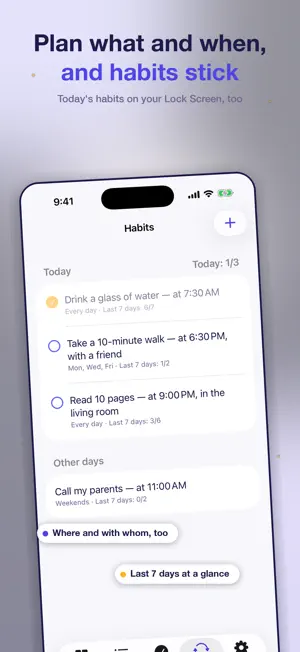
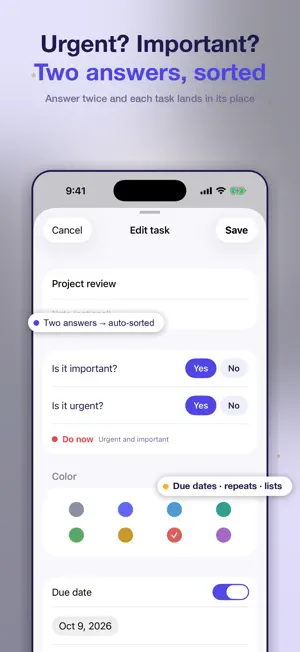
It's not that you have too many tasks. They just don't have an order. Peekdo is a to-do app that sorts your tasks by priority using the Eisenhower Matrix (urgent x important, four quadrants). Answer two quick questions - is it important? is it urgent? - and each task lands where it belongs. - Check tasks right on your Lock Screen A Live Activity keeps today's tasks on your Lock Screen, and you can check them off right there. Dynamic Island and Lock Screen widgets are supported too. - Plan good habits In the Habits tab you decide in advance what you'll do and when (plus where and with whom, if you like), then check it off each day. See today's habits in a Lock Screen widget and a Home Screen widget and check them off right there, and set a reminder per habit with its own time and message. - Priorities at a glance Urgent x important matrix home Drag to move tasks between quadrants and reorder them Due dates with a D-day count, start times, repeating tasks Start-time reminders: once you allow notifications, a reminder arrives at a task's start time Checklists, color tags, hide completed Home Screen widgets, dark mode Fills the whole screen on iPad and in landscape - Stays on your device No sign-up. Your to-dos are stored on this device and never uploaded, and you can export or import a backup file any time. The app sends only four things: feedback you choose to send from Settings, a one-way hashed device value used to apply the 7-day free period once per device, usage statistics about which screens and buttons are used (you can turn this off in Settings), and app install and launch information plus subscription and lifetime pass purchase confirmations for ad measurement (Meta). Your task contents are never included. - Free for 7 days, then Premium Every feature is free for 7 days after install (no payment details needed). After that, adding and editing tasks, checking them off (in the app, on the lock screen and in widgets), moving between quadrants and importing backups continue with a Premium subscription (monthly or yearly) or a one-time lifetime pass. Viewing tasks (including the lock-screen card and widgets), deleting, exporting backups and settings stay free. Prices are shown in the app and the store. Terms of Use (EULA): https://www.apple.com/legal/internet-services/itunes/dev/stdeula/ Privacy Policy: https://fork-bestseller-2d1.notion.site/Peekdo-3b689cfb23c08036843dc9e41cd0738f
What’s new
Version 1.3.4 · Updated October 26, 2026
• Works on iPad and in landscape, filling the whole screen • Stability improvements
App privacy
The developer, yoon seong dan, reported these privacy practices to Apple.
Data Used to Track You
The following data may be used to track you across apps and websites owned by other companies:
- Purchases: Purchase History
- Identifiers: Device ID
- Usage Data: Product Interaction
Data Not Linked to You
The following data, which may be collected but is not linked to your identity, may be used for the following purposes:
- Purchases: Purchase History
- Identifiers: Device ID
- Usage Data: Product Interaction
- Location: Coarse Location
- User Content: Other User Content
Used for: Developer’s Advertising or Marketing, Analytics, App Functionality
Alternatives to Peekdo: Lock Screen To-Do List
Looking for apps like Peekdo: Lock Screen To-Do List? Here are 6 similar apps on the App Store. The highest rated is DayMap (5.0/5), and all 6 are free to download.
-
 My List AI: Shared To Do List
-
 Plantri: Time Block Planner
3.0
-
 TaskTracker: Daily Planner
-
 DayMap
5.0
-
 Flipnotes - Digital Notebook
5.0
-
 Wispy - AI Voice Reminders
2.0
| App | Rating | Price | Last updated | Compare |
|---|---|---|---|---|
| Peekdo: Lock Screen To-Do List | – | Free | October 26, 2026 | |
| My List AI: Shared To Do List | – | Free | Sep 1, 2026 | Compare |
| Plantri: Time Block Planner | 3.0 / 5 (1) | Free | Oct 29, 2026 | Compare |
| TaskTracker: Daily Planner | – | Free | Oct 10, 2026 | Compare |
| DayMap | 5.0 / 5 (8) | Free | Oct 30, 2026 | Compare |
| Flipnotes - Digital Notebook | 5.0 / 5 (1) | Free | Oct 27, 2026 | Compare |
| Wispy - AI Voice Reminders | 2.0 / 5 (1) | Free | Oct 26, 2026 | Compare |