

DayMap
Whetstone Apps, LLC Productivity iPhoneiPadiPod touchMacApple Watch
DayMap is a free Productivity app for iPhone and iPad by Whetstone Apps, LLC. Rated 5.0/5 from 8 ratings. Requires iOS 17.0. Updated October 23, 2026.
- Rating
- 5.0
- 8 ratings
- Price
- Free
- on the App Store
- Size
- 17 MB
- Age 4+
- Updated
- Oct 23
- 2026 · v1.55
Screenshots


About DayMap
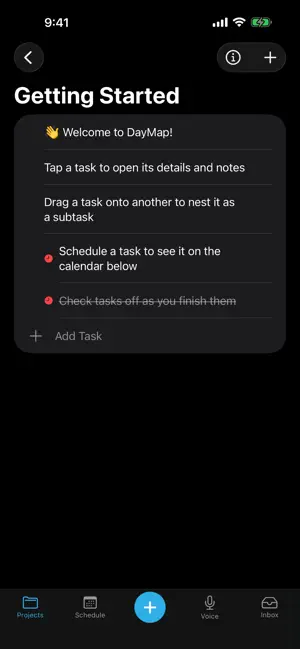
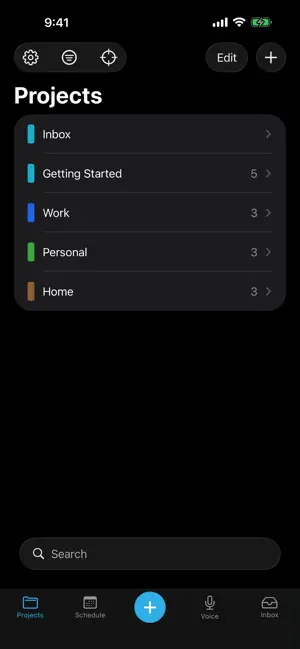
Most productivity apps make one thing easy. Some manage tasks. Others focus on projects, calendars, or notes. But real life doesn't fit into just one — your projects shape your schedule, and your schedule decides what you get done today. DayMap brings them together — one clear view of where you are, where you're headed, and what to do next: • Capture ideas before they slip away • Organize them into color-coded projects • Schedule them on a built-in calendar • Focus on today's next step FEATURES • Project board — clean, color-coded columns • Tasks & subtasks — break big things into doable steps • Built-in scheduler — drag a task onto the calendar to plan your week, or see everything ahead in Upcoming • Notes & links — keep info (and tappable links) with any task or project • Focus mode — see just what matters for a chosen day • Quick capture — jot to your Inbox by keyboard or voice • Contexts — group projects by area of life • Print or share — a day, a week, or a whole project, as PDF or plain text • On your Home Screen — a Today widget, plus Siri, Shortcuts, and Spotlight search • Apple Watch — today's tasks on your wrist DAYMAP PRO unlocks iCloud sync across Mac, iPad, iPhone & Apple Watch, calendar mirroring to Apple Calendar, recurring tasks, contexts, and unlimited projects. Free to start with up to 5 projects on one device. Whether you're leading a business, serving in ministry, running a household, or building a side project — know where you are, see where you're headed, and choose your next step. One day at a time. Terms of Use (EULA): https://www.apple.com/legal/internet-services/itunes/dev/stdeula/
Ratings & reviews
5.0
8 ratings
What’s new
Version 1.55 · Updated October 23, 2026
What's New has a new look. Each change is listed on its own, and See All Updates opens every past update on the DayMap website. A deadline can have a time of day. Turn on Set a specific time under the deadline, and on the day itself the flag shows the time, then Overdue once it has passed. A repeating deadline keeps its time every time it comes around. On iPhone, Unschedule could break across three lines when a task had a time. It now moves to a line of its own, and so does Clear beside a deadline. On the Mac, Escape clears the selected task. Before, nothing did: the last task you clicked stayed highlighted.
App privacy
The developer, Whetstone Apps, LLC, reported these privacy practices to Apple.
Data Not Collected
The developer does not collect any data from this app.
Alternatives to DayMap
Looking for apps like DayMap? Here are 6 similar apps on the App Store. The highest rated is FASTER: Must Do Today (5.0/5), and all 6 are free to download.
-
 FASTER: Must Do Today
5.0
-
 Flipnotes - Digital Notebook
5.0
-
 Peekdo: Lock Screen To-Do List
-
 Domani - Daily Planner
5.0
-
 Plnnr AI: Daily Planner
4.7
-
 Remainder: Timebox To Do List
5.0
| App | Rating | Price | Last updated | Compare |
|---|---|---|---|---|
| DayMap | 5.0 / 5 (8 ratings) | Free | October 23, 2026 | |
| FASTER: Must Do Today | 5.0 / 5 (8) | Free | Aug 15, 2026 | Compare |
| Flipnotes - Digital Notebook | 5.0 / 5 (1) | Free | Oct 3, 2026 | Compare |
| Peekdo: Lock Screen To-Do List | – | Free | Oct 26, 2026 | Compare |
| Domani - Daily Planner | 5.0 / 5 (4) | Free | Sep 18, 2026 | Compare |
| Plnnr AI: Daily Planner | 4.7 / 5 (80) | Free | Oct 27, 2026 | Compare |
| Remainder: Timebox To Do List | 5.0 / 5 (7) | Free | Oct 22, 2026 | Compare |
Compare DayMap with the top alternatives: ratings, updates, ASO score and keyword gaps →