

GPS Area Measure – Fieldora
Milan Devmurari Utilities iPhoneiPadiPod touch
GPS Area Measure – Fieldora is a free Utilities app for iPhone and iPad by Milan Devmurari. Requires iOS 15.0. Updated October 24, 2026.
- Price
- Free
- on the App Store
- Size
- 118 MB
- Age 4+
- Updated
- Oct 24
- 2026 · v1.1
Screenshots

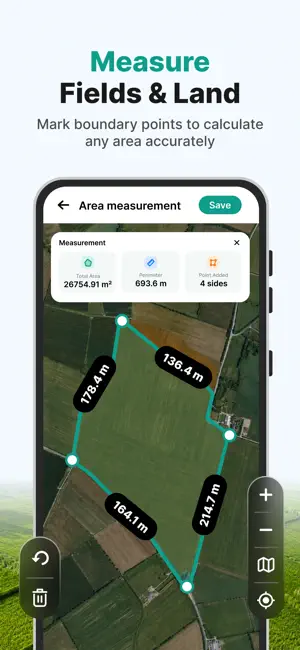

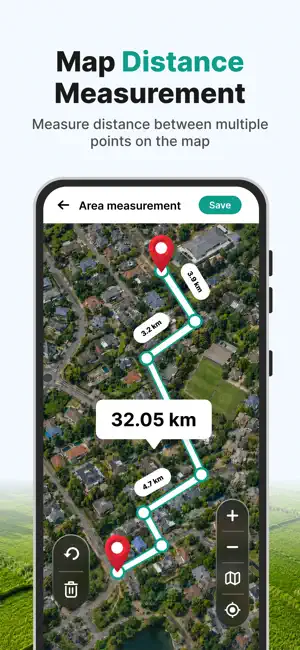
About GPS Area Measure – Fieldora
Fieldora – GPS Area Measure makes it easy to measure land area, fields, farms, plots, properties, and distances using GPS and map-based measurement tools. Mark points on the map, create boundaries, calculate area and distance, and view GPS coordinates in one convenient app. Whether you're checking a farm, property, garden, field, or outdoor space, Fieldora provides practical GPS measurement tools for everyday use. LAND AREA MEASUREMENT Measure the area of a location by marking points around its boundary on the map. Create a measurement polygon and quickly view the calculated area. View land measurements in commonly used units, including: • Acres • Hectares • Square meters • Square feet Useful for measuring farms, agricultural fields, plots, properties, gardens, landscaping areas, and other outdoor spaces. GPS DISTANCE MEASUREMENT Measure the distance between two or more points directly on the map. Mark locations and create measurement lines to estimate: • Property and field dimensions • Distance between locations • Outdoor distances • Routes and paths • Plot boundaries GPS & MAP TOOLS Use GPS and interactive map tools to: • View your current location • Mark multiple points on the map • Measure land and field area • Measure distance between points • View latitude and longitude coordinates • Create area boundaries • Review selected locations USEFUL FOR LAND & OUTDOOR MEASUREMENT Fieldora can help with everyday measurement tasks involving: • Farms and agricultural fields • Land and plots • Property and real estate visits • Gardens and landscaping • Construction planning • Outdoor spaces • Routes and distance planning SIMPLE MEASUREMENT WORKFLOW 1. Open the map 2. Select or mark points 3. Create an area or distance measurement 4. View the calculated result 5. Save or review measurements where supported GPS-BASED MEASUREMENTS Fieldora uses GPS technology, map information, and user-selected points to calculate measurement estimates. Measurement accuracy may vary depending on GPS signal quality, device hardware, environmental conditions, map data, location conditions, and the points selected on the map. IMPORTANT DISCLAIMER Fieldora provides GPS- and map-based measurement estimates for general reference, planning, and everyday use. Results are not guaranteed to be exact. Fieldora does not provide certified surveying, legal property measurements, or official boundary determinations. Do not rely on Fieldora as the sole source for legal boundaries, financial decisions, construction requirements, property transactions, or other situations requiring professionally verified measurements. For official land surveys, certified measurements, or legal property boundaries, consult a qualified surveyor or appropriate local authority. PREMIUM FEATURES Fieldora may offer optional premium features through auto-renewable subscriptions. Available plans, prices, subscription periods, and included features are displayed in the app before purchase. SUBSCRIPTION INFORMATION • Payment is charged to your Apple Account upon confirmation of purchase. • Subscriptions automatically renew unless auto-renewal is turned off at least 24 hours before the end of the current subscription period. • Your Apple Account will be charged for renewal within 24 hours before the end of the current period. • You can manage or cancel subscriptions through your Apple Account subscription settings. • If an introductory offer is available, applicable pricing, duration, and renewal terms are displayed before purchase. • Eligibility for introductory offers is determined by Apple. PRIVACY Fieldora may request location access when needed for GPS and map-based features. You can manage location permissions through your device settings. Privacy Policy: https://fieldora-gps-area-measure.blogspot.com/2026/09/privacy-policy.html Terms of Use: https://fieldora-gps-area-measure.blogspot.com/2026/09/terms-of-use.html
What’s new
Version 1.1 · Updated October 24, 2026
Thanks for staying with us! In this update, we have made bug fixes and performance improvements. Your feedback helps us to improve!
App privacy
The developer, Milan Devmurari, reported these privacy practices to Apple.
Data Used to Track You
The following data may be used to track you across apps and websites owned by other companies:
- Location: Precise Location, Coarse Location
Data Linked to You
The following data, which may be collected and linked to your identity, may be used for the following purposes:
- Location: Precise Location, Coarse Location
Used for: App Functionality
Alternatives to GPS Area Measure – Fieldora
Looking for apps like GPS Area Measure – Fieldora? Here are 6 similar apps on the App Store. The highest rated is FldMx - GPS Field Area Measure (5.0/5), and all 6 are free to download.
-
 Mesura: Construction Calc
-
 HVAC Field Tools: Calculator
-
 MapLab: GPS Area Measure
-
 FldMx - GPS Field Area Measure
5.0
-
 Tape Measure:3D Scanner
-
 Smart NFC Tools Reader
| App | Rating | Price | Last updated | Compare |
|---|---|---|---|---|
| GPS Area Measure – Fieldora | – | Free | October 24, 2026 | |
| Mesura: Construction Calc | – | Free | Oct 12, 2026 | Compare |
| HVAC Field Tools: Calculator | – | Free | Sep 30, 2026 | Compare |
| MapLab: GPS Area Measure | – | Free | Jul 14, 2026 | Compare |
| FldMx - GPS Field Area Measure | 5.0 / 5 (1) | Free | May 29, 2026 | Compare |
| Tape Measure:3D Scanner | – | Free | Apr 22, 2026 | Compare |
| Smart NFC Tools Reader | – | Free | Apr 15, 2025 | Compare |