

Bounce Navigation
Tyrone Carson Navigation iPhoneiPadiPod touch
Bounce Navigation is a free Navigation app for iPhone and iPad by Tyrone Carson. Rated 5.0/5 from 1 ratings. Requires iOS 26.0. Updated October 23, 2026.
- Rating
- 5.0
- 1 ratings
- Price
- Free
- on the App Store
- Size
- 117 MB
- Age 4+
- Updated
- Oct 23
- 2026 · vMercury RC1 HF1
Screenshots
Save to Pinterest
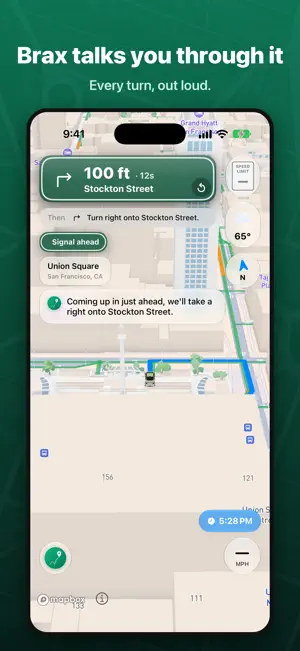
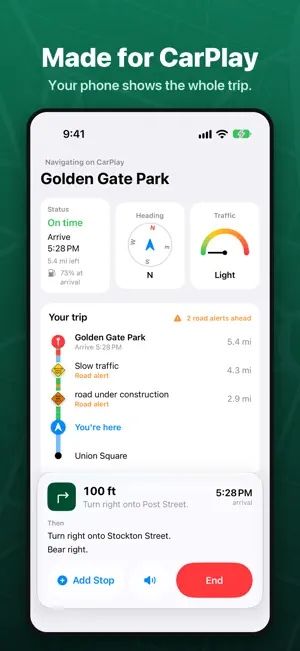
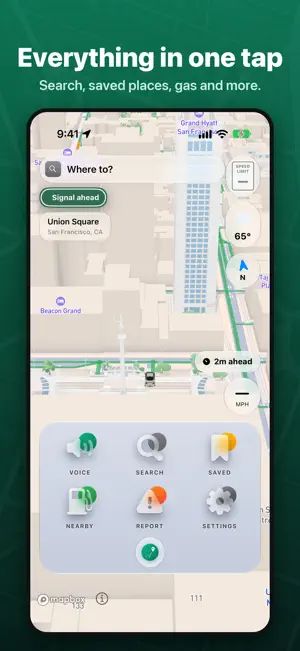
About Bounce Navigation
Ready for your drive. Ready to plug into your life. Other maps say "traffic ahead." Bounce tells you which lanes are closed, what it costs to skip them, and the faster way around. It reads real alerts from highway patrol and road crews. No guessing. READY FOR YOUR DRIVE • Get in and go. Bounce is on your car screen, your Lock Screen and your wrist. • Your next turn rides in the Dynamic Island, always in sight. • Brax, your voice guide, talks like a calm friend, not a robot. • SigAlerts in plain words: "SigAlert 2 miles ahead. Right two lanes closed." • Closures, crashes, weather and the real speed limit, right on your route. READY TO INTEGRATE • Your car: link your car account and Bounce sees your real fuel or battery and range. • Your calendar: meetings with a place show up as one-tap trips. • Siri: "Take me home with Bounce." Report a crash without touching your phone. • Shortcuts: build your own one-tap drives and reports. • Your fleet: Bounce reads hours, fuel and range from your ELD and takes stops straight from dispatch. • Your toll pass and carpool: Bounce plans every route around them. EXPRESS LANES, DONE RIGHT • See the minutes you save and the toll you pay before you pick. • Bounce knows when you are in the express lanes, so it never thinks you are lost. CHANGE YOUR MIND IN ONE TAP • Other ways glow on the map with their time, like "4 min faster." • Tap one. You are on it. No menus, no stopping. • Traffic changes? Brax tells you your new arrival time. MADE FOR THE NEWEST IPHONE • Live turns in the Dynamic Island and on the Lock Screen • A clear glass design that keeps the map in view • Brax gets smarter with Apple Intelligence • Your turns on Apple Watch in the Smart Stack • Full CarPlay with clear turn cards and alert icons SIGNS YOU ALREADY KNOW • Exit signs that look just like the big green ones on the highway • Bright yellow EXIT ONLY warnings, so you are in the right lane in time JUST LOOKING? THAT WORKS TOO • Search a place without starting a route • Look around the street or fly around it in 3D before you go IT NOTICES THE LITTLE THINGS • Stop for gas and Bounce fills your tank for you • A trip recap after every drive, even short ones • Tap a star and your feedback sends itself BUILT FOR TRUCKS • Routes for your truck's height, weight and load • Warnings for low bridges and weight limits • Your hours on the map, right from your ELD Bounce is free. Pro and Family plans add even more. Bounce shows hours from your ELD. Your ELD is the official record. Apple Intelligence needs a supported device. Car linking works with supported car makers. Please drive safely and follow road signs and local laws. Pro and Family are auto-renewing subscriptions, monthly or yearly. Payment is charged to your Apple Account. They renew unless you turn off auto-renew at least 24 hours before the period ends. Manage or cancel in your Apple Account settings. Terms of Use (EULA): https://bouncenav.com/license Privacy Policy: https://bouncenav.com/privacy
What’s new
Version Mercury RC1 HF1 · Updated October 23, 2026
Ready for iPhone Duo. Ready for everything. This update fixes problems you told us about, and adds a few things. FIXED • Bounce could close on the car screen when a route started, after allowing the microphone, or when you talked to Brax. It stays open now. • The battery gauge didn't change after you charged or filled up without a route. Now it does, and if Bounce can't confirm your level, it asks. • Trip status asked for charging stops you didn't need. The battery estimate was too cautious. It now stays close to what your car says. • The car screen could show 0% or "..." for your battery. It now shows the number, or "1 charging stop needed." • Charger, gas, truck stop and rest area lists were cut short. Now they're complete, from the full government list. • The car map could hide your next turn, and express lanes didn't show on the car screen. Both are fixed. • Brax stayed silent when muted, even when you asked a question. Now Brax always answers you. • Bounce kept steering you back to a road you had left, even with a closure ahead. Now it goes your way, and routes around closures on its own. • "Find Another Way" popped up for every hazard. Now Bounce decides, and asks only when two ways are about as good. • A short hop off the freeway around a crash was never considered. Now Bounce times it with live traffic and takes it when it saves time. • On iOS 26, the app closed when a route started with CarPlay connected. It stays open now. • On drives with CarPlay, iOS could close Bounce for working too hard while checking road alerts. It now checks only the road just ahead. • Brax fell behind and cut itself off. Now Brax says one thing at a time, the most urgent first, and never makes a turn wait. • The replay button covered the stop count on the turn sign, and the battery gauge was hard to read over the map. Both are fixed. NEW • Delay risk on every route: Bounce weighs lanes, exits, live traffic, sun glare and weather, shows how likely a long delay is, and marks the best bet. • A faster way that is much riskier isn't worth it. Bounce keeps you on the safer way unless the time saved is big. • Crash ahead? Bounce picks the best exit and tells you early, then you decide. • Parallel roads are offered as choices, compared on time, miles, climbing, battery and curves. • Calendar heads-up (Pro): driving without a route to a meeting with an address? Bounce shows the way and whether you're on time. • Ask for stops in plain words, like "tacos in two hours." • The car screen shows the plugs your car can use at the charger, and a light bar while you charge. • Crash reports, so we can fix problems faster. No name or location is sent, and you can turn it off.
App privacy
The developer, Tyrone Carson, reported these privacy practices to Apple.
Data Not Linked to You
The following data, which may be collected but is not linked to your identity, may be used for the following purposes:
- Usage Data: Other Usage Data
- Location: Precise Location
- Diagnostics: Performance Data
- Other Data: Other Data Types
Used for: Developer’s Advertising or Marketing, Analytics, App Functionality, Other Purposes
Alternatives to Bounce Navigation
Looking for apps like Bounce Navigation? Here are 6 similar apps on the App Store. The highest rated is Magic Maps AI (5.0/5), and all 6 are free to download.
-
 NoJamGO: Private AI Navigation
-
 Pinly: Maps, curated by people
-
 AI Route Optimizer: FixMyStops
1.0
-
 Magic Maps AI
5.0
-
 Hard To Find Maps
-
 Loopr: Delivery Route Planner
| App | Rating | Price | Last updated | Compare |
|---|---|---|---|---|
| Bounce Navigation | 5.0 / 5 (1 rating) | Free | October 23, 2026 | |
| NoJamGO: Private AI Navigation | – | Free | Nov 19, 2026 | Compare |
| Pinly: Maps, curated by people | – | Free | Sep 3, 2026 | Compare |
| AI Route Optimizer: FixMyStops | 1.0 / 5 (1) | Free | Nov 18, 2026 | Compare |
| Magic Maps AI | 5.0 / 5 (3) | Free | Sep 21, 2026 | Compare |
| Hard To Find Maps | – | Free | Sep 14, 2026 | Compare |
| Loopr: Delivery Route Planner | – | Free | Nov 25, 2026 | Compare |
Compare Bounce Navigation with the top alternatives: ratings, updates, ASO score and keyword gaps →