

AI Route Optimizer: FixMyStops
Ramanpreet Singh Navigation iPhoneiPadiPod touch
AI Route Optimizer: FixMyStops is a free Navigation app for iPhone and iPad by Ramanpreet Singh. Rated 1.0/5 from 1 ratings. Requires iOS 16.4.
- Rating
- 1.0
- 1 ratings
- Price
- Free
- on the App Store
- Size
- 97 MB
- Age 17+
- Updated
- Nov 18
- 2026 · v1.1.6
Screenshots
Save to Pinterest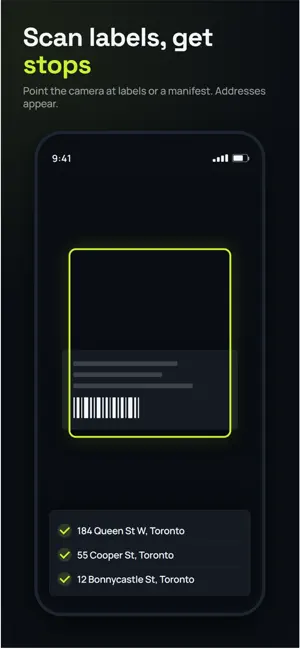


About AI Route Optimizer: FixMyStops
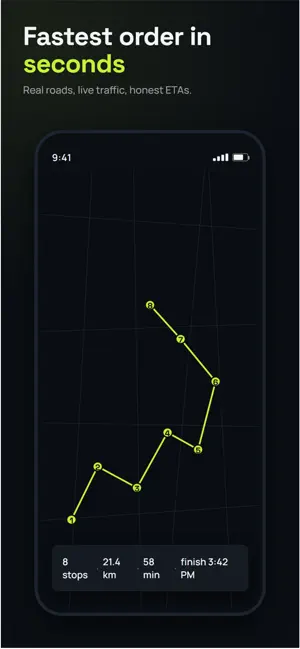
Fix My Route turns a list of addresses into the fastest route to drive them, built for delivery drivers, couriers, and anyone running multiple stops a day, not for planning a single trip. HOW IT WORKS Add your stops, type them one at a time, paste a whole list at once, upload a CSV, or just take a photo of a delivery manifest or app screenshot and let Fix My Route read the addresses for you. Tap Optimize, and get the fastest visiting order in seconds. Then work through your route stop by stop: mark each one Arrived, Done, or Skipped, and hand off to your own preferred maps app, Google Maps, Apple Maps, or Waze — for the actual turn-by-turn driving. BUILT FOR THE JOB, NOT THE DESK - Skip a stop and the rest of that cluster re-optimizes automatically - Works when you don't have signal, mark stops done in an elevator or a dead zone, and it syncs the moment you're back online, no lost work - Real history, not guesses: every finished route logs actual start time, actual finish time, and how long you spent at each stop, so you know exactly how your day went versus the plan - Large, thumb-friendly controls designed to be used one-handed, on the move GO PRO FOR - Unlimited stops per route - Unlimited photo/screenshot address imports - Avoid tolls, highways, and ferries when it matters Whether you're running your own delivery route, dispatching for a small courier business, or just tired of manually figuring out the best order to hit ten stops, Fix My Route gets you moving faster and keeps a real record of the work you did. Questions or feedback? We read every email, reach us right from the app's Settings screen. ... Questions or feedback? We read every email, reach us right from the app's Settings screen. Terms of Use (EULA): https://www.apple.com/legal/internet-services/itunes/dev/stdeula/ Terms of Service: https://app.fixmyroute.app/terms Privacy Policy: https://app.fixmyroute.app/privacy
What’s new
Version 1.1.6 · Updated November 18, 2026
Fix My Route is now Fix My Stops. Same app, same routes, new name. • Free plan: up to 20 stops per route. • New 24-hour pass: Pro for one big day, no subscription. • Vehicle spots: "Loading into" now changes the moment you pick a spot or type today's code. • Long routes are easier to edit: search by street, house number, note or package tag, and removing a stop no longer reshuffles the whole list. • Photo import keeps your country and won't add a unit or door code that isn't on your list. • The sample route now teaches the swipes: right when delivered, left to skip. • Signing in after buying Pro keeps your Pro on the new account. • Bug fixes and speed improvements.
App privacy
The developer, Ramanpreet Singh, reported these privacy practices to Apple.
Data Linked to You
The following data, which may be collected and linked to your identity, may be used for the following purposes:
- Contact Info: Email Address
Used for: Other Purposes
Data Not Linked to You
The following data, which may be collected but is not linked to your identity, may be used for the following purposes:
- Usage Data: Product Interaction
- Location: Precise Location
Used for: Analytics, Other Purposes
Alternatives to AI Route Optimizer: FixMyStops
Looking for apps like AI Route Optimizer: FixMyStops? Here are 6 similar apps on the App Store. The highest rated is FixMyRoute: Flex Optimizer (5.0/5), and all 6 are free to download.
-
 FixMyRoute: Flex Optimizer
5.0
-
 Bounce Navigation
5.0
-
 NoJamGO: Private AI Navigation
-
 Pinly: Maps, curated by people
-
 Magic Maps AI
5.0
-
 Hard To Find Maps
| App | Rating | Price | Last updated | Compare |
|---|---|---|---|---|
| AI Route Optimizer: FixMyStops | 1.0 / 5 (1 rating) | Free | November 18, 2026 | |
| FixMyRoute: Flex Optimizer | 5.0 / 5 (3) | Free | Nov 15, 2026 | Compare |
| Bounce Navigation | 5.0 / 5 (1) | Free | Oct 23, 2026 | Compare |
| NoJamGO: Private AI Navigation | – | Free | Nov 19, 2026 | Compare |
| Pinly: Maps, curated by people | – | Free | Sep 3, 2026 | Compare |
| Magic Maps AI | 5.0 / 5 (3) | Free | Sep 21, 2026 | Compare |
| Hard To Find Maps | – | Free | Sep 14, 2026 | Compare |