

Spently: Expense Tracker
Andi Rrashi Finance iPhoneiPadiPod touch
Spently: Expense Tracker is a free Finance app for iPhone and iPad by Andi Rrashi. Requires iOS 26.0. Updated November 5, 2026.
- Price
- Free
- on the App Store
- Size
- 10 MB
- Age 4+
- Updated
- Nov 5
- 2026 · v1.3.1
Screenshots
Save to Pinterest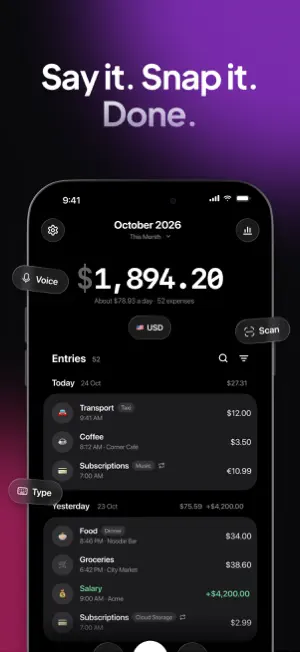


About Spently: Expense Tracker
Spently keeps track of what you spend. SAY IT Say "spent 12 on lunch" and it's saved, in the right category. Several at once works too: "coffee 3 and a taxi 15". Or type it on Spently's own keypad. SNAP IT Scan a receipt and Spently reads the total and items for you. A mixed receipt can be split into one entry per category. SEE WHERE IT GOES A clear breakdown of your month: charts, your biggest categories, how you're doing against last month, and what's still due. ASK YOUR MONEY ANYTHING "How much did I spend eating out this month?" Get a real answer, worked out from your own entries. EVERY CURRENCY Record in any currency. Totals convert into your home currency, and abroad Spently offers the local one. ALSO • Repeating entries and installments • Widgets for the Home Screen and Lock Screen • Siri and Shortcuts • Face ID lock • iCloud sync across your devices • Backups and spreadsheet import and export PRIVATE BY DESIGN No account, no ads and no tracking. Your entries stay on your devices and in your private iCloud. Speech and Apple Intelligence run on your iPhone. SPENTLY PRO Adding entries by voice or typing is free. Spently Pro unlocks unlimited questions, receipt scanning, smarter receipts, the full breakdown, widgets and spreadsheet export. Free: 5 receipt scans a month and 10 questions. Monthly or yearly with a 1-week free trial or once for life. Subscriptions renew automatically unless cancelled at least 24 hours before the end of the period; manage them in your Apple Account settings. Smarter receipts and some answers need an iPhone with Apple Intelligence. Terms of Use: https://www.apple.com/legal/internet-services/itunes/dev/stdeula/ Privacy Policy: https://andirrashi.github.io/spently-website/privacy.html
What’s new
Version 1.3.1 · Updated November 5, 2026
• Moving to a new iPhone keeps your own categories instead of swapping in the starter ones. • The date pill ignores stray flicks and finally reaches the last day of the month. • The amount keypad now sits at the bottom of the screen, where keypads belong. • Breakdown no longer counts "no category" as a category. It had ideas above its station. • Shop names with a comma, like "Bed, Bath and Beyond", stay in one piece. • If iCloud sync can't start, Settings now says why instead of shrugging. • Plus friendlier empty screens and small fixes, swept up and put away.
App privacy
The developer, Andi Rrashi, reported these privacy practices to Apple.
Data Not Collected
The developer does not collect any data from this app.
Alternatives to Spently: Expense Tracker
Looking for apps like Spently: Expense Tracker? Here are 6 similar apps on the App Store.
-
 Blinkify - Expense Tracker
-
 Tanda: Expense & Money Tracker
-
 Spencio - Expense Manager
-
 Sollus: Expense Tracker
-
 BillKeep - Smart Bill Tracker
-
 Expense Tracker・Money Manager
| App | Rating | Price | Last updated | Compare |
|---|---|---|---|---|
| Spently: Expense Tracker | – | Free | November 5, 2026 | |
| Blinkify - Expense Tracker | – | Free | Aug 6, 2026 | Compare |
| Tanda: Expense & Money Tracker | – | Free | Nov 4, 2026 | Compare |
| Spencio - Expense Manager | – | Free | Nov 21, 2026 | Compare |
| Sollus: Expense Tracker | – | Free | Nov 23, 2026 | Compare |
| BillKeep - Smart Bill Tracker | – | Free | May 1, 2026 | Compare |
| Expense Tracker・Money Manager | – | Free | Nov 23, 2026 | Compare |