

Expense Tracking: Finance App
Ashir Khan Finance iPhoneiPadiPod touch
Expense Tracking: Finance App is a free Finance app for iPhone and iPad by Ashir Khan. Requires iOS 15.0. Updated October 13, 2026.
- Price
- Free
- on the App Store
- Size
- 54 MB
- Age 4+
- Updated
- Oct 13
- 2026 · v1.1.6
Screenshots
About Expense Tracking: Finance App
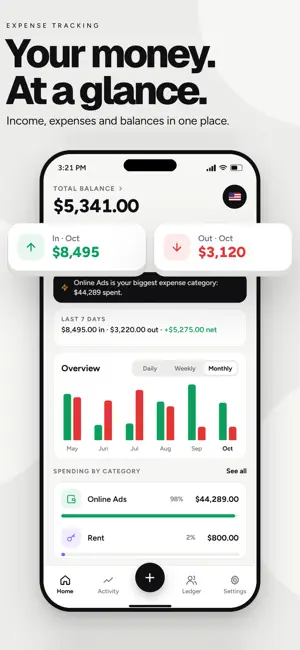
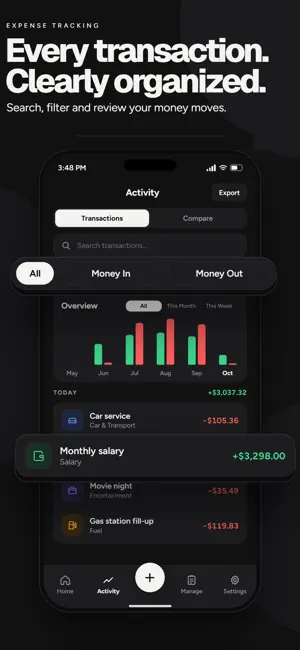
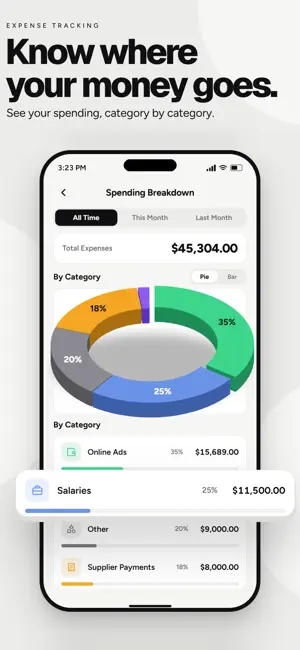
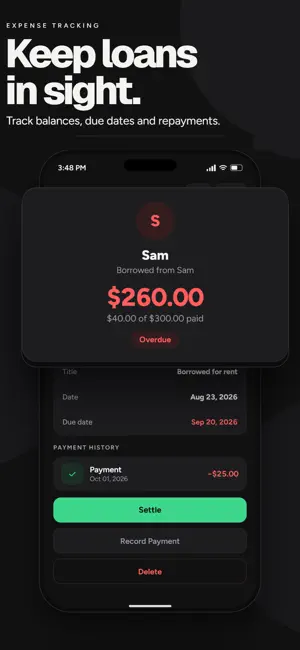
Know what you earn, spend, owe and receive. Expense Tracking is a personal and business expense tracker that brings income, expenses, bills, loans and ledgers together, with offline support and optional cloud backup and sync. Record your transactions as you go, keep personal and business finances separate, and turn your daily entries into useful insights. Personal income and expense tracker Keep everyday spending organized with an expense manager built around the records you add. • Log income and expenses, choose categories and add notes. • Find previous transactions with search and filters. • Review spending charts, compare periods and understand your habits. • Track household costs, daily purchases and other personal expenses. Business expense tracker Manage your business finances alongside your personal records. Track one or more businesses, each with its own transactions, balances and reports. • Record daily sales totals and operating expenses. • Add the cost of sales and follow unpaid or partially paid sales. • Review revenue, gross profit and net profit or loss. • Keep business activity separate from personal spending. Business ledger and balances Know what customers owe you and what you owe suppliers. Maintain individual balances, record payments and check outstanding amounts. Export ledger records and share balance statements as PDFs when you need to follow up. Loan tracker Keep track of money lent and borrowed. Set due dates, receive reminders and record partial or full repayments. See the remaining balance without searching through old notes or messages. Bill tracker and reminders Organize recurring bills and upcoming payments. Get a bill reminder before the due date, spot overdue bills and mark payments as completed while keeping a payment history. Access across devices, with offline support Start without creating an account, or sign in with your email for free cloud backup and sync across your devices. Add and view transactions without an internet connection. When signed in, offline changes sync when you reconnect. Cloud backup, sync and sharing updates with your team require internet access. Share your business with staff With optional Premium, invite employees to your business and choose what each person can view or change. Team members can record sales and expenses from their own phones. Activity history helps you see who added, changed or deleted a record. Export and share Export your data to PDF, CSV or Excel, and import transactions from spreadsheets. Share bill, loan and balance reminders through WhatsApp, email or other apps. Budgets and savings goals Use the budget planner to set weekly or monthly limits by category. Follow your progress and set savings goals based on the income and expenses you record. Make it your own • Choose from 60+ currencies and 17 languages. • Protect access with a PIN. • Switch between light and dark mode. Free features and Premium Expense Tracking is free to use with ads. Core features include personal tracking, Business Mode, ledgers, bills, loans, budgets and savings goals. Optional Premium removes ads and enables business sharing with staff. Premium is an auto-renewing subscription. Payment is charged to your Apple Account at purchase confirmation. Subscriptions renew unless cancelled at least 24 hours before the current period ends. Manage or cancel your subscription in your Apple Account settings. Start with your next transaction and build a clearer picture of your personal and business finances. Privacy Policy: https://expensetracking.reflect-technology.ca/privacy-policy.html Terms of Use (EULA): https://www.apple.com/legal/internet-services/itunes/dev/stdeula/
What’s new
Version 1.1.6 · Updated October 13, 2026
• Link your email to back up your data and sync across devices. • Share your business with staff and manage their access. • Now available in 17 languages. • Bug fixes and performance improvements.
App privacy
The developer, Ashir Khan, reported these privacy practices to Apple.
Data Used to Track You
The following data may be used to track you across apps and websites owned by other companies:
- Identifiers: Device ID
Data Not Linked to You
The following data, which may be collected but is not linked to your identity, may be used for the following purposes:
- Identifiers: Device ID
Used for: Third-Party Advertising, Product Personalization, Other Purposes
Alternatives to Expense Tracking: Finance App
Looking for apps like Expense Tracking: Finance App? Here are 6 similar apps on the App Store.
-
 Paydown: Budget & Expense
-
 Budget | Savings & Assets
-
 JotWell: Expense Tracker
-
 Hanimani
-
 KikobaPro
-
 Tanda: Expense & Money Tracker
| App | Rating | Price | Last updated | Compare |
|---|---|---|---|---|
| Expense Tracking: Finance App | – | Free | October 13, 2026 | |
| Paydown: Budget & Expense | – | Free | Oct 5, 2026 | Compare |
| Budget | Savings & Assets | – | Free | Aug 19, 2026 | Compare |
| JotWell: Expense Tracker | – | Free | Oct 10, 2026 | Compare |
| Hanimani | – | Free | Oct 6, 2026 | Compare |
| KikobaPro | – | Free | Sep 8, 2026 | Compare |
| Tanda: Expense & Money Tracker | – | Free | Oct 19, 2026 | Compare |