

Play by Ear: Ear Training
永彪 赵 Music iPhoneiPadiPod touch
Play by Ear: Ear Training is a free Music app for iPhone and iPad by 永彪 赵. Requires iOS 17.0. Updated October 14, 2026.
- Price
- Free
- on the App Store
- Size
- 30 MB
- Age 4+
- Updated
- Oct 14
- 2026 · v1.0.1
Screenshots



About Play by Ear: Ear Training
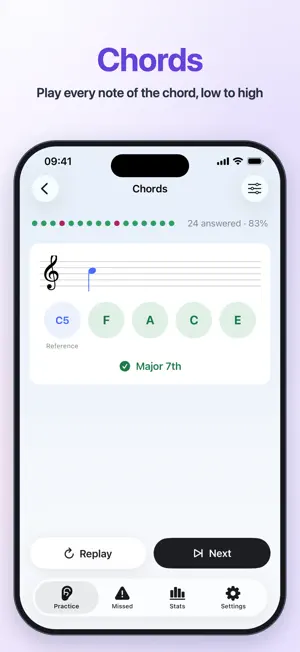
Hear a melody and play it straight away on your instrument — that's the goal for many musicians. Play by Ear helps you build that ear step by step: the app plays, you answer on your own instrument, and it checks your pitch through the microphone in real time. No tapping answers — you practice exactly what matters: hear it, then play it. SINGLE NOTE • Hear a reference note, then the question, and play the same note back — the octave has to match too • With one note per question, all 12 notes come up; with more, it becomes a short melody in a random major or natural, harmonic or melodic minor key • After a correct answer you see the interval from the previous note (such as "ascending major 3rd"), so your sense of intervals grows as you go INTERVALS • After the reference note, the two notes are played one after the other (melodic), then together (harmonic); play both back in order on your instrument • All 13 intervals from unison to octave, ascending or descending at random; practice only consonant or dissonant intervals, or pick your own • The interval's name is revealed when you're done CHORDS • The chord is played broken from low to high, then as a block; play each of its notes from low to high • Major, minor, augmented and diminished triads, plus major 7th, dominant 7th, minor 7th, half-diminished and diminished 7th chords, with optional inversions • The chord's name is revealed when you're done DESIGNED FOR PRACTICING WITH AN INSTRUMENT IN HAND • Practice starts as soon as you open it; replay or skip to the next question at any time • After a correct answer the app waits until you stop playing, so you never need to look at the screen • Supports flute, piano, oboe, bassoon, violin, viola, cello, erhu, trombone and tuba — the question range and clef match your instrument • A staff at the top shows the clef, key signature and reference note • Optionally keep the screen awake while you practice MISSED INTERVALS AND STATISTICS • Intervals you miss in single-note and interval practice (such as "descending perfect 5th") go into your Missed list; the more you miss one, the more often it comes up, and it's removed once you get it right several times in a row • Daily practice volume, first-try accuracy, days practiced, most-missed intervals, and accuracy per interval and per chord ICLOUD SYNC Practice history, statistics and your Missed list sync through your iCloud account, so nothing is lost when you switch devices. FREE AND PRO Free: single-note practice (one or two notes per question), interval training (all 13 intervals), chord training (all four triads), the Missed list and 7-day statistics — every kind of practice works fully for free. Pro (one-time purchase, no subscription): melodic dictation with 3 to 10 notes per question; harmonic-only intervals and block-chord-only mode for a harder challenge; seventh chords and inversions; practice built from your missed intervals; 30-day and all-time statistics. PRIVACY The microphone is used only to detect the pitch you play, on your device and in real time. Nothing is recorded, stored or uploaded, and the app collects no personal data.
What’s new
Version 1.0.1 · Updated October 14, 2026
What's new in 1.0.1: • Intervals and Chords are now answered on your instrument too: hear the notes one by one, then together, play them back, and see the name when you're done • Simpler Single Note practice: every question starts with the reference note, and the note range adapts to the number of notes per question; after a correct answer you see the interval from the previous note • Redesigned practice screen: starts right away, replay or skip at any time, a staff shows the clef, key signature and reference note, and the note you play appears live while listening • The Missed list now records intervals, from both Single Note and Interval practice • New "Most-missed intervals" chart in Statistics • New first-run guide and far fewer settings • Fresh colors, smoother playback of several notes, and louder sound
App privacy
The developer, 永彪 赵, reported these privacy practices to Apple.
Data Not Collected
The developer does not collect any data from this app.
Alternatives to Play by Ear: Ear Training
Looking for apps like Play by Ear: Ear Training? Here are 6 similar apps on the App Store. The highest rated is Ear Training: Pitch & Chords (1.0/5), and 5 of the 6 are free to download.
-
 Ear Training - Relative Pitch
-
 Soloist Ear Training & Pitch
-
 Ear Training: Chords & Scales
-
 Ear Training: Pitch & Chords
1.0
Ear Training: Pitch & Chords
1.0
-
 Harmony & Counterpoint
1.0
Harmony & Counterpoint
1.0
-
 Guitartuner (no adds)
| App | Rating | Price | Last updated | Compare |
|---|---|---|---|---|
| Play by Ear: Ear Training | – | Free | October 14, 2026 | |
| Ear Training - Relative Pitch | – | Free | Oct 14, 2026 | Compare |
| Soloist Ear Training & Pitch | – | Free | Oct 5, 2026 | Compare |
| Ear Training: Chords & Scales | – | Free | Oct 9, 2026 | Compare |
| Ear Training: Pitch & Chords | 1.0 / 5 (1) | Free | Jun 11, 2026 | Compare |
| Harmony & Counterpoint | 1.0 / 5 (1) | 4.99 USD | Oct 11, 2026 | Compare |
| Guitartuner (no adds) | – | Free | Jan 20, 2026 | Compare |