

Video Compressor MP4, MOV
Anton Mikhailenko Photo & Video iPhoneiPadiPod touch
Video Compressor MP4, MOV is a free Photo & Video app for iPhone and iPad by Anton Mikhailenko. Requires iOS 17.0. Updated October 22, 2026.
- Price
- Free
- on the App Store
- Size
- 8 MB
- Age 4+
- Updated
- Oct 22
- 2026 · v1.0.1
Screenshots
About Video Compressor MP4, MOV
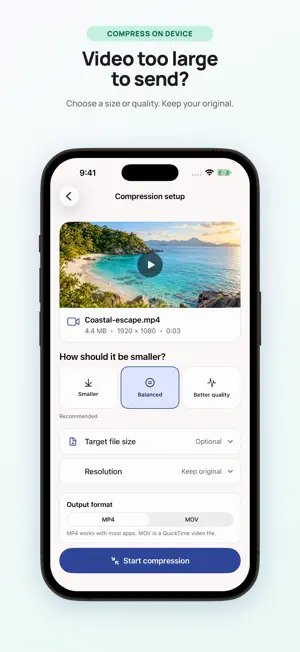
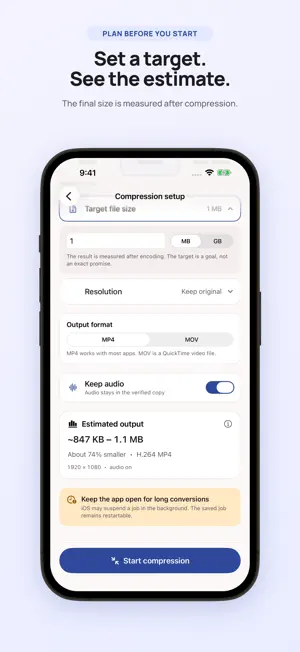
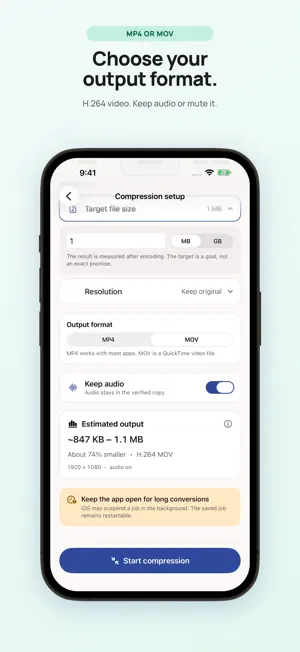
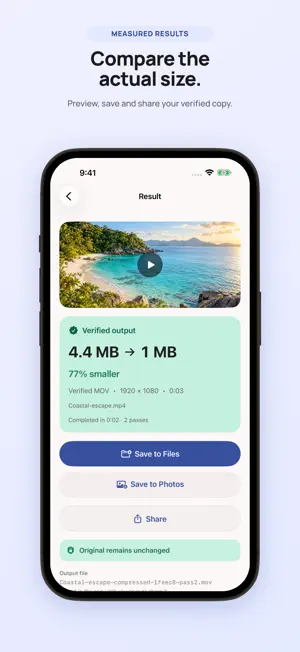
A video too large to send can still be worth keeping. Video Compressor creates a separate MP4 or MOV copy on your iPhone or iPad, leaving the original untouched. Import from Photos or Files, compress video, then compare the result before you save or share it. Choose a quality preset, change the output resolution or enter a target file size in MB or GB. This video size reducer shows an estimate before you start. The target file size is a guide, not an exact promise; motion, sound and duration all affect the result. Use the MP4 compressor to re-encode compatible clips as H.264, or choose MOV for the output. You can keep the audio or mute it. To reduce video size further, try a lower resolution or quality setting. The app never enlarges a video's resolution. A smaller video file is easier to share. Play it back, check its actual size and save it to Photos or Files. Local history lets you reopen completed results. The MP4 compressor also reports when a clip is already well optimized, so you can decide whether the new copy is worth keeping. The free version lets you compress video one at a time, with all compression settings available; ads may appear. Lifetime Pro is a one-time purchase that removes ads and unlocks batch compression for up to 10 videos, processed in order. Completed results stay available if a later item fails. Video Compressor uses local compression: your videos are not uploaded to our servers. Ads, purchases and optional usage analytics may use the internet. You can turn analytics off in Settings; it never includes videos or filenames. Keep the app open while processing. An interrupted job may need to restart. A video size reducer cannot make every clip smaller: an already optimized video may grow. Check the final size when you reduce video size, then keep the copy that suits you.
What’s new
Version 1.0.1 · Updated October 22, 2026
Improved video compression, saving, and error handling. Videos are processed on your device. Optional usage analytics remain controlled in Settings.
App privacy
The developer, Anton Mikhailenko, reported these privacy practices to Apple.
Data Used to Track You
The following data may be used to track you across apps and websites owned by other companies:
- Identifiers: Device ID
Data Linked to You
The following data, which may be collected and linked to your identity, may be used for the following purposes:
- Location: Coarse Location
- Identifiers: Device ID
- Usage Data: Product Interaction, Advertising Data
- Purchases: Purchase History
Used for: Third-Party Advertising, Developer’s Advertising or Marketing, Analytics, App Functionality
Data Not Linked to You
The following data, which may be collected but is not linked to your identity, may be used for the following purposes:
- Diagnostics: Performance Data, Other Diagnostic Data, Crash Data
Used for: Third-Party Advertising, Developer’s Advertising or Marketing, Analytics, App Functionality
Alternatives to Video Compressor MP4, MOV
Looking for apps like Video Compressor MP4, MOV? Here are 6 similar apps on the App Store. The highest rated is Green Screen AI: Photo & Video (1.0/5), and all 6 are free to download.
-
 VideoSqueezer: Compress Videos
-
 かるムービー
-
 VideoConverterS - Video to MP3
-
 Compress Videos - Condenso
-
 Video Compressor & Resize: Kio
-
 Green Screen AI: Photo & Video
1.0
Green Screen AI: Photo & Video
1.0
| App | Rating | Price | Last updated | Compare |
|---|---|---|---|---|
| Video Compressor MP4, MOV | – | Free | October 22, 2026 | |
| VideoSqueezer: Compress Videos | – | Free | Oct 24, 2026 | Compare |
| かるムービー | – | Free | Aug 13, 2026 | Compare |
| VideoConverterS - Video to MP3 | – | Free | Oct 17, 2026 | Compare |
| Compress Videos - Condenso | – | Free | Sep 18, 2026 | Compare |
| Video Compressor & Resize: Kio | – | Free | Oct 11, 2026 | Compare |
| Green Screen AI: Photo & Video | 1.0 / 5 (1) | Free | Jul 21, 2026 | Compare |