

Video Compressor & Resize: Kio
Tugberk Dilbaz Photo & Video iPhoneiPadiPod touch
Video Compressor & Resize: Kio is a free Photo & Video app for iPhone and iPad by Tugberk Dilbaz. Requires iOS 17.6. Updated October 11, 2026.
- Price
- Free
- on the App Store
- Size
- 34 MB
- Age 4+
- Updated
- Oct 11
- 2026 · v1.0.5
Screenshots


About Video Compressor & Resize: Kio
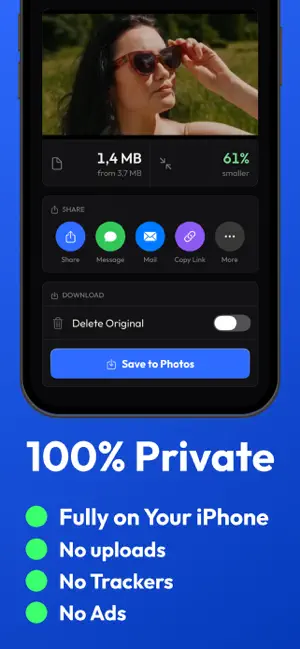
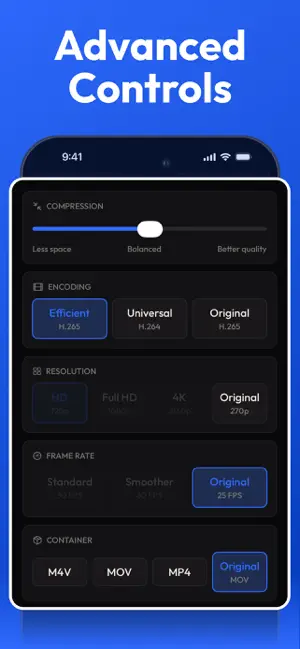
Your phone's storage is full and that 4K clip won't send. Video Compressor fixes both in seconds. Pick any video, choose how small you want it, and see the new size before you even start. Then save it back to your library or share it anywhere, with no quality you can see lost, no watermark slapped on top, and nothing uploaded to some stranger's server. Everything happens right on your iPhone. Tap one preset for a quick result, or open Advanced to dial in exactly what you want. SIMPLE: ONE TAP • High, Medium, or Low quality. Pick the trade-off and you're done. • Smart auto-tuning: screen recordings stay crisp, camera footage stays natural. • See the projected new size, and how much smaller it'll be, before you compress. ADVANCED: FULL CONTROL • Resolution up to 4K, or keep the original. • Choose your codec: H.265 for smaller files, H.264 for maximum compatibility. • Cap the frame rate (30/60 fps), switch the container (MP4/MOV), or drop the audio track. BATCH IN ONE GO • Select a stack of videos and compress them all at once. • Walk away, and every clip lands back in your library when it's done. FAST, PRIVATE, NO WATERMARK • On-device encoding with Apple's own video engine, so it's quick and battery-friendly. • Nothing ever leaves your phone. No account, no cloud, no tracking. • Never a watermark on your video. It stays yours. FREE TO START Your first compression is free. Upgrade to Video Compressor Pro for unlimited compressions and unlimited batches. VIDEO COMPRESSOR PRO • Unlimited compressions, so you never hit the free limit again. • Batch unlimited videos at once (the free plan covers up to 3). SUBSCRIPTION DETAILS Video Compressor Pro is offered as a Weekly auto-renewable subscription, and as a one-time Lifetime purchase (not a subscription). Prices are shown in the app and may vary by region. • Payment is charged to your Apple Account at confirmation of purchase. • The Weekly subscription renews automatically unless auto-renew is turned off at least 24 hours before the end of the current period. • Your account is charged for renewal within 24 hours before the current period ends. • Manage or cancel your subscription anytime in your App Store account settings. • The Lifetime option is a one-time payment that unlocks Pro permanently and does not renew. Privacy Policy: https://www.bunchofapps.co/video-compressor/privacy Terms of Use: https://www.bunchofapps.co/video-compressor/terms Questions? [email protected] Small video, big space saved.
What’s new
Version 1.0.5 · Updated October 11, 2026
We've updated Kio's app information and localized text.
App privacy
The developer, Tugberk Dilbaz, reported these privacy practices to Apple.
Data Not Linked to You
The following data, which may be collected but is not linked to your identity, may be used for the following purposes:
- Identifiers: Device ID
- Usage Data: Product Interaction
- Purchases: Purchase History
Used for: Analytics, App Functionality
Alternatives to Video Compressor & Resize: Kio
Looking for apps like Video Compressor & Resize: Kio? Here are 6 similar apps on the App Store. The highest rated is Video Compressor Free Storage (5.0/5), and all 6 are free to download.
-
 Compress Video - Resize Videos
-
 Video Compressor - Squish
-
 Video Compressor – Shrink MP4
-
 Video Compressor: VidMin
-
 Video Compressor and Resizer
-
 Video Compressor Free Storage
5.0
| App | Rating | Price | Last updated | Compare |
|---|---|---|---|---|
| Video Compressor & Resize: Kio | – | Free | October 11, 2026 | |
| Compress Video - Resize Videos | – | Free | Oct 9, 2026 | Compare |
| Video Compressor - Squish | – | Free | Jul 1, 2026 | Compare |
| Video Compressor – Shrink MP4 | – | Free | Oct 21, 2026 | Compare |
| Video Compressor: VidMin | – | Free | Aug 6, 2026 | Compare |
| Video Compressor and Resizer | – | Free | Oct 16, 2026 | Compare |
| Video Compressor Free Storage | 5.0 / 5 (3) | Free | Oct 23, 2026 | Compare |