

Talkcut: Auto Captions
Mobivalley Photo & Video iPhoneiPadiPod touch
Talkcut: Auto Captions is a free Photo & Video app for iPhone and iPad by Mobivalley. Requires iOS 18.0. Updated October 22, 2026.
- Price
- Free
- on the App Store
- Size
- 12 MB
- Age 4+
- Updated
- Oct 22
- 2026 · v1.0.0
Screenshots
Save to Pinterest

About Talkcut: Auto Captions
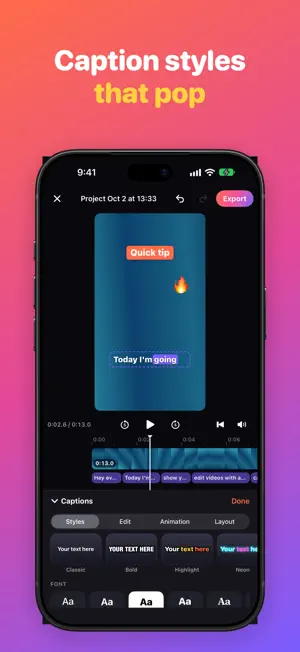
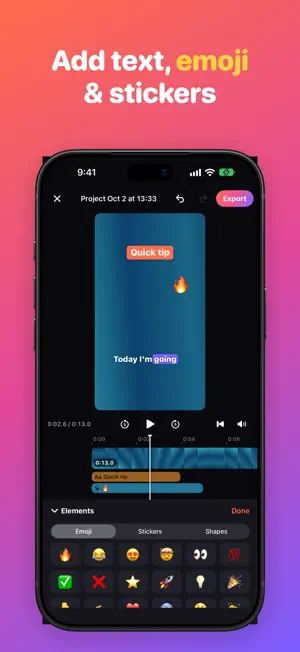
Talkcut turns your talking videos into ready-to-post clips. Captions timed word by word, pauses cut automatically and a cleaner voice, all on your iPhone or iPad, with no watermark. AUTO CAPTIONS, WORD BY WORD • Captions from your speech with timing for every word, generated on your device • One tap to start, with the speech language right on the button • 9 animated styles: Classic, Bold, Highlight, Neon, Minimal, Creator, Dynamic, Karaoke and Typewriter • Keywords highlighted automatically, plus matching emoji • Edit text and timing, split or merge, paste a script, export SRT SMART CUTS FOR TALKING VIDEOS • Cut silences and "ums" in one tap, with a preview of every cut • Punch-in zoom at every cut, like creator edits • Speed from 0.25× to 4× with natural-sounding voice • Transitions: dissolve, slide, zoom, flash, blur • Follow face: keeps you centered when changing format SOUND THAT HOLDS ATTENTION • Enhance voice: reduces background noise and evens out the volume • Music that lowers automatically while you speak • Record voiceovers and set the volume of each clip CREATE MORE • Add photos, text, emoji, stickers and shapes • Filters and adjustments for the whole video or a single clip • 9:16, 1:1, 16:9 and 4:5 with blurred, color or image backgrounds • Export video up to 1080p at 60 fps, an animated GIF or only the audio TALKCUT PRO • B-roll and picture-in-picture • Remove the background behind you • Translate captions, on your device • AI title, post text and hashtags (Apple Intelligence) • Save your own caption styles • 4K export Talkcut Pro is available as a yearly subscription or a one-time lifetime purchase. Payment is charged to your Apple ID at confirmation. The subscription renews automatically unless cancelled at least 24 hours before the end of the current period; your account is charged for renewal within 24 hours before the end of the period. Manage or cancel it in your Apple ID settings. Terms of Use: https://www.apple.com/legal/internet-services/itunes/dev/stdeula/ No account, no ads. Your projects stay on your device.
App privacy
The developer, Mobivalley, reported these privacy practices to Apple.
Data Not Linked to You
The following data, which may be collected but is not linked to your identity, may be used for the following purposes:
- Purchases: Purchase History
- Location: Coarse Location
- Identifiers: Device ID
- Usage Data: Product Interaction
- Diagnostics: Crash Data, Performance Data
Used for: Analytics, App Functionality
Alternatives to Talkcut: Auto Captions
Looking for apps like Talkcut: Auto Captions? Here are 6 similar apps on the App Store. The highest rated is Subly: Subtitle Maker (5.0/5), and all 6 are free to download.
-
 PoseLab: Selfie Pose Ideas
-
 AI Captions: Video Subtitles
-
 Capster: AI Captions for Video
-
 Subly: Subtitle Maker
5.0
-
 Matra AI - Gujarati Captions
-
 Caption Craft Video
| App | Rating | Price | Last updated | Compare |
|---|---|---|---|---|
| Talkcut: Auto Captions | – | Free | October 22, 2026 | |
| PoseLab: Selfie Pose Ideas | – | Free | Oct 26, 2026 | Compare |
| AI Captions: Video Subtitles | – | Free | Oct 22, 2026 | Compare |
| Capster: AI Captions for Video | – | Free | Nov 6, 2026 | Compare |
| Subly: Subtitle Maker | 5.0 / 5 (2) | Free | Nov 5, 2026 | Compare |
| Matra AI - Gujarati Captions | – | Free | Oct 29, 2026 | Compare |
| Caption Craft Video | – | Free | Dec 17, 2025 | Compare |