

ActionWidget: URL Buttons
Lukasz Wudarski Utilities iPhoneiPadiPod touch
ActionWidget: URL Buttons is a free Utilities app for iPhone and iPad by Lukasz Wudarski. Requires iOS 26.0. Updated October 28, 2026.
- Price
- Free
- on the App Store
- Size
- 1 MB
- Age 4+
- Updated
- Oct 28
- 2026 · v1.0
Screenshots
Save to Pinterest


About ActionWidget: URL Buttons
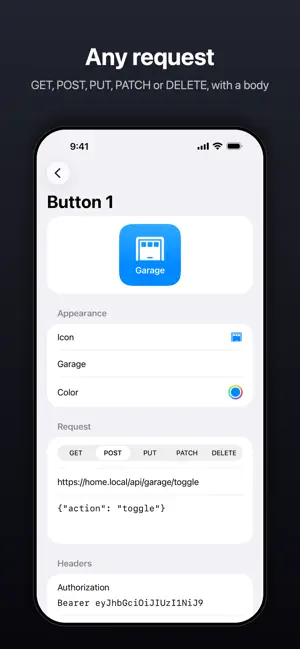
Turn any web address into a button you can tap from your Home Screen. With iOS 26, the same buttons also work on your car's screen with CarPlay. ActionWidget puts one, two or four buttons in a small widget. Each button sends a web request you set up: open the garage, switch on the lights, start the car's climate, trigger a webhook or call your smart home hub. One tap, and the button shows a checkmark when it worked or a cross when it didn't. IN THE CAR CarPlay in iOS 26 shows widgets on your car's screen, and ActionWidget's buttons come along. Pick which widgets appear in Settings › General › CarPlay. Buttons run in the background, so your iPhone can stay locked in your pocket. On cars with a touchscreen, tap them right on the car's display. REQUESTS YOUR WAY • GET, POST, PUT, PATCH and DELETE • A body, with JSON checked as you type • Headers, such as Authorization with a Bearer token or an API key • Choose which statuses count as success: 2xx, 2xx or 3xx, any, or your own list like 200-299, 409 • Sign in with a user name and password: Basic, or Digest with MD5 or SHA-256 • Allow a device's self-signed certificate, button by button • Plain HTTP and devices on your local network SEE THE RESULT A checkmark or a cross appears on the button you tapped. If the response is a picture, like a snapshot from a camera, it shows behind the checkmark for a few seconds. AS MANY WIDGETS AS YOU NEED Widget 1 and Widget 2 are ready in the widget gallery. Add more in the app and show any of them with Any Widget. Every button gets its own icon (over 300 to choose from), color and label. PRIVATE BY DESIGN No account, no ads, no tracking. Requests go straight from your iPhone to the addresses you enter, and nothing passes through anyone else's servers. Your buttons and settings are stored on your iPhone. Requires iOS 26. CarPlay widgets need iOS 26 and a car with CarPlay.
App privacy
The developer, Lukasz Wudarski, reported these privacy practices to Apple.
Data Not Collected
The developer does not collect any data from this app.
Alternatives to ActionWidget: URL Buttons
Looking for apps like ActionWidget: URL Buttons? Here are 6 similar apps on the App Store. The highest rated is Car Dashboard Widgets: moCar (5.0/5), and all 6 are free to download.
-
 Dashfie: Car Widgets
-
 CarScreen: Car Widgets
-
 Car Dashboard Widgets: moCar
5.0
-
 CasaRay for Home Assistant
-
 Sphereon Wallet
-
 Paradym Wallet
| App | Rating | Price | Last updated | Compare |
|---|---|---|---|---|
| ActionWidget: URL Buttons | – | Free | October 28, 2026 | |
| Dashfie: Car Widgets | – | Free | Nov 11, 2026 | Compare |
| CarScreen: Car Widgets | – | Free | Nov 25, 2026 | Compare |
| Car Dashboard Widgets: moCar | 5.0 / 5 (1) | Free | Aug 12, 2026 | Compare |
| CasaRay for Home Assistant | – | Free | Nov 18, 2026 | Compare |
| Sphereon Wallet | – | Free | Feb 2, 2026 | Compare |
| Paradym Wallet | – | Free | Nov 25, 2026 | Compare |