

Dashfie: Car Widgets
Natalia Tomala Utilities iPhoneiPadiPod touch
Dashfie: Car Widgets is a free Utilities app for iPhone and iPad by Natalia Tomala. Requires iOS 26.0. Updated November 11, 2026.
- Price
- Free
- on the App Store
- Size
- 35 MB
- Age 4+
- Updated
- Nov 11
- 2026 · v1.2
Screenshots
Save to Pinterest


About Dashfie: Car Widgets
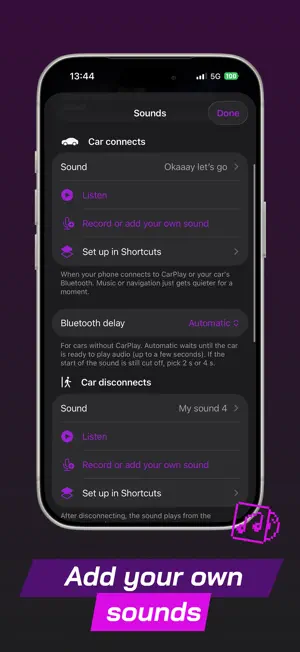
Your car, not a stock picture. Dashfie turns a photo of your own car into a widget for your iPhone Home Screen, Lock Screen and, on iOS 26, your CarPlay dashboard. HOW IT WORKS 1. Take a photo of your car or pick one from your library. GIFs, Live Photos and built-in silhouettes work too. 2. Cut out the background right on your iPhone, or keep the full photo. 3. Pick a template and a style, then add the widget. TEMPLATES - A greeting with your name - Today's date - A countdown to your insurance renewal or technical inspection - Days together with your car - Photo only, with no text at all Add your plate, typed the way you like it, with a country band (30 countries). Small and medium sizes, plus the Lock Screen. MAKE IT YOURS - 6 themes: Classic, Sport, Speed, Vintage, Blossom and Dreamy - 14 banners, animated or solid - 8 effects: headlights, smoke, snow, rain, butterflies and frames - Pixel art pets that ride along CAR MODE Put your iPhone in a holder and turn it sideways. Car Mode opens a big landscape dashboard with your widget, a clock and shortcuts to Maps, Music, Spotify and more. It opens and closes when you rotate your phone. - Choose the tiles next to your car and their order - Weather where you are, from Apple Weather - Now Playing: the song in Apple Music, with big buttons - A second photo or animation SOUNDS FOR YOUR CAR A short sound for three moments: when your iPhone connects to your car (CarPlay or Bluetooth), when you get out, and when you arrive home. You set it up once with a Shortcuts automation, and Dashfie walks you through it. 15 sounds you can listen to before you buy, or record your own (it stays on your phone). DASHFIE PRO Design your widget and watch the live preview for free. Saving it needs Dashfie Pro: - Unlimited widgets - All templates, themes, banners, effects and pets - Car Mode - All 15 sounds and your own sounds - Widgets on CarPlay, the Home Screen and the Lock Screen Pick the yearly subscription with a 3-day free trial for new subscribers (cancel in Settings before it ends and you pay nothing), or pay once with a one-time purchase and no subscription at all. Payments only through Apple. PRIVATE BY DESIGN - No account, no sign-up. - Your photos stay on your iPhone. The cut-out and the photo check happen on the device. - Weather uses your approximate location, only when you add the tile. - Anonymous usage stats, which you can turn off in Settings. GOOD TO KNOW - Dashfie is a widget app. It does not replace or theme the CarPlay interface. - Showing widgets on CarPlay requires iOS 26 and a car or head unit that supports CarPlay widgets. - Dashfie is not affiliated with Apple or any car maker, and uses no car brand logos. PURCHASE TERMS Dashfie Pro yearly is an auto-renewable yearly subscription ($9.99 per year in the US; local prices may vary) with a 3-day free trial for new subscribers. Payment is charged to your Apple Account when the trial ends, unless you cancel at least 24 hours before. The subscription renews automatically each year unless cancelled at least 24 hours before the end of the current period, and your account is charged for renewal within 24 hours before that. You can manage or cancel anytime in iPhone Settings > [your name] > Subscriptions. Any unused part of the free trial is forfeited when you buy a subscription. Dashfie Pro, pay once is a one-time purchase ($16.99 in the US; local prices may vary). It is not a subscription and never renews. It is tied to your Apple Account, and you can restore it on your other devices with Restore Purchases. Dashfie requires Dashfie Pro. Without an active Dashfie Pro, for example after a cancelled trial or an expired subscription, your widgets show a locked state until you subscribe again or restore your purchase. Terms of Use: https://dashfie.com/terms Privacy Policy: https://dashfie.com/privacy Support: [email protected]
What’s new
Version 1.2 · Updated November 11, 2026
- Your own countdown: a trip, a wedding, payday. Give it a name and a date in Dates, and the Countdown widget counts the days. - Saving a widget? The Pro screen now shows the widget you made, so you see what you're saving. - Photo check: only explicit content is stopped, so far fewer of your own photos get turned down. - Smaller fixes and polish.
App privacy
The developer, Natalia Tomala, reported these privacy practices to Apple.
Data Not Linked to You
The following data, which may be collected but is not linked to your identity, may be used for the following purposes:
- Purchases: Purchase History
- Identifiers: User ID
- Usage Data: Product Interaction, Other Usage Data
- Location: Coarse Location
Used for: Analytics, App Functionality
Alternatives to Dashfie: Car Widgets
Looking for apps like Dashfie: Car Widgets? Here are 6 similar apps on the App Store. The highest rated is BUBUTV: Car Video & Mirroring (5.0/5), and all 6 are free to download.
-
 Bort: Your License Plate
-
 Car Widgets: PlayBoard
-
 VibeWidgets: Aesthetic Widgets
-
 BUBUTV: Car Video & Mirroring
5.0
-
 Dashly: Car Widgets
1.0
-
 Car Dashboard Lights
| App | Rating | Price | Last updated | Compare |
|---|---|---|---|---|
| Dashfie: Car Widgets | – | Free | November 11, 2026 | |
| Bort: Your License Plate | – | Free | Oct 26, 2026 | Compare |
| Car Widgets: PlayBoard | – | Free | Nov 27, 2026 | Compare |
| VibeWidgets: Aesthetic Widgets | – | Free | Oct 24, 2026 | Compare |
| BUBUTV: Car Video & Mirroring | 5.0 / 5 (1) | Free | Nov 11, 2026 | Compare |
| Dashly: Car Widgets | 1.0 / 5 (2) | Free | Nov 25, 2026 | Compare |
| Car Dashboard Lights | – | Free | Sep 23, 2025 | Compare |