

RemindMe: Reminders & Alarms
KAAN KACMAZ Productivity iPhoneiPadiPod touch
RemindMe: Reminders & Alarms is a free Productivity app for iPhone and iPad by KAAN KACMAZ. Rated 5.0/5 from 1 ratings. Requires iOS 16.4.
- Rating
- 5.0
- 1 ratings
- Price
- Free
- on the App Store
- Size
- 54 MB
- Age 4+
- Updated
- Nov 16
- 2026 · v1.2.1
Screenshots
Save to Pinterest


About RemindMe: Reminders & Alarms
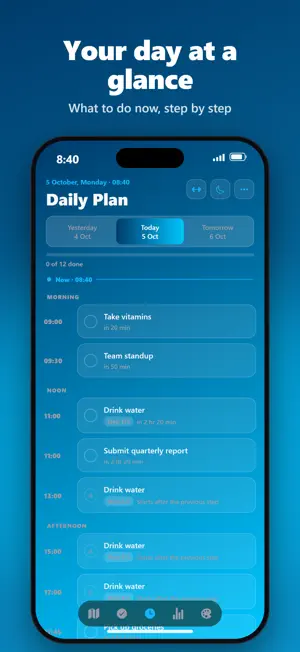
Forget less, do more. RemindMe turns one sentence — typed or spoken — into a reminder with the right date, time and repeat. No menus, no forms. Works with Siri, real alarms, places and widgets on iPhone and iPad. JUST SAY IT • “Call mom tomorrow at 8 pm” • “Take my pills every day at 9 and 21” • “Drink water every 2 hours between 9 and 21” • “Alarm tomorrow at 6:30” It understands long, mixed sentences and even several reminders at once, in Turkish, English, French, German and Arabic. VOICE, SIRI AND REAL ALARMS • Tap the microphone and speak. • Ask Siri: “Add a reminder with RemindMe”. Siri asks for the day and the time and saves it without opening the app. “Add a detailed reminder” and “Add a place reminder” work too. • On iOS 26 your reminder can ring like a real alarm, even in silent mode or a Focus. PLACE REMINDERS Pin a place on the map and get a reminder when you arrive or when you leave — even when the app is closed. BUILT FOR REAL LIFE • Daily, weekly, monthly, yearly, every N days or every N hours, with a start date, an end date or a time window. • A daily plan that shows only what is left for today. • A calendar view, tick-off with streaks, snooze, urgent priority. • Get notified before the time (10 minutes, 1 day…). • Keep reminding until you tick it off. • Checklists, photos, links and categories. • Templates for the things you repeat. • Import a plan from Notes, a text file, CSV or Excel; the app asks about whatever is missing. MAKE IT YOURS • Beautiful gradient themes — the whole app, and the home screen icon, follow your theme. • Choose the language, text size and light or dark mode. • Face ID / Touch ID app lock and hidden notification content. PRIVATE BY DESIGN No account. No ads. No tracking. Your reminders stay on your iPhone and iPad. Try it now: open RemindMe and type “remind me to stretch tomorrow at 9”. Questions or ideas? Use Settings > Share problem report.
What’s new
Version 1.2.1 · Updated November 16, 2026
• Siri understands you better: if it only heard a name (“mom”), it asks what to remind you about, and short answers such as “5” or “7 pm” work. • More sentences are understood in all five languages: times written out (“half past six”), dates like “the first of every month” and “every other Tuesday”. • The Face ID lock opens by itself, and the unlock button is full width. • Easier to read: button text is dark on light accent colors. • Your reminders and settings stay safe through every update. • New in Settings: rate the app and recommend it to a friend. • Siri without opening the app: a step-by-step guide in Settings.
App privacy
The developer, KAAN KACMAZ, reported these privacy practices to Apple.
Data Not Linked to You
The following data, which may be collected but is not linked to your identity, may be used for the following purposes:
- Location: Precise Location, Coarse Location
- Search History: Search History
Used for: App Functionality
Alternatives to RemindMe: Reminders & Alarms
Looking for apps like RemindMe: Reminders & Alarms? Here are 6 similar apps on the App Store. The highest rated is RMNDR — AI Powered Reminders (5.0/5), and 5 of the 6 are free to download.
-
 RMNDR — AI Powered Reminders
5.0
-
 Later: Simple Reminders
-
 Daily Reminder : By k27
-
 Peal - Planning
5.0
-
 Life by Shift - shift tracker
-
 Remember: To-do List/Calendar
| App | Rating | Price | Last updated | Compare |
|---|---|---|---|---|
| RemindMe: Reminders & Alarms | 5.0 / 5 (1 rating) | Free | November 16, 2026 | |
| RMNDR — AI Powered Reminders | 5.0 / 5 (2) | Free | Sep 2, 2026 | Compare |
| Later: Simple Reminders | – | Free | Mar 20, 2026 | Compare |
| Daily Reminder : By k27 | – | Free | Jun 24, 2026 | Compare |
| Peal - Planning | 5.0 / 5 (1) | Free | Nov 24, 2026 | Compare |
| Life by Shift - shift tracker | – | 1.99 USD | Oct 15, 2026 | Compare |
| Remember: To-do List/Calendar | – | Free | Apr 22, 2026 | Compare |