

Peal - Reminder Alarms
Benjamin Archer Productivity iPhoneiPadiPod touch
Peal - Reminder Alarms is a free Productivity app for iPhone and iPad by Benjamin Archer. Rated 5.0/5 from 1 ratings. Requires iOS 26.0.
- Rating
- 5.0
- 1 ratings
- Price
- Free
- on the App Store
- Size
- 40 MB
- Age 4+
- Updated
- Oct 8
- 2026 · v1.0.181
Screenshots

About Peal - Reminder Alarms
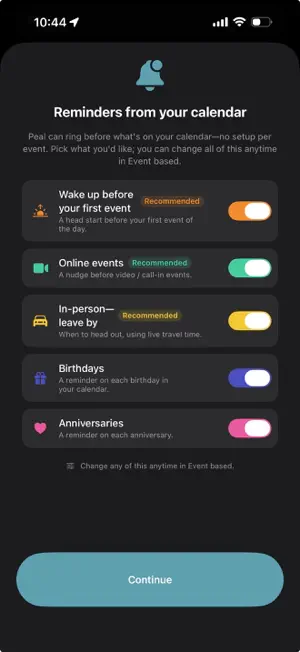
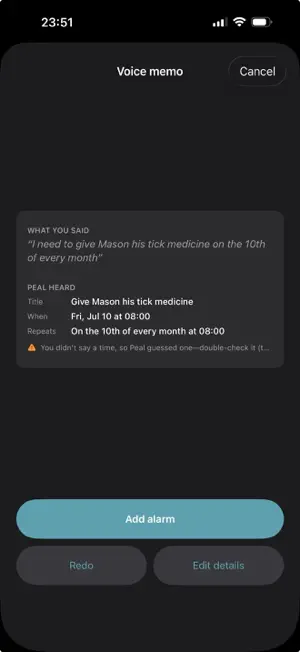
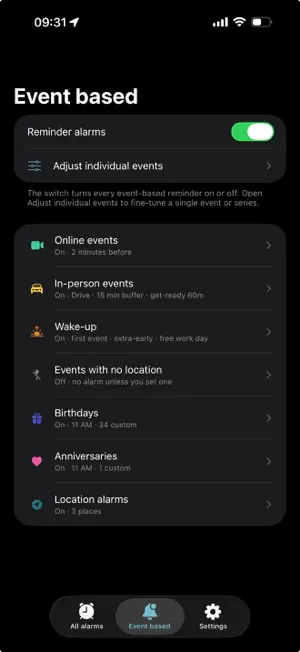
Peal does the timing. You do the day. Most alarm apps buzz before every event the same way. Peal reads your calendar and times each alarm to the kind of event it is, then leaves the choice to you. Your better, timelier self—so you can be a regular human. WHAT THE ENGINE DOES • A flight gets you moving earlier, earlier still if it's international • An in-person meeting gets a leave-by alarm timed to the drive, traffic included; a video call gets a shorter heads-up, since you aren't going anywhere • A birthday becomes a friendly morning reminder, not a midnight buzz • A daily standup collapses to one alarm, not fourteen • It won't pile on: set a leave-by and the redundant "starting now" buzz is dropped YOU'RE ALWAYS IN CHARGE Some of this Peal offers as suggestions you tap to accept. Some, like leave-by reminders, you switch on once and let run. Nothing happens until you choose it. SET ONE IN SECONDS, OR BY VOICE Dictate an alarm and Peal works out the time and the repeat on your phone: "every third Thursday, team lunch." It also handles repeats the built-in Clock can't: every other week, the last day of the month, yearly. ALARMS TIED TO A PLACE Ring when you arrive somewhere or leave it: grab the dry cleaning on the way home, send a text when you land. The place is watched on your phone, never on a server. RINGS LIKE THE SYSTEM CLOCK Built on Apple's AlarmKit, so alarms sound through Silent, Do Not Disturb, and Focus, with a full-screen alert and Apple Watch support. HELPFUL WHEN YOUR MEMORY NEEDS THE HELP The alarms that matter most are the ones you forget to set. Peal offers them from the day you actually have. That helps anyone, and it's a real hand for some people with ADHD or time-blindness. PRIVATE BY DESIGN No account. No ads. No tracking. Peal has no servers; your alarms, your calendar, and your locations stay on your iPhone. Every feature is free.
What’s new
Version 1.0.181 · Updated October 8, 2026
A ringing alarm you can read. The alert iOS draws fits only a few words, so it now gets the ones that matter ("Leave for Dentist"). Open Peal while an alarm rings or is snoozed to see the whole alarm, why it rang, and Done, Snooze for 5, 10, 15 or 30 minutes, or Open. Snoozed alarms, the way iOS expects. A snoozed alarm shows on the Lock Screen and in the Dynamic Island with a countdown and the time it rings again. Apple says iOS may dismiss an alarm if an app doesn't provide this view, so Peal now does. When a meeting runs long. A new alarm when an event ends, so the next thing doesn't slip. Limit it to the titles and places you choose. Event based › When events end. Birthdays that stay out of your meetings. Birthday and anniversary reminders move out of a meeting when they can, and a mark on the Day view shows anything that couldn't fit. Skip one day. Swipe a repeating alarm on the Day view to skip just that day; the row stays so you can bring it back. Flexible tasks, rebuilt: - They ring once a day. An edit or a background check no longer makes a task ring again; Try again is there when you want a second ring. - Tap a task in All alarms to see what it is, when it rings next and why, with Tomorrow instead, Try again and Edit. - Set days, like Sundays and Wednesdays, each with its own hours. Vary it picks a different day or time each time. - A day with no room can ring anyway, wait a day, try later or ring a day early, and a morning note says when a day can't fit. - Where can be "away from where I'm based", and a place can wait until you've stayed a couple of minutes, so driving past doesn't ring. - Wait for steps: a task can wait until Health counts 200, 500, 800 or 1,500 steps today. - Defaults for new tasks: set the hours, steps, place wait and sound once. - When Peal doubts a ring sounded, it says so plainly ("Your iPhone was off or restarting at 11:00 AM"), and a ring that didn't sound never counts as the day's. Betas, labeled. Everything still settling shows for everyone with a Beta label, and a beta that changes what rings stays off until you turn it on: - Tasks tied to an event: "bring the insurance card, 30 min before you leave for the dentist". - Event sequence planning (Toolbox): when events overlap, pick the order, see the travel and choose how long to stay. Your calendar changes only if you turn that on and confirm, with Undo. - Running late, leave now: one more ring after a missed leave-by, while you can still make it. - One get-ready for back-to-back in-person events. - Automations can add another event, like a pickup at 5:00 PM on each day you have a drop-off. Pause now covers every alarm. Know before you update: a task tied to an event, made on this version, rings daily 9 AM to 6 PM on any device still running a version from before September 25 that shares the same iCloud data. Update every device to this version first.
App privacy
The developer, Benjamin Archer, reported these privacy practices to Apple.
Data Not Collected
The developer does not collect any data from this app.
Alternatives to Peal - Reminder Alarms
Looking for apps like Peal - Reminder Alarms? Here are 6 similar apps on the App Store. The highest rated is RemindMe Fast Reminders (5.0/5), and all 6 are free to download.
-
 Remembro: Food explained by AI
-
 Peal: Alarm for Appointments
-
 Daily Reminder : By k27
-
 Slick Reminders
-
 RemindMe Fast Reminders
5.0
RemindMe Fast Reminders
5.0
-
 Daily Tick Alarm & Reminder
| App | Rating | Price | Last updated | Compare |
|---|---|---|---|---|
| Peal - Reminder Alarms | 5.0 / 5 (1 rating) | Free | October 8, 2026 | |
| Remembro: Food explained by AI | – | Free | Jun 18, 2026 | Compare |
| Peal: Alarm for Appointments | – | Free | Oct 5, 2026 | Compare |
| Daily Reminder : By k27 | – | Free | Jun 24, 2026 | Compare |
| Slick Reminders | – | Free | Sep 29, 2026 | Compare |
| RemindMe Fast Reminders | 5.0 / 5 (3) | Free | Jan 20, 2026 | Compare |
| Daily Tick Alarm & Reminder | – | Free | Dec 24, 2025 | Compare |