

SpendDay
Artem Kulakovskyi Finance iPhoneiPadiPod touch
SpendDay is a free Finance app for iPhone and iPad by Artem Kulakovskyi. Requires iOS 18.0. Updated October 24, 2026.
- Price
- Free
- on the App Store
- Size
- 6 MB
- Age 4+
- Updated
- Oct 24
- 2026 · v4.0.0
Screenshots
Save to Pinterest

About SpendDay
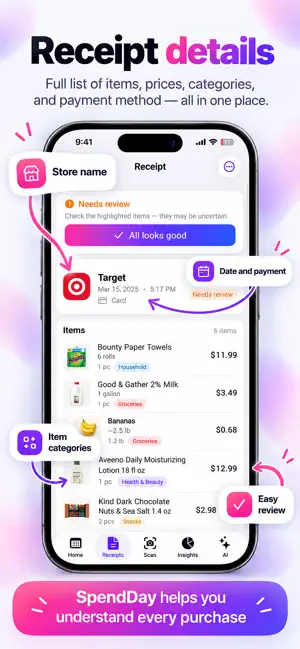
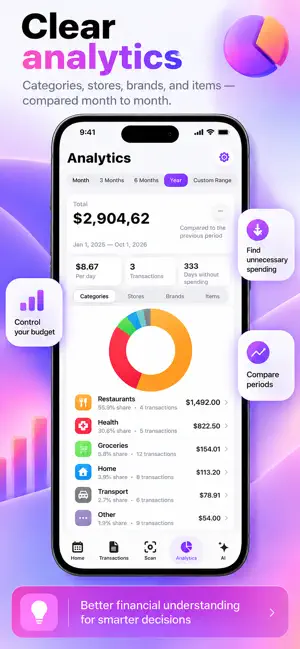
Where does my money go? Take a photo of a receipt and find out. SpendDay reads the whole receipt — store, every item, prices, discounts and total — in a few seconds, then organizes your spending so you can finally see the picture: by day, by category, by store, by brand, by product. SCAN, DON'T TYPE Point the camera at a paper receipt. SpendDay recognizes the store, each line item, quantities, discounts and the total. If something was hard to read, the app highlights it so you can check it in one tap. The photo stays attached to the receipt. A CALENDAR OF YOUR SPENDING Every day gets a color: no spending, calm, normal or expensive. One look at the month tells you how it went. Tap a day to see what you bought. ANALYTICS THAT EXPLAIN Categories, stores, brands and products for today, this week, this month, 3, 6 or 12 months, or any period you choose — with month-over-month and year-over-year comparison. PRODUCT HISTORY Search "milk" or "coffee" and see how much you spend on it, where you buy it, the average price and the price range over time. AI ADVISOR Ask anything about your spending in plain language: "What changed since last month?", "Where can I save 100 a month?" The advisor only uses the numbers from your receipts and builds a personal savings plan with concrete, achievable steps. BUDGETS WITH ALERTS Set a monthly limit for a category and get a notification at 70%, 90% and 100%. ANY COUNTRY, ANY CURRENCY Receipts in foreign currencies are converted at the exchange rate of the purchase day. 31 interface languages. Works with receipts from supermarkets, cafés, pharmacies, gas stations and online orders. YOUR DATA IS YOURS Photos are stripped of location data before upload. Export everything as CSV and JSON at any time. Delete your account and all data in one tap. FREE AND PRO Free: 10 scans a month, the calendar and 3 months of history. SpendDay Pro: unlimited scans, full analytics and comparisons, the AI advisor and savings plans, budgets with alerts, full history, search and export. Monthly or yearly subscription, 7-day free trial. Payment is charged to your Apple ID account at confirmation of purchase. The subscription renews automatically unless cancelled at least 24 hours before the end of the current period. You can manage or cancel it in your App Store account settings. Privacy policy: https://spendday.app/p/privacy Terms of use: https://spendday.app/p/terms
App privacy
The developer, Artem Kulakovskyi, reported these privacy practices to Apple.
Data Not Linked to You
The following data, which may be collected but is not linked to your identity, may be used for the following purposes:
- Purchases: Purchase History
- Contact Info: Email Address
- User Content: Photos or Videos
- Identifiers: User ID
- Diagnostics: Crash Data
Used for: App Functionality
Alternatives to SpendDay
Looking for apps like SpendDay? Here are 6 similar apps on the App Store.
-
 Paydown: Budget & Expense
-
 Neverlose: Budget Tracker
-
 Groupy - Smart Money Tracking
-
 Phoenix Micro
-
 Kharcha Diary: Track Expenses
-
 CashSecured Put Options Income
| App | Rating | Price | Last updated | Compare |
|---|---|---|---|---|
| SpendDay | – | Free | October 24, 2026 | |
| Paydown: Budget & Expense | – | Free | Oct 5, 2026 | Compare |
| Neverlose: Budget Tracker | – | Free | Nov 20, 2026 | Compare |
| Groupy - Smart Money Tracking | – | Free | Jul 23, 2026 | Compare |
| Phoenix Micro | – | Free | Oct 27, 2026 | Compare |
| Kharcha Diary: Track Expenses | – | Free | Nov 26, 2026 | Compare |
| CashSecured Put Options Income | – | Free | Nov 13, 2026 | Compare |
Compare SpendDay with the top alternatives: ratings, updates, ASO score and keyword gaps →