

Interval Routine Timer
junto yanai Health & Fitness iPhoneiPadiPod touch
Interval Routine Timer is a free Health & Fitness app for iPhone and iPad by junto yanai. Requires iOS 18.0. Updated October 12, 2026.
- Price
- Free
- on the App Store
- Size
- 62 MB
- Age 4+
- Updated
- Oct 12
- 2026 · v1.3.1
Screenshots
About Interval Routine Timer
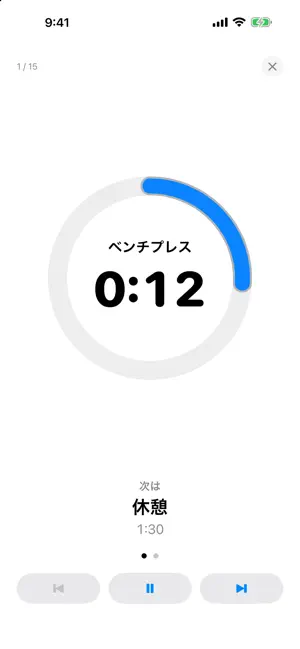
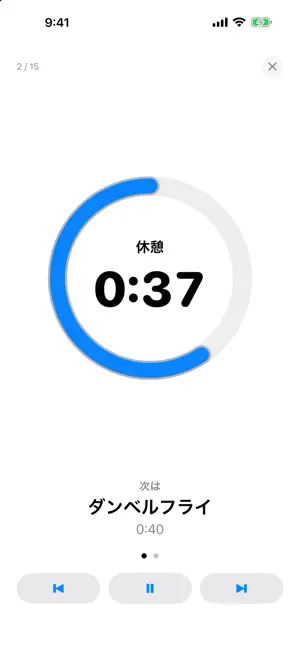
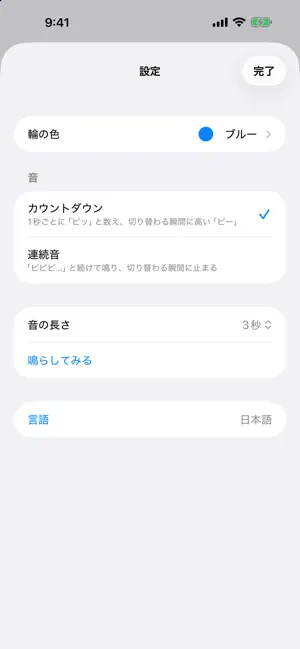
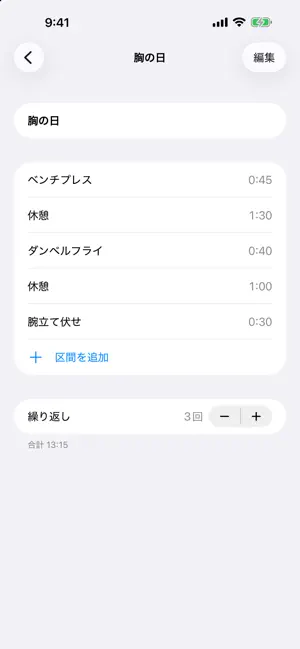
A training timer that simply plays a sequence of work and rest. It is a routine player, not a logging app: press play and move to the chimes. BUILD A ROUTINE - Line up "how many seconds" and "what that time is for" and save it as a routine - Name each interval anything you like: "Bench Press", "Rest", "Stretch". Whatever you write becomes its label - Set each length as either Time or Reps. Time is chosen with minute and second wheels - For exercises you count, such as squats and push-ups, a Reps interval waits until you finish. Write how many in the name ("Squats 20") - Duplicate, reorder and delete routines, so a "Chest Day" and a "Back Day" with the same rests are quick to make PLAY, THEN FOLLOW ALONG - Once you start, each timed interval moves on to the next by itself - A Reps interval moves on when you tap inside the ring after you finish - A ring shows the time left, and you can see what comes next - Pause, skip and stop are supported. In a timed interval, you can also tap inside the ring to pause and resume CHIMES FOR EVERY CHANGE - Chimes start a little before each change and finish exactly on it, so you know it is ending before it does - Choose a countdown (a beep each second, then a long high tone) or a steady beep - Set how long the chime lasts - They sound even when the silent switch is on and the screen is locked SCREEN OFF, PHONE IN YOUR POCKET - While the phone is locked, chimes sound at the same moment as when the app is open - The current interval and time left appear on the Lock Screen and Dynamic Island, and advance with each change (Live Activities) - Each change also arrives as a notification, and shows on your wrist if you wear an Apple Watch (notification permission required) A CALENDAR OF THE DAYS YOU TRAINED - Days you play a routine to the end are marked automatically. Add days by hand for sessions you ended early or did without the app - Only the date and routine name are stored. Reps, weights and calories are not tracked SYNC WITH ICLOUD - Routines, the days you trained, and the ring color stay in step across iPhones and iPads signed in with the same Apple Account - The app works without iCloud, too. Syncing happens only between devices signed in to iCloud - Chime settings (style and length) stay on each device AND MORE - Choose the ring color; the app icon changes to match - Dark Mode - Japanese and English (follows your device language) - iPhone and iPad - No sign-up, no ads. Your data is stored on your device and in your own iCloud, where neither the developer nor third parties can see it ABOUT CALORIES This app does not show calories burned. To record calories and heart rate, use it together with the Workout app on your Apple Watch.
What’s new
Version 1.3.1 · Updated October 12, 2026
Changed the app icon’s background in Dark Mode from pure black to dark gray.
App privacy
The developer, junto yanai, reported these privacy practices to Apple.
Data Not Collected
The developer does not collect any data from this app.
Alternatives to Interval Routine Timer
Looking for apps like Interval Routine Timer? Here are 6 similar apps on the App Store.
-
 HIIT Note - タバタ式タイマー
-
 Roundwork – Interval Timer
-
 トレーニングタイマー_インターバル
-
 BUSHIDO: Boxing Round Timer
-
 トレマー - 筋トレタイマー
-
 Timer - Interval Workout Timer
| App | Rating | Price | Last updated | Compare |
|---|---|---|---|---|
| Interval Routine Timer | – | Free | October 12, 2026 | |
| HIIT Note - タバタ式タイマー | – | Free | Oct 3, 2026 | Compare |
| Roundwork – Interval Timer | – | Free | Oct 19, 2026 | Compare |
| トレーニングタイマー_インターバル | – | Free | Oct 5, 2026 | Compare |
| BUSHIDO: Boxing Round Timer | – | Free | Oct 24, 2026 | Compare |
| トレマー - 筋トレタイマー | – | Free | Apr 30, 2026 | Compare |
| Timer - Interval Workout Timer | – | Free | Sep 22, 2026 | Compare |