

Notation: Sheet Music & Loops
Moritz Kuntz Music iPhoneiPadiPod touch
Notation: Sheet Music & Loops is a free Music app for iPhone and iPad by Moritz Kuntz. Requires iOS 26.0. Updated November 19, 2026.
- Price
- Free
- on the App Store
- Size
- 18 MB
- Age 4+
- Updated
- Nov 19
- 2026 · v1.3.2
Screenshots


About Notation: Sheet Music & Loops
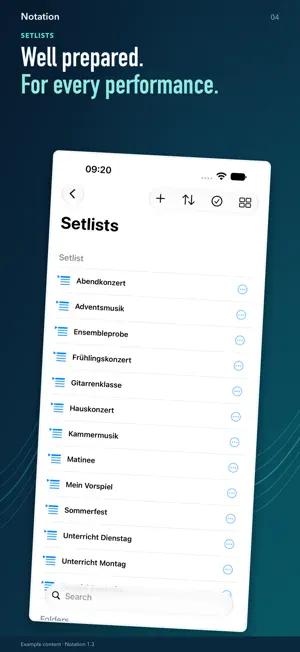
YOUR DIGITAL SHEET MUSIC LIBRARY. MORE ROOM FOR MUSIC. Keep your scores organized, add personal annotations and work on challenging passages: Notation brings your PDF library and powerful music tools together on iPad and iPhone. For musicians, students and teachers – at home, in lessons, at rehearsals and in concert. YOUR LIBRARY, ORGANIZED Import your own PDF scores and organize your repertoire into collections and setlists. Favorites, search and bookmarks help you find the right piece and passage. Add work details and notes. On-device PDF analysis suggests metadata; you decide what to accept. Read your music, turn pages and zoom in on details. The included sample score “Recuerdos de la Luna” lets you try things out right away. PRACTICE WITH LOOPS AT YOUR OWN PACE Link imported audio or your own recordings to your scores. Place markers in the waveform to define practice sections and repeat exactly the passage you want to work on. Adjust playback speed for the entire track or your loops and progress step by step. Notation automatically estimates the BPM. If needed, correct the value manually or tap the beat with TAP. Confirm manual entries; a valid TAP result is saved automatically after a short pause. These features work with both imported audio and your own recordings. MAKE YOUR SCORES YOUR OWN Add fingerings, highlight important passages and write personal reminders directly on the page. Use the pen, text, musical symbols and shapes – from a simple line to a music staff. Colors, line widths and layers help you organize your annotations. Use Apple Pencil on compatible iPads, or draw and annotate with your finger in Drawing mode on iPhone. RECORD, LISTEN, KEEP PRACTICING Record your playing and listen alongside the corresponding score. Then use your recording to practice with loops and adjusted playback speed. A metronome and chromatic tuner round out your toolkit. KEEP TRACK OF YOUR PRACTICE See how long you have practiced and which pieces you have worked on. Weekly, monthly and yearly views show your practice history. Select today or a previous practice day in the calendar to explore its details. CONNECTED ON IPAD AND IPHONE Sync your library data through iCloud across devices using the same Apple Account. PDF and audio files are stored in iCloud Drive. Content already available on your device can also be used without an internet connection. A short interactive introduction helps you get started. Notation is available in German, English, Spanish, French, Italian and Portuguese (Brazil). START FREE. EXPAND WITH PRO. Use Notation without a time limit with up to: • 5 of your own PDF files • 5 imported audio tracks • 5 of your own recordings Each limit applies separately. The included sample score does not count. Items in Trash continue to take up a slot until permanently deleted. Pro removes these quantity limits with a one-time In-App Purchase – no subscription. The price is shown before you buy. Restore your Pro purchase using the same purchase account. GOOD TO KNOW Requires iOS 26 or iPadOS 26 or later. Imports, saved recordings and syncing require iCloud Drive to be enabled and sufficient storage. Recording and the tuner require microphone access. Notation does not automatically play PDF scores and is not music notation software. Audio files, a sheet music catalog and additional iCloud storage are not included. Other content and practice times shown in screenshots are sample data.
What’s new
Version 1.3.2 · Updated November 19, 2026
New in Notation 1.3.2 • Collections: Choose one or more named page ranges for each PDF. • Trash: Select multiple files with a swipe, then restore or delete them together. • Setlists: Identify the current piece, turn to the next piece with the sidebar open, and add entries with a more stable confirmation window. • Simpler writing tools: Find the circle and rectangle erasers directly in the pen menu. Clear annotations on the current page or all pages with confirmation and undo support. The lasso has been removed. • Consistent opacity when retracing pencil and highlighter strokes, plus improved handling when lifting Apple Pencil. • New wavy line: Place it on the PDF and drag to the height you need. • Improved search and scrolling responsiveness. Centered quick-access controls and fully opaque gray tiles in the PDF title bar. • Support emails automatically include the device model, iPadOS/iOS version, and Notation version and build number.
App privacy
The developer, Moritz Kuntz, reported these privacy practices to Apple.
Data Not Collected
The developer does not collect any data from this app.
Alternatives to Notation: Sheet Music & Loops
Looking for apps like Notation: Sheet Music & Loops? Here are 6 similar apps on the App Store. The highest rated is ChoirXML (5.0/5), and 4 of the 6 are free to download.


| App | Rating | Price | Last updated | Compare |
|---|---|---|---|---|
| Notation: Sheet Music & Loops | – | Free | November 19, 2026 | |
| Notenbuch: Sheet Music Stand | – | 3.99 USD | Nov 16, 2026 | Compare |
| SheetOne | – | 2.99 USD | Feb 14, 2026 | Compare |
| Honk It Up! | – | Free | Oct 28, 2026 | Compare |
| ChoirXML | 5.0 / 5 (1) | Free | Nov 19, 2026 | Compare |
| WindSynth 16 | – | Free | Jul 25, 2026 | Compare |
| El Notas - Tuner | – | Free | Jan 12, 2025 | Compare |