

Stillkey · Focus App Blocker
Taleppo Productivity iPhoneiPadiPod touch
Stillkey · Focus App Blocker is a free Productivity app for iPhone and iPad by Taleppo. Requires iOS 18.0. Updated October 27, 2026.
- Price
- Free
- on the App Store
- Size
- 14 MB
- Age 4+
- Updated
- Oct 27
- 2026 · v1.2
Screenshots



About Stillkey · Focus App Blocker
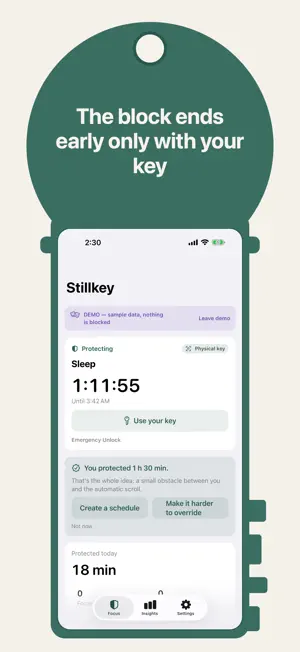
Stillkey blocks the apps and websites you choose with Apple's Screen Time and puts a small, real obstacle between you and the automatic scroll. Its Physical key rule ends a block early only with your key: a key you print, or an NFC tag you pair with this iPhone. Put the printout in another room, or keep the tag on your key ring by the door. When you truly want back in, you get up, walk to the key and scan it, or hold the tag to the top of your iPhone. Not willpower — friction you set up yourself. You decide how hard it is to get past a block. Flexible lets you pause or end it any time and is free. Intentional asks for a reason and a short pause before a few minutes of access. Physical key opens things early only with your printed key or your NFC tag. Hard Mode gives no early access until the timer ends. The printed key needs no hardware and comes with a 16-character backup code. A tag can be an NFC sticker or a key fob: Stillkey reads only its serial number, keeps a one-way fingerprint of it on this iPhone and writes nothing to the tag. This iPhone can't scan a photo of the printed key shown on its own screen; a copy on another device would work, so keep it on paper. Pick apps, whole categories and Safari websites with Apple's own picker, then start a focus session of 30, 60 or 90 minutes or any length you like. Schedules cover work hours, study, mornings and nights, and a daily limit lets a social app run for, say, 25 minutes before it stays blocked until midnight. When you start a focus session, its countdown sits on the Lock Screen and in the Dynamic Island, so you can see how long is left without unlocking your phone. The countdown is free for everyone. There is always a way out. Emergency Unlock never costs money and only takes a short wait, and you can turn off Screen Time access in iOS Settings at any time. Stillkey adds friction; it doesn't lock you out of your phone. Insights show protected time, completed sessions and deliberate opens for today and this week — calm numbers, no streaks to keep. Your selections, Screen Time usage and keys stay on your iPhone. There is no account and no advertising. Stillkey sends usage counts to its developer only if you switch that on in Settings › Privacy, and never app names, websites or anything you type. The free version includes focus sessions with up to 3 apps, categories or sites and one daily limit. Stillkey Pro — monthly, yearly or once for a lifetime — opens the upper rungs: Intentional, the physical key (printed or NFC) and Hard Mode, plus more profiles, more apps per profile, schedules and more daily limits. The yearly plan starts with a 7-day free trial if your Apple Account hasn't had one. Subscriptions renew automatically unless cancelled at least 24 hours before the end of the period or of the free trial. Manage or cancel them in your Apple account settings. Terms: https://stillkey.taleppo.com/terms · Privacy: https://stillkey.taleppo.com/privacy
What’s new
Version 1.2 · Updated October 27, 2026
Your key can now be an NFC tag. In Settings › Keys, tap Add NFC tag and hold a sticker, a key fob or a card with a fixed number to the top of your iPhone. With the Physical key rule, the tag ends a block early or opens a blocked app for a few minutes, just like the printed key. Stillkey keeps only a one-way fingerprint of the tag's serial number on this iPhone and writes nothing to the tag. Part of Pro. The yearly plan starts with a 7-day free trial if your Apple Account hasn't had one. The Pro screen shows the trial, the price after it and how to cancel. Keys can be renamed. While a physical-key or Hard Mode block runs, no new key can be added. Unlock requests now have their own group in Notification Center instead of sharing a stack with other Stillkey notifications. The block screen and its notification now say "Use your key", and Diagnostics names the App Store as the source of purchases.
App privacy
The developer, Taleppo, reported these privacy practices to Apple.
Data Not Linked to You
The following data, which may be collected but is not linked to your identity, may be used for the following purposes:
- Purchases: Purchase History
- Identifiers: Device ID
- Usage Data: Product Interaction
- Diagnostics: Other Diagnostic Data
Used for: Analytics, App Functionality
Alternatives to Stillkey · Focus App Blocker
Looking for apps like Stillkey · Focus App Blocker? Here are 5 similar apps on the App Store. The highest rated is RoutineFlow: Routine for ADHD (4.7/5), and all 5 are free to download.
-
 Pomodoro — Focus Timer
3.9
Pomodoro — Focus Timer
3.9
-
 RemotePC Remote Desktop
4.6
RemotePC Remote Desktop
4.6
-
 RoutineFlow: Routine for ADHD
4.7
RoutineFlow: Routine for ADHD
4.7
-
 Junkman: AI Spam SMS Blocker
4.3
Junkman: AI Spam SMS Blocker
4.3
-
 Zoiper Lite voip soft phone
4.4
Zoiper Lite voip soft phone
4.4
| App | Rating | Price | Last updated | Compare |
|---|---|---|---|---|
| Stillkey · Focus App Blocker | – | Free | October 27, 2026 | |
| Pomodoro — Focus Timer | 3.9 / 5 (20) | Free | Oct 14, 2026 | Compare |
| RemotePC Remote Desktop | 4.6 / 5 (3,562) | Free | Oct 23, 2026 | Compare |
| RoutineFlow: Routine for ADHD | 4.7 / 5 (2,453) | Free | Mar 4, 2026 | Compare |
| Junkman: AI Spam SMS Blocker | 4.3 / 5 (120) | Free | Oct 13, 2026 | Compare |
| Zoiper Lite voip soft phone | 4.4 / 5 (1,674) | Free | Sep 10, 2026 | Compare |