

Inside: Phone Check
Yi-Chiun Wu Utilities iPhoneiPadiPod touchApple Watch
Inside: Phone Check is a free Utilities app for iPhone and iPad by Yi-Chiun Wu. Requires iOS 18.0. Updated October 31, 2026.
- Price
- Free
- on the App Store
- Size
- 17 MB
- Age 4+
- Updated
- Oct 31
- 2026 · v1.7.0
Screenshots

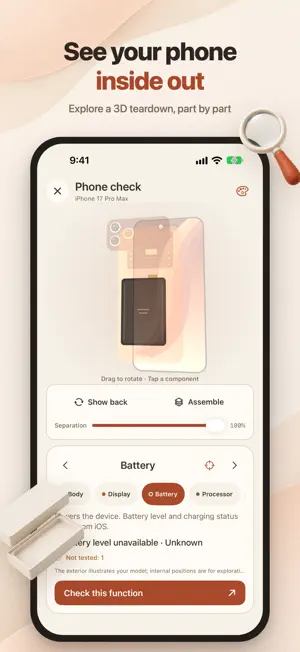


About Inside: Phone Check
A warm, clear look at how your phone is doing, and a guided check before you buy a used iPhone. Inside combines a step-by-step check, live system information, importable diagnostic logs, a 3D model and a charging clock. The overview shows battery, charging, thermal state, storage and network. • Used-iPhone check Groups: screen, cameras, audio, sensors and buttons, connectivity, battery and ownership. Test the display and touch, each camera, speaker and microphone, Face ID or Touch ID, buttons, sensors, Wi-Fi, cellular, Bluetooth, NFC and charging. You run each test and record what you see. Items no app can read (battery health, parts and service history, Find My, whether the IMEI and serial match the box) you look up in Settings and enter; the report marks them as entered by you. The battery step can fill in the cycle count from an imported Analytics log. Continue later, or use Quick inspection for common checks. Saved reports can be compared and shared as image or text. • 2-minute check and Inside Pro One tap on the overview checks display, touch, cameras, speaker, microphone and charging. Reports carry an ID and a QR summary a buyer can scan; untested items never count as passing. Inside Pro, a one-time purchase, adds a PDF report with your seller details and no watermark, a battery health trend and deep screen tests. Basic checks and report comparison stay free. • Performance and score CPU, sustained performance, storage speed and GPU tests run on the device. The score is mostly your check results (70%) plus CPU performance (30%), compared only with this device's own normal runs; it needs at least 80% of checks done. • Hardware info and diagnostic files Live values show their source. Import an Analytics log or sysdiagnose to see battery cycles, capacity, display, memory and device records it contains. Imported data stays separate, with source and time. Availability depends on the file and iOS version; original files are never uploaded and serial numbers are masked. • 3D explorer Rotate, take apart and zoom an illustrative model. Supported iPhones show their own shape and official colors; others use a neutral one. Inner parts and colors are illustrations, not scans. • Charging clock With the app open it shows time, battery and a charging animation, in portrait or landscape. Six clock faces are free; twenty optional style packs add three faces each, All Styles unlocks every pack including future ones, and you can try a pack for 24 hours by watching an ad. Charging history groups sessions you can label by charger and compare; it covers only foreground time and exports as CSV. • Lock Screen and StandBy While charging, one tap shows the starting level and time charged on the Lock Screen and in the Dynamic Island, in your clock style; the StandBy widget uses your style too. • Before you sell Tick off backing up, unpairing Apple Watch, signing out of your Apple Account and erasing the phone, each with a link to Apple's guide. • iPhone Duo and Apple Watch On iPhone Duo, the two pages split overview and checks, a hinge check follows the angle and the 3D model folds open. The Apple Watch app checks display, touch, Digital Crown, haptics, speaker and microphone for the iPhone report and shows iPhone charging. Inside is free and shows banner ads. Closing the report image after a finished check may show one full-screen ad, at most once a day; trial ads play only when you choose. A one-time purchase removes ads; Unlock Everything adds Pro and every style. Family Sharing included. About the data: values iOS does not expose (live CPU temperature, the Settings battery health figure, actual charging wattage and the device color) are never presented as measured. Some part names may come from an imported log; unknown codes are not guessed. Thermal state is the level iOS reports. Checks record only this session and your judgement; they cannot rule out intermittent faults or wear and are not a repair diagnosis.
What’s new
Version 1.7.0 · Updated October 31, 2026
New 2-minute check on Home: one tap checks the display, touch, cameras, speaker, microphone and charging. Leave and pick up where you stopped, and when you finish, the same button opens the report. Check reports now carry a report ID, check coverage and a QR code summary a buyer can scan. New Inside Pro, a one-time purchase: PDF reports with your seller name and contact and no watermark, a battery health trend, and deep screen tests (gray levels, gradient, checkerboard and a fine 8 × 14 touch grid). The basic check and comparing saved reports stay free. Unlock Everything adds every clock style and removes ads in one purchase. Every purchase supports Family Sharing. While charging, tap Show charging on Lock Screen on the Charging tab to see the starting level and time charged on the Lock Screen and in the Dynamic Island, in your clock style's colors; remove it any time from the same page. Firebase Crashlytics crash reports help us fix problems. Turn them off with Settings > Privacy and data > Share usage statistics.
App privacy
The developer, Yi-Chiun Wu, reported these privacy practices to Apple.
Data Used to Track You
The following data may be used to track you across apps and websites owned by other companies:
- Identifiers: Device ID
Data Linked to You
The following data, which may be collected and linked to your identity, may be used for the following purposes:
- Location: Coarse Location
- Identifiers: Device ID
- Usage Data: Product Interaction, Advertising Data
- Diagnostics: Performance Data
- Purchases: Purchase History
Used for: Third-Party Advertising, Analytics, App Functionality
Data Not Linked to You
The following data, which may be collected but is not linked to your identity, may be used for the following purposes:
- Diagnostics: Other Diagnostic Data, Crash Data
Used for: Third-Party Advertising, Analytics, App Functionality
Alternatives to Inside: Phone Check
Looking for apps like Inside: Phone Check? Here are 6 similar apps on the App Store. The highest rated is Onscreen Translate (5.0/5), and 5 of the 6 are free to download.
-
 Keyly - AI Zhuyin Keyboard
-
 Onscreen Translate
5.0
-
 晌间充ּּּּ电ּ
-
 单词GO
5.0
-
 RBX Games Codes Finder Tools
4.6
-
 云徒步-赛博穿越鳌太线
| App | Rating | Price | Last updated | Compare |
|---|---|---|---|---|
| Inside: Phone Check | – | Free | October 31, 2026 | |
| Keyly - AI Zhuyin Keyboard | – | Free | Oct 30, 2026 | Compare |
| Onscreen Translate | 5.0 / 5 (3) | Free | Sep 23, 2026 | Compare |
| 晌间充ּּּּ电ּ | – | Free | Oct 29, 2026 | Compare |
| 单词GO | 5.0 / 5 (1) | Free | May 28, 2026 | Compare |
| RBX Games Codes Finder Tools | 4.6 / 5 (31) | Free | Apr 14, 2026 | Compare |
| 云徒步-赛博穿越鳌太线 | – | 0.99 USD | Jan 26, 2026 | Compare |