

Keyly - AI Zhuyin Keyboard
C2W Studio Utilities iPhoneiPadiPod touch
Keyly - AI Zhuyin Keyboard is a free Utilities app for iPhone and iPad by C2W Studio. Requires iOS 18.0. Updated October 15, 2026.
- Price
- Free
- on the App Store
- Size
- 141 MB
- Age 4+
- Updated
- Oct 15
- 2026 · v1.1.6
Screenshots

About Keyly - AI Zhuyin Keyboard
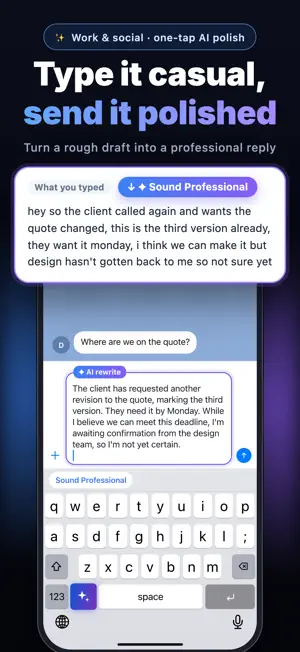
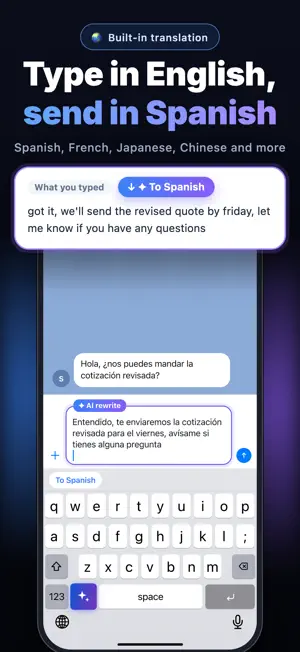
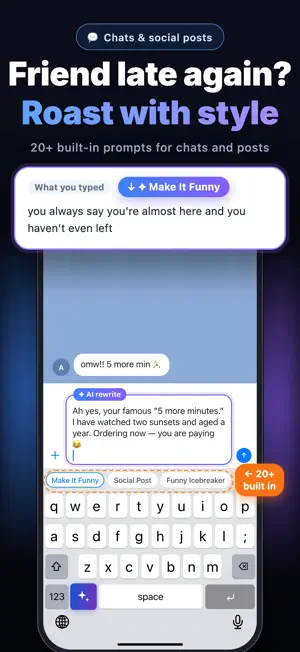
Keyly is an AI writing keyboard. Type in English as usual, then tap the AI key to polish, rewrite, or translate your text right where you're typing — in almost any app. No copy-pasting, no switching apps. Try AI rewriting free 5 times — no sign-in needed. Sign in for free daily uses. AI REWRITING, ONE TAP AWAY • Sound professional: turn quick drafts into clear, polished emails and replies. • Fix grammar and typos before you hit send. • Change the tone: make it casual, soften it, or cut the fluff — or turn it into bullet points. • Write social posts, icebreakers, and comebacks when you need the right words fast. • Translate to Spanish, French, Japanese, or Chinese — or turn any language into natural English. • Create your own AI commands for the things you write every day. A KEYBOARD THAT FEELS FAMILIAR • Full QWERTY layout with English word suggestions. • Customizable typing sounds and haptic feedback. ALSO TYPES TRADITIONAL CHINESE Need Chinese? Tap the switch key to type Traditional Chinese with Zhuyin (Bopomofo), or choose Pinyin or Double Pinyin in settings. Zhuyin input is tuned for how people type in Taiwan. PRIVACY-FIRST • No keystroke logging: everyday typing and word suggestions are processed on your device. • AI only when you ask: when you use an AI feature, only the text you're rewriting (the current line) is sent for processing over an encrypted connection. Keyly's servers don't save your text. REQUIREMENTS • Requires iOS 18.0 or later. • AI features require an internet connection and "Allow Full Access." Typing works offline. KEYLY PRO AUTO-RENEWABLE SUBSCRIPTIONS Upgrade to Keyly Pro (monthly or annual) for more AI rewrites. Payment is charged to your Apple ID. Subscriptions renew automatically unless canceled at least 24 hours before the end of the current period. Manage or cancel anytime in your App Store account settings. Subscription details: https://keylyapp.com/subscriptions/en/ Privacy Policy: https://keylyapp.com/privacy/en/ Terms of Use (EULA): https://www.apple.com/legal/internet-services/itunes/dev/stdeula/
What’s new
Version 1.1.6 · Updated October 15, 2026
What's New in Keyly • Smart language default: when the app language is set to English, the keyboard now opens on the English layout. • New creative prompts: added presets like "Movie Trailer" to liven up your chats and posts. • Clearer prompt categories: social and comeback prompts are easier to find. • More natural rewrites: improved apologies and text shortening. • Bug fixes and stability improvements.
App privacy
The developer, C2W Studio, reported these privacy practices to Apple.
Data Not Linked to You
The following data, which may be collected but is not linked to your identity, may be used for the following purposes:
- Identifiers: User ID
- Diagnostics: Crash Data, Performance Data, Other Diagnostic Data
Used for: Analytics, App Functionality
Alternatives to Keyly - AI Zhuyin Keyboard
Looking for apps like Keyly - AI Zhuyin Keyboard? Here are 6 similar apps on the App Store.


| App | Rating | Price | Last updated | Compare |
|---|---|---|---|---|
| Keyly - AI Zhuyin Keyboard | – | Free | October 15, 2026 | |
| 龜米輸入法 | – | Free | Sep 28, 2026 | Compare |
| 琦琦輸入法 | – | Free | Oct 16, 2026 | Compare |
| 快打注音 | – | 3.99 USD | Oct 10, 2026 | Compare |
| Stoat Keyboard | – | Free | Oct 19, 2026 | Compare |
| Panda Zhuyin | – | Free | Oct 18, 2026 | Compare |
| Rando: Random Picker & Dice | – | 0.29 USD | Oct 3, 2026 | Compare |