

Tracevelle: Tracing Lightbox
SEPIDEH JAVANBAKHT DALIR Graphics & Design iPhoneiPadiPod touch
Tracevelle: Tracing Lightbox is a free Graphics & Design app for iPhone and iPad by SEPIDEH JAVANBAKHT DALIR. Requires iOS 15.0. Updated October 23, 2026.
- Price
- Free
- on the App Store
- Size
- 2 MB
- Age 4+
- Updated
- Oct 23
- 2026 · v1.0.1
Screenshots


About Tracevelle: Tracing Lightbox
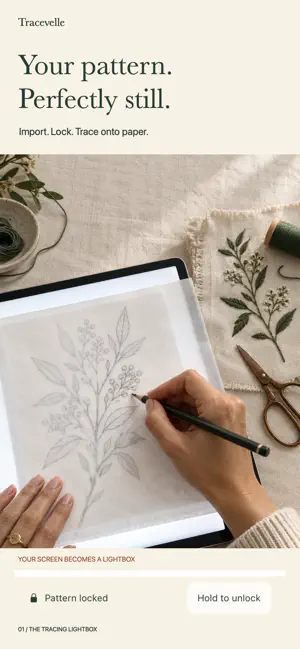
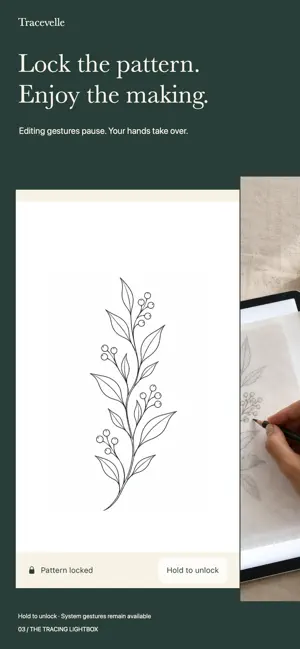
Your pattern. Perfectly still. Turn your iPhone or iPad into a focused tracing lightbox. Bring an embroidery reference, stencil, lettering study or craft pattern, prepare it on screen, then lock its position while you trace onto suitable thin paper. IMPORT YOUR OWN PATTERN Choose a JPEG, PNG or HEIC image from Photos or Files. Your original stays preserved, with all image processing on your device. PREPARE AND TRACE — INCLUDED FREE Move, resize, rotate or mirror your current pattern. Adjust contrast or try an outline view. Use a physical ruler to calibrate the screen setup and set the image width in centimeters or inches. Lock editing gestures, then hold the visible unlock control to return to editing. Optional brightness and stay-awake controls support a tracing session; system gestures remain available. The complete single-image workflow and current-work recovery are free, with no timer or watermark. SAVE TIME NEXT SESSION — LIFETIME PRO Build a named local pattern library. Find a saved pattern with search, duplicate a project for a variation and rename it for the next piece of handwork. Save reusable size, contrast and outline presets for another pattern. One purchase, no subscription. The upgrade is optional; existing saved work remains accessible. Library and Save Pattern are available directly in your workspace. No account, ads, AI service or cloud upload. Paper transparency and physical sizing depend on your device and setup. Recheck calibration with a ruler when the screen or window configuration changes. Image width includes any blank margins in the imported image. Saved patterns and settings remain on your device; this is not cloud sync.
What’s new
Version 1.0.1 · Updated October 23, 2026
Save the patterns you want to use again. • Library and Save Pattern are now easy to find in your workspace. • Search your saved patterns, rename them and duplicate a project with Lifetime Pro. • Reuse your size, contrast and outline settings on another pattern. • A clearer Pro preview shows what the one-time upgrade includes, with a direct path back to your library after purchase. • Better price loading and retry controls when your App Store connection changes. Your free single-pattern tracing tools and current-work recovery stay free. Existing saved work remains accessible.
App privacy
The developer, SEPIDEH JAVANBAKHT DALIR, reported these privacy practices to Apple.
Data Not Collected
The developer does not collect any data from this app.
Alternatives to Tracevelle: Tracing Lightbox
Looking for apps like Tracevelle: Tracing Lightbox? Here are 6 similar apps on the App Store. The highest rated is Pic Draw: Photo Trace & Draw (5.0/5), and all 6 are free to download.
-
 Hoopful: Embroidery Library
-
 TraceLens: Sketch & Trace
-
 TextileStudio.ai
-
 Beh.Stitched
3.0
-
 Pic Draw: Photo Trace & Draw
5.0
-
 PaperTrace Light Table
| App | Rating | Price | Last updated | Compare |
|---|---|---|---|---|
| Tracevelle: Tracing Lightbox | – | Free | October 23, 2026 | |
| Hoopful: Embroidery Library | – | Free | Oct 17, 2026 | Compare |
| TraceLens: Sketch & Trace | – | Free | Oct 13, 2026 | Compare |
| TextileStudio.ai | – | Free | Sep 18, 2026 | Compare |
| Beh.Stitched | 3.0 / 5 (1) | Free | Oct 31, 2026 | Compare |
| Pic Draw: Photo Trace & Draw | 5.0 / 5 (1) | Free | Sep 15, 2026 | Compare |
| PaperTrace Light Table | – | Free | Aug 29, 2026 | Compare |