

Shizuka: Quiet Home Screen
Ryo Nakano Productivity iPhoneiPadiPod touch
Shizuka: Quiet Home Screen is a free Productivity app for iPhone and iPad by Ryo Nakano. Requires iOS 26.0. Updated November 23, 2026.
- Price
- Free
- on the App Store
- Size
- 82 MB
- Age 4+
- Updated
- Nov 23
- 2026 · v1.3
Screenshots
Save to Pinterest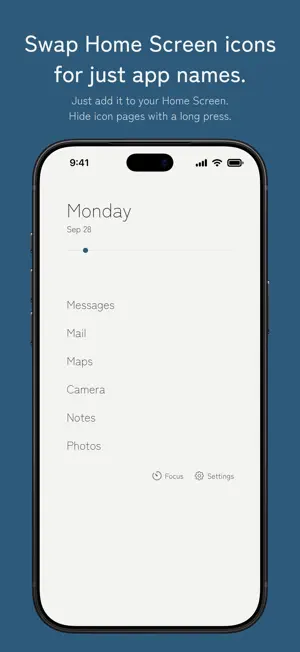


About Shizuka: Quiet Home Screen
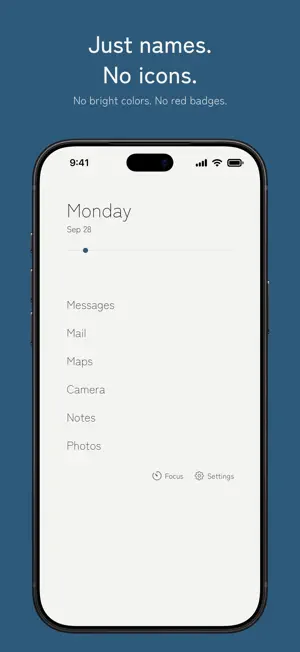
Looking at your phone wears you out a little. Then you notice you've opened it again. Shizuka puts app names, not icons, on your Home Screen, with a breath before chosen apps open. A one-time purchase, not a subscription. Your usage records stay on your iPhone. One widget, up to six app names, no icons. You choose which apps get the breath. ■ Getting started The only step is adding one widget. Come back, and the app moves on by itself. For a quieter iPhone, try any of these four, all optional: • Breathe before apps open • Hide other pages • Use a plain wallpaper • Batch notifications Hidden apps stay in the App Library. ■ Widget Tap a name to open that app. It starts with three everyday apps, and you can pick your own. Above the names are the day, the date, and a thin line for how far the day has gone. You can turn them off. Extra Large on iOS 27, Large on iOS 26, or Medium, which shows up to six apps (two columns from four). The widget keeps its color day and night. ■ Breath Open an app like Instagram, and the breath screen comes first. Breathe in as the circle grows and out as it shrinks: one breath. It also shows today's tries and the time since you last opened it. "Not now" works even mid-breath. When the breath ends, "Open" appears. After you open an app, reopening it within the time you set skips the breath. Setup uses Apple's Shortcuts app. On iOS 27, add an app and a ready-made shortcut opens. Turn on its switch and add it. On iOS 26, or if that doesn't work, the app guides you step by step. Turn it on or off per app. ■ Focus Choose a length, and the apps you picked won't open until it's over. If you try to open one, a Screen Time screen appears instead. Focus offers 25, 50, or 90 minutes, or your own from 15 to 180 minutes in 5-minute steps. Meanwhile, the widget shows only the time left. Tap Focus again for a countdown; "End focus" there, or "End" on the widget, stops it at any time. Routine keeps chosen apps closed on set days and times. ■ Review See your daily average screen time, a 7-day bar chart, most-used apps, and how often you didn't open an app. Tap a bar for that day's total. The 4-week view has 28 daily bars up to yesterday; tap one for its total and top apps. No streaks, no rankings, no arrows. ■ Themes (full version) Six themes, White, Mono, Beige, Pink, Green, and Sky Blue, change the background colors of the widget and app. Mono is black on the widget. Save a matching wallpaper, too. ■ Screen Time permission The app asks only when you first use Focus or Routine, or when you tap the prompt in the 7-day view. You choose the apps and the length, and you can lift the limit at any time. The app doesn't manage family members' or children's devices. ■ Data and ads No account, no ads. Which apps you use, and for how long, never leaves your iPhone. ■ What's free • Up to six apps on the widget • Setup and tips for a quieter iPhone • A breath before one app • Focus • Routine (up to 3) • 7-day and 4-week views, focus time Focus you start yourself and Review are free, with no limits. ■ Full version • 6 themes • A breath before any number of apps Also: breath length, your words on the breath screen, Home Screen font, up to 8 routines. It's a one-time purchase, so nothing renews. The first time you touch a full-version feature, you can start a 14-day free trial. It ends by itself after 14 days, with no charge. After the trial, the theme returns to White, only the first 3 routines run, and your choices are kept. On the free version, the breath appears only for your first app. Buy it, and everything works as before. ■ The idea The app is rooted in the Zen phrase "Muichimotsu chu mujinzo": where there is nothing, there is something that never runs out. ■ Terms and policies Terms of Use https://ryodevapp.github.io/shizuka-home/en/terms/ Privacy Policy https://ryodevapp.github.io/shizuka-home/en/privacy/ Legal notice (Japan, in Japanese) https://ryodevapp.github.io/shizuka-home/tokushoho/
What’s new
Version 1.3 · Updated November 23, 2026
Fixed Camera and Alarm sometimes not opening from the widget. - If Camera or Alarm can't open, you'll see how to add a shortcut that opens it. Tap the button, then "Add Shortcut," and it opens from then on - You'll see the same guide when you add Camera or Alarm in Settings - If an app you added from the list isn't on this iPhone and can't open, you'll see a note that it couldn't open, with a way to change your apps - In Settings, under Home Screen, touch and hold to reorder has been rebuilt. With two or more apps, a "Touch and hold to reorder" note appears under the list - The third button on the breath screen now reads "Open without the breath today" - Review shows a line under the chart saying you can tap a bar or an app to filter. It's hidden while something is selected - When you first set up, you now pick the apps you use every day before placing the widget. They appear in the order you tap - The steps for placing the widget are now two numbered steps - The last screen of setup now explains the breath. Tap "Set up a breath" to go on to set it up - In Review, you can pick a day on the 7-day chart with VoiceOver by swiping up or down - With Increase Contrast on, button outlines are easier to see
App privacy
The developer, Ryo Nakano, reported these privacy practices to Apple.
Data Not Collected
The developer does not collect any data from this app.
Alternatives to Shizuka: Quiet Home Screen
Looking for apps like Shizuka: Quiet Home Screen? Here are 6 similar apps on the App Store. The highest rated is less. Minimalist Launcher (5.0/5), and all 6 are free to download.
-
 Expiry Secretary
-
 Hush: Quiet Your Phone
-
 Quiet: Minimal Launcher
-
 less. Minimalist Launcher
5.0
-
 Pact: App Blocker & Time Limit
-
 FocusMe: App & Website Blocker
5.0
| App | Rating | Price | Last updated | Compare |
|---|---|---|---|---|
| Shizuka: Quiet Home Screen | – | Free | November 23, 2026 | |
| Expiry Secretary | – | Free | Oct 18, 2026 | Compare |
| Hush: Quiet Your Phone | – | Free | Apr 2, 2026 | Compare |
| Quiet: Minimal Launcher | – | Free | Nov 25, 2026 | Compare |
| less. Minimalist Launcher | 5.0 / 5 (1) | Free | Nov 20, 2026 | Compare |
| Pact: App Blocker & Time Limit | – | Free | Nov 25, 2026 | Compare |
| FocusMe: App & Website Blocker | 5.0 / 5 (8) | Free | Nov 25, 2026 | Compare |