

Tintaq: Tattoo Consent Forms
Olexandr Zhovnir Business iPhoneiPadiPod touch
Tintaq: Tattoo Consent Forms is a free Business app for iPhone and iPad by Olexandr Zhovnir. Requires iOS 17.0. Updated November 1, 2026.
- Price
- Free
- on the App Store
- Size
- 11 MB
- Age 12+
- Updated
- Nov 1
- 2026 · v1.2
Screenshots


About Tintaq: Tattoo Consent Forms
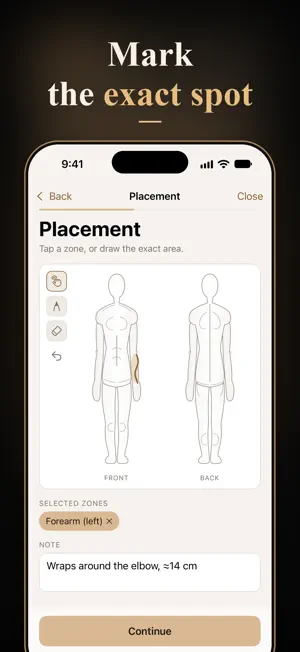
The client answers the health questions, shows an ID and signs with a finger. Tintaq turns it into one PDF — the document an inspector asks for and the copy the client takes home. WHAT MAKES IT DIFFERENT • Client data stays on the phone Health answers and ID photos stay in the app, encrypted by iOS, behind Face ID. There is no account to create and no server holding your clients' records. It works with no signal. • The wording is frozen at signing A consent form is only worth something if you can show what the client actually read. Editing a template later raises its version and never touches a form already signed. • Hand the phone over safely Client mode hides every other client's record and asks for Face ID before anyone can leave the form. • Lot numbers on the document Ink and needle batches go on the PDF, because that is the first thing a health inspector asks for. • Fourteen languages English, German, French, Spanish, Italian, Portuguese, Dutch, Polish, Russian, Turkish, Japanese, Korean and both forms of Chinese — the app, the consent templates and the aftercare sheet. • Your wording, your logo The templates are a starting point. Rewrite them for your country and your studio, and put your logo on the header. HOW A SESSION GOES 1. Pick the client, or add them in twenty seconds. 2. Choose the form: tattoo, piercing, touch-up, or one you wrote. 3. Record the procedure, the placement on the body chart, and the batches you opened. 4. Hand the phone over. The client answers the health questions, shows an ID, reads the wording and signs. 5. Face ID hands the phone back. Check the flagged answers, save, and the PDF is done. PRICE Five clients free, so you can try it on real people. After that Pro lifts the limit: one payment that is yours for good, or a yearly or monthly subscription. No fee per form. Tintaq gives you a document, not legal advice. LEGAL Terms of Use (EULA): https://www.apple.com/legal/internet-services/itunes/dev/stdeula/ Privacy Policy: https://sanchizas007.github.io/tintaq-site/privacy/
What’s new
Version 1.2 · Updated November 1, 2026
A short, animated tour now greets new artists, and you can replay it any time from Studio → How Tintaq works. • Face ID no longer pops up before you have set up your studio. • Small polish across the app.
App privacy
The developer, Olexandr Zhovnir, reported these privacy practices to Apple.
Data Not Linked to You
The following data, which may be collected but is not linked to your identity, may be used for the following purposes:
- Purchases: Purchase History
- Usage Data: Advertising Data
Used for: Analytics, App Functionality
Alternatives to Tintaq: Tattoo Consent Forms
Looking for apps like Tintaq: Tattoo Consent Forms? Here are 6 similar apps on the App Store. The highest rated is SIA Reloj (4.0/5), and all 6 are free to download.
-
 FileX: PDF Scanner & Editor
-
 Einverständniserklärung App
-
 Inkarte: Tattoo Client Manager
-
 InPersonForms: PDF Fill & Sign
-
 Taddoo: Tattoo Studio Booking
-
 SIA Reloj
4.0
| App | Rating | Price | Last updated | Compare |
|---|---|---|---|---|
| Tintaq: Tattoo Consent Forms | – | Free | November 1, 2026 | |
| FileX: PDF Scanner & Editor | – | Free | Nov 1, 2026 | Compare |
| Einverständniserklärung App | – | Free | Nov 2, 2026 | Compare |
| Inkarte: Tattoo Client Manager | – | Free | Oct 27, 2026 | Compare |
| InPersonForms: PDF Fill & Sign | – | Free | Oct 17, 2026 | Compare |
| Taddoo: Tattoo Studio Booking | – | Free | Nov 1, 2026 | Compare |
| SIA Reloj | 4.0 / 5 (3) | Free | Oct 16, 2026 | Compare |