

InPersonForms: PDF Fill & Sign
SUNLIT GRACE PTY LTD Business iPhoneiPadiPod touch
InPersonForms: PDF Fill & Sign is a free Business app for iPhone and iPad by SUNLIT GRACE PTY LTD. Requires iOS 26.0. Updated October 17, 2026.
- Price
- Free
- on the App Store
- Size
- 17 MB
- Age 4+
- Updated
- Oct 17
- 2026 · v1.5.0
Screenshots



About InPersonForms: PDF Fill & Sign
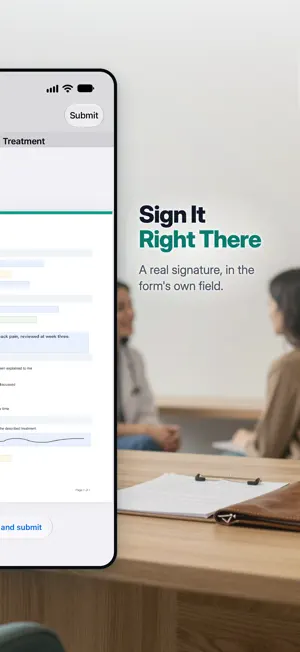
InPersonForms helps you run in-person paperwork faster on iPhone and iPad. Import your PDF forms once, place smart fillable fields, then complete and sign with clients on the spot. No printing, no scanning, no messy back-and-forth. No subscription. Start free with 3 templates and unlimited clients. Upgrade to Pro once to unlock everything, forever. Built for teams who handle real forms in the real world: - clinics, allied health & wellness practices - therapy & counselling practices - consultants and field service teams - contractors and home services - agencies and small businesses - anyone collecting client intake, consent, waiver, or service forms Key features: - Import existing PDF forms as reusable templates - Replace the PDF behind a template later and keep the fields you placed on it - Share a PDF in from Files, Mail, or any other app and it arrives as a template - Add signature, initials, date, text, text area, checkbox, radio, and dropdown fields - Handwriting mode: draw directly on PDFs with Apple Pencil on iPad - Auto-detect many common form fields to speed setup - Mark required fields so nothing critical is missed - Smart next/previous navigation across incomplete fields - A guided fill panel that walks you through every field in order - Undo and redo while placing fields, filling in, or writing by hand - Save a form as a draft, signatures included, and finish it later where you left off - Auto-fill fields from client info and custom profile templates - Capture signatures and initials directly on device - Generate final signed PDFs, save version history, and share instantly - Attach photos, IDs, and documents to any client, and mark them up in the app - Sort, search, and filter records by template, client, or profile data - Customizable record columns to see exactly the data you need - Back up everything to a single file and restore it on a new device - Automatic backups to your own iCloud Drive, on the schedule and count you choose - Sync clients, templates and records across your practice's iPads and iPhones, over the Wi-Fi they share or directly, device to device - Review forms from other devices: forms filled on your practice's other devices arrive as drafts on the main device you chose, to check and submit there - Keep all client and document data on your own devices, with no server of ours Pro unlocks: - Unlimited templates - No watermark on forms & PDFs - Client profiles & auto-fill from profile data - Create & browse form version history - Replace a template's document and restore an earlier one from Document History - Advanced sorting, search & filters - Unlimited client attachments - Export completed forms to CSV - Sync with your practice's other devices Why teams choose InPersonForms: - Faster client onboarding at the point of service - More consistent form completion with required-field guidance - Cleaner records with saved versions and PDF exports - Local-first workflow that works without cloud dependencies - Works fully offline, no internet connection needed If your process still relies on pen-and-paper forms or manual PDF edits, InPersonForms gives you a practical, professional upgrade in minutes. Terms of Use: https://www.apple.com/legal/internet-services/itunes/dev/stdeula/ Privacy Policy: https://www.inpersonforms.com/legal/privacy
What’s new
Version 1.5.0 · Updated October 17, 2026
Version 1.5.0 lets you put a form down and pick it up again. • Put a form down, finish it later. Tap Save Draft while you fill a form, or when you cancel, and everything on it is kept, signatures included. If you leave the app halfway through a form, it's saved too. Your drafts wait at the top of Records and on the client's page in Clients: tap one to pick up where you left off. Drafts are free. • Sync nearby devices, no network needed. Devices near each other, in the same room for example, now sync directly, with no Wi-Fi network and no internet. Everything goes straight from one device to the other. Wi-Fi just has to be switched on, even when it isn't connected to anything, and InPersonForms open on both. Drafts sync too, so a form started on one device can be finished on another. Sync needs InPersonForms Pro on each device. • Review forms on the main device. On the main device, turn on Review forms from other devices under Sync Across Devices in Settings. Forms filled on the other devices then arrive on the main device as drafts, for you to check and submit there. Sync needs InPersonForms Pro on each device. • A record signed by mistake can now be archived: open it and tap Archive Record. An archived record can then be deleted for good with Delete Permanently. • Handwriting is filed in the ink color you picked, in dark mode too, and each new handwriting form starts with the default pen. • Buttons keep their labels while you press them, and a signed PDF opens full screen, without the tab bar. Thank you for using InPersonForms.
App privacy
The developer, SUNLIT GRACE PTY LTD, reported these privacy practices to Apple.
Data Not Collected
The developer does not collect any data from this app.
Alternatives to InPersonForms: PDF Fill & Sign
Looking for apps like InPersonForms: PDF Fill & Sign? Here are 6 similar apps on the App Store. The highest rated is Jotform Sign: eSign PDF & Docs (4.9/5), and all 6 are free to download.
-
 DotSign - Sign & Fill PDFs
-
 Jotform Sign: eSign PDF & Docs
4.9
Jotform Sign: eSign PDF & Docs
4.9
-
 Form Filler: fill & sign forms
4.6
Form Filler: fill & sign forms
4.6
-
 Jotform - Form, Sign & Survey
4.9
Jotform - Form, Sign & Survey
4.9
-
 PDF Fill & Sign. Editor Filler
4.6
PDF Fill & Sign. Editor Filler
4.6
-
 Adobe Acrobat Sign
2.2
Adobe Acrobat Sign
2.2
| App | Rating | Price | Last updated | Compare |
|---|---|---|---|---|
| InPersonForms: PDF Fill & Sign | – | Free | October 17, 2026 | |
| DotSign - Sign & Fill PDFs | – | Free | Mar 27, 2026 | Compare |
| Jotform Sign: eSign PDF & Docs | 4.9 / 5 (411) | Free | Oct 16, 2026 | Compare |
| Form Filler: fill & sign forms | 4.6 / 5 (31,727) | Free | Oct 24, 2024 | Compare |
| Jotform - Form, Sign & Survey | 4.9 / 5 (44,770) | Free | Oct 23, 2026 | Compare |
| PDF Fill & Sign. Editor Filler | 4.6 / 5 (6,752) | Free | May 22, 2025 | Compare |
| Adobe Acrobat Sign | 2.2 / 5 (646) | Free | Sep 22, 2026 | Compare |