

DotSign - Sign & Fill PDFs
Tommy Ong Business iPhoneiPadiPod touch
DotSign - Sign & Fill PDFs is a free Business app for iPhone and iPad by Tommy Ong. Requires iOS 17.0. Updated March 27, 2026.
- Price
- Free
- on the App Store
- Size
- 2 MB
- Age 4+
- Updated
- Mar 27
- 2026 · v1.0
Screenshots


About DotSign - Sign & Fill PDFs
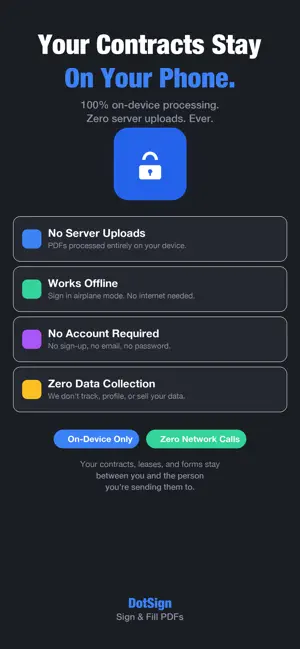
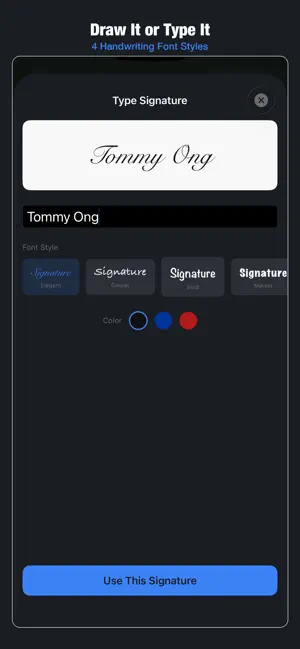
DotSign signs PDFs in seconds — no subscription, no account, no uploading your documents to a server. FREE to use. Upgrade to Pro for $4.99 once to unlock unlimited signing, multiple signatures, and all annotation tools. No subscription. No ads. Ever. You shouldn't need a $120/year subscription to put your name on a lease. FREE FEATURES: → Sign up to 3 PDF documents per day → Draw your signature with finger or Apple Pencil → Type your signature in a handwriting font → Add text to fill form fields → Navigate multi-page PDFs → Export and share signed documents → 100% on-device — your documents never leave your phone PRO FEATURES ($4.99 once): → Unlimited document signing → Save multiple signatures and initials → Import signature from a photo → 4 signature font styles → Signature colors (black, blue, red, custom) → Pen thickness options → Date stamps and checkboxes → Photo-to-PDF conversion → Document history with annotation persistence → Flatten PDF (lock your annotations permanently) HOW IT WORKS: 1. Import a PDF from Files, email, or any app 2. Tap where you want to sign 3. Draw or type your signature 4. Resize and position it perfectly 5. Export the signed PDF SIGN FROM ANYWHERE: → Share Extension — sign PDFs directly from Mail, Messages, or Safari without switching apps → Quick Actions — long-press the icon to start signing instantly FILL FORMS: → Tap anywhere to add text → Adjustable font sizes for any field → Date stamps for quick date entry (Pro) → Checkboxes for form fields (Pro) → All annotations are movable and deletable YOUR DOCUMENTS ARE PRIVATE: → Everything happens on your device → No server uploads — ever → No account required → Works completely offline → Your contracts, leases, and forms stay between you and the person you're sending them to PERFECT FOR: → Signing leases and rental agreements → Filling out job applications → Signing contracts and freelance agreements → Completing insurance or medical forms → Signing school permission slips → Any PDF that says "sign here" Stop paying monthly to sign your own name.
App privacy
The developer, Tommy Ong, reported these privacy practices to Apple.
Data Not Collected
The developer does not collect any data from this app.
Alternatives to DotSign - Sign & Fill PDFs
Looking for apps like DotSign - Sign & Fill PDFs? Here are 6 similar apps on the App Store. The highest rated is PDF Form Filler: Fill and Sign (4.9/5), and all 6 are free to download.
-
 InPersonForms: PDF Fill & Sign
-
 PDF Form Filler: Fill and Sign
4.9
PDF Form Filler: Fill and Sign
4.9
-
 Fill & Sign Documents PDF Scan
4.7
Fill & Sign Documents PDF Scan
4.7
-
 eSign - Fill & Sign Form Docs
4.8
eSign - Fill & Sign Form Docs
4.8
-
 Form Filler: fill & sign forms
4.6
Form Filler: fill & sign forms
4.6
-
 PDF Fill & Sign. Editor Filler
4.6
PDF Fill & Sign. Editor Filler
4.6
| App | Rating | Price | Last updated | Compare |
|---|---|---|---|---|
| DotSign - Sign & Fill PDFs | – | Free | March 27, 2026 | |
| InPersonForms: PDF Fill & Sign | – | Free | Oct 17, 2026 | Compare |
| PDF Form Filler: Fill and Sign | 4.9 / 5 (9) | Free | Nov 18, 2025 | Compare |
| Fill & Sign Documents PDF Scan | 4.7 / 5 (298) | Free | Aug 21, 2026 | Compare |
| eSign - Fill & Sign Form Docs | 4.8 / 5 (130) | Free | Oct 22, 2026 | Compare |
| Form Filler: fill & sign forms | 4.6 / 5 (31,727) | Free | Oct 24, 2024 | Compare |
| PDF Fill & Sign. Editor Filler | 4.6 / 5 (6,752) | Free | May 22, 2025 | Compare |