

Peak Pocket AI
Myron Koch Developer Tools iPhoneiPadiPod touch
Peak Pocket AI is a free Developer Tools app for iPhone and iPad by Myron Koch. Rated 5.0/5 from 1 ratings. Requires iOS 16.4. Updated October 15, 2026.
- Rating
- 5.0
- 1 ratings
- Price
- Free
- on the App Store
- Size
- 54 MB
- Age 17+
- Updated
- Oct 15
- 2026 · v1.3.0
Screenshots



About Peak Pocket AI
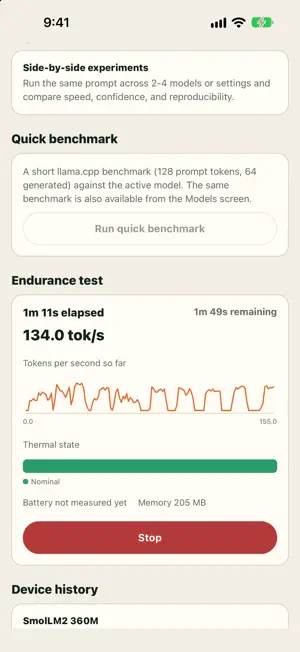
Peak Pocket AI is a lab for language models that run on your iPhone. Chat privately with open models, then look under the hood: how fast they generate, how confident they are in every word, how well they remember a long prompt, and how your phone holds up under sustained load. PRIVATE BY DESIGN Models run on the device. Your chats, notebook, photos, and settings never leave your iPhone. No account, no analytics, no ads. Once a model is downloaded, everything works in airplane mode. A LAB NOTEBOOK FOR EVERY GENERATION Every reply is recorded with its seed, settings, timings, and device state. Rerun any run with identical settings and see whether the output reproduces, character for character. Export runs as CSV or JSON, or as a signed report that anyone can check for changes. LIVE TELEMETRY Watch tokens per second, time to first token, memory, and thermal state as a reply streams in. SEE WHAT THE MODEL WAS THINKING Confidence shading shows how sure the model was of each word. Tap any word to see the alternatives it nearly chose, with their probabilities. Reasoning models show their thinking above the answer. EVALUATIONS Score models on built-in question sets for knowledge, math, tool calling, and structured JSON output, or import your own. Compare two models on the same questions with confidence intervals. EXPERIMENTS Run the same prompt and seed across models or settings. Measure how speed and memory change as the context fills, and test long-context recall: hide a fact at different depths of a long prompt and chart how often the model finds it. ENDURANCE AND ENERGY Measure what sustained generation does to your phone: throughput over time, throttling, thermal state, and battery used. An energy-per-token estimate is shown when a run is measured on battery. VISION AND APPLE'S ON-DEVICE MODEL Ask vision models about a photo, processed on the device. On iPhones with Apple Intelligence, chat with and evaluate Apple's built-in model alongside open models. BRING YOUR OWN MODELS Browse Hugging Face for GGUF models with a fit estimate for your phone's memory, including gated models with your access token. Optionally connect an OpenAI-compatible provider with your own API key; remote chats are clearly marked. MAKE IT YOURS Four themes in light and dark, including High Contrast, a colorblind-safe confidence scale, science personas, and share cards for any run or comparison. Built by Peak Summit Labs.
What’s new
Version 1.3.0 · Updated October 15, 2026
- Protocols: one-button Speed check, Trust check, and Heat and battery tests that check the phone is ready first (cool, power, battery) and record exactly how they ran. - Rigor levels for experiments: Standard alternates the models, discards a warmup run and lets the phone cool between repeats; results lead with the effect size and its 95% interval. - Parameter sweep: time one model across settings such as flash attention, GPU layers and KV cache type. - Blind arena: compare two models on your own prompts without knowing which wrote which, and build your own ranking. - Simpler model settings: a sampling preset and a load profile (Auto, Max speed, Low memory) on top, a list of what differs from the defaults, and every control still under All controls. - LoRA adapters, a chat template viewer, and quick comparison of the same model at different quantizations. - Siri and Shortcuts: ask your model, run a quick benchmark, or open the Lab. - Every run records the engine that produced it and whether the GPU was used; evaluations draw a random seeded sample of questions and show intervals for calibration. - Experiments let you choose the reply length and turn thinking off or on. - Scrolling up while a reply streams no longer pulls you back down; swipe down to hide the keyboard mid-reply. - A clear message when a chat fills the model's context window.
App privacy
The developer, Myron Koch, reported these privacy practices to Apple.
Data Not Collected
The developer does not collect any data from this app.
Alternatives to Peak Pocket AI
Looking for apps like Peak Pocket AI? Here are 6 similar apps on the App Store. The highest rated is MuxLink: SSH Terminal & tmux (5.0/5), and all 6 are free to download.
-
 MuxLink: SSH Terminal & tmux
5.0
MuxLink: SSH Terminal & tmux
5.0
-
 SendMan: API & HTTP Client
5.0
SendMan: API & HTTP Client
5.0
-
 Luma SSH
-
 Nice SSH
5.0
Nice SSH
5.0
-
 Proxmox Manager Server
-
 Text Editor · Edit Text File
| App | Rating | Price | Last updated | Compare |
|---|---|---|---|---|
| Peak Pocket AI | 5.0 / 5 (1 rating) | Free | October 15, 2026 | |
| MuxLink: SSH Terminal & tmux | 5.0 / 5 (1) | Free | Aug 18, 2026 | Compare |
| SendMan: API & HTTP Client | 5.0 / 5 (1) | Free | Jun 13, 2026 | Compare |
| Luma SSH | – | Free | Sep 5, 2026 | Compare |
| Nice SSH | 5.0 / 5 (3) | Free | Sep 14, 2026 | Compare |
| Proxmox Manager Server | – | Free | Jun 10, 2026 | Compare |
| Text Editor · Edit Text File | – | Free | Aug 21, 2026 | Compare |
Compare Peak Pocket AI with the top alternatives: ratings, updates, ASO score and keyword gaps →