

MuxLink: SSH Terminal & tmux
Jesse Ziegler Developer Tools iPhoneiPadiPod touch
MuxLink: SSH Terminal & tmux is a free Developer Tools app for iPhone and iPad by Jesse Ziegler. Rated 5.0/5 from 1 ratings. Requires iOS 17.0.
- Rating
- 5.0
- 1 ratings
- Price
- Free
- on the App Store
- Size
- 8 MB
- Age 4+
- Updated
- Aug 18
- 2026 · v1.0
Screenshots

About MuxLink: SSH Terminal & tmux
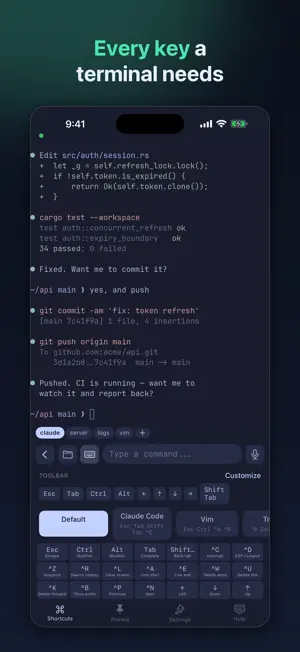
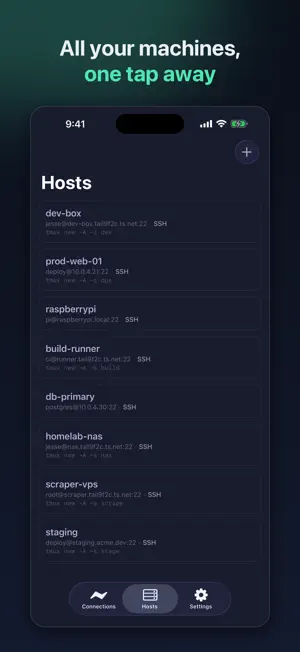
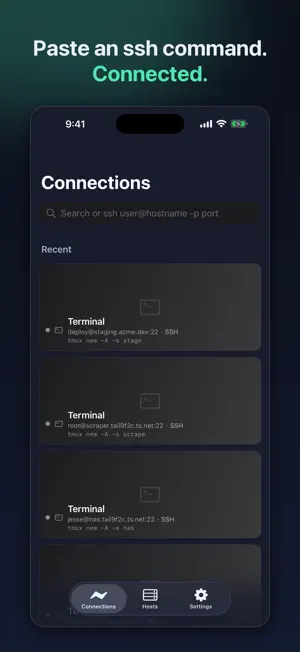
Your terminal, everywhere you go. MuxLink is an SSH client built for one thing: making a real remote development session usable from a phone. Connect to your dev box, attach to tmux, and pick up exactly where you left off — including long-running coding agents that keep working while your screen is off. RUN AGENTS FROM ANYWHERE Start a coding agent on your server, lock your phone, and check back later. Your tmux session keeps running on the remote machine, so nothing is lost when the connection drops or the app goes to the background. A one-tap "Copy Terminal Buffer" button grabs the visible scrollback so you can paste context into a chat without fighting a text selection handle. Works with any terminal-based agent — Claude Code, Codex, Aider, or your own scripts. MuxLink is not affiliated with or endorsed by their makers. TMUX AS A NATIVE INTERFACE MuxLink detects when your session is running tmux and renders your windows as a native tab bar. Switch windows by tapping instead of typing a prefix chord. It works with grouped sessions, so your phone can follow its own window without dragging your desktop client along with it. A KEYBOARD THAT WORKS ON A TOUCHSCREEN The iOS keyboard has no Ctrl, Esc, Tab, or arrow keys. MuxLink adds them in an accessory bar you can customize, with presets for tmux, Vim, and agent-driven workflows. Type into a comfortable text field and send whole lines, or drop into raw keystroke mode when an app needs every character live. COMMANDS YOU ALREADY RAN Command history is kept per host, with inline ghost-text autocomplete as you type and up/down recall. Pin the commands you run constantly and tap them from a menu. Everything is scoped to the host you are on, so your laptop's history does not clutter your server's. BUILT FOR REAL SERVERS • SSH with password, Ed25519 key, or passwordless auth • Generate keys on device, optionally protected by Face ID • Known-hosts fingerprint verification with a clear warning if a host key changes • Mosh support for roaming between networks • SFTP file browsing • Per-host startup command — auto-attach tmux the moment you connect • Auto-reconnect when you return to the app • Multiple concurrent sessions • Paste an "ssh user@host -p port" command to connect instantly MADE TO LOOK RIGHT Thirty themes, five monospace fonts, and full-color terminal rendering so Starship prompts, syntax highlighting, and TUI apps look the way they do on your desktop. Native iPad support with a resizable window. PRIVATE BY DESIGN No accounts, no telemetry, no analytics SDKs, no ads. Keys and passwords live in the iOS Keychain on your device. The only network connections MuxLink makes are the ones you initiate to the servers you name. REQUIREMENTS MuxLink connects to servers you already have access to. It does not provide servers, hosting, or a VPN. To reach a machine that is not exposed to the public internet, use it alongside a mesh VPN such as Tailscale.
App privacy
The developer, Jesse Ziegler, reported these privacy practices to Apple.
Data Not Collected
The developer does not collect any data from this app.
Alternatives to MuxLink: SSH Terminal & tmux
Looking for apps like MuxLink: SSH Terminal & tmux? Here are 6 similar apps on the App Store. The highest rated is NodeOps: Terminal, Docker, K8s (5.0/5), and all 6 are free to download.
-
 BentoTerm
-
 RootDeck
-
 Vays - Markdown reader
-
 CmdForge
-
 NodeOps: Terminal, Docker, K8s
5.0
NodeOps: Terminal, Docker, K8s
5.0
-
 Senrigan Remote Desktop
| App | Rating | Price | Last updated | Compare |
|---|---|---|---|---|
| MuxLink: SSH Terminal & tmux | 5.0 / 5 (1 rating) | Free | August 18, 2026 | |
| BentoTerm | – | Free | Aug 18, 2026 | Compare |
| RootDeck | – | Free | Oct 24, 2026 | Compare |
| Vays - Markdown reader | – | Free | Aug 31, 2026 | Compare |
| CmdForge | – | Free | Aug 17, 2026 | Compare |
| NodeOps: Terminal, Docker, K8s | 5.0 / 5 (2) | Free | Oct 9, 2026 | Compare |
| Senrigan Remote Desktop | – | Free | Sep 22, 2026 | Compare |