

PDFCompare: Offline PDF & DOC
Omer Sanli Productivity iPhoneiPadiPod touchMac
PDFCompare: Offline PDF & DOC is a free Productivity app for iPhone and iPad by Omer Sanli. Requires iOS 26.0. Updated October 25, 2026.
- Price
- Free
- on the App Store
- Size
- 541 MB
- Age 4+
- Updated
- Oct 25
- 2026 · v1.308
Screenshots



About PDFCompare: Offline PDF & DOC
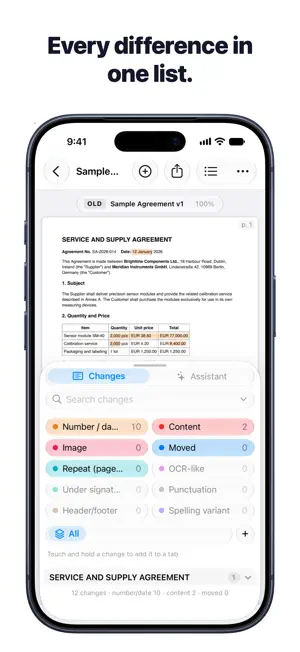
PDFCompare shows you exactly what changed between two versions of a document. Pick the old and the new version from Files — PDF or Word, digital or scanned — and PDFCompare lists every difference and highlights it on the pages, side by side. WHAT IT FINDS • Changed numbers, amounts, dates and percentages • Added, removed and reworded sentences and clauses • Moved paragraphs and changed table cells • Punctuation and small wording changes, kept separate from real content changes BUILT FOR REAL DOCUMENTS • Reads scanned and photographed pages with on-device text recognition, and straightens skewed pages • Detects the document language automatically • Ignores repeated headers and footers, page breaks and stamp marks, so you can focus on real changes REVIEW, MARK UP AND SHARE • Step through the changes one by one or filter them by type • On iPhone, read one document at a time and switch between the old and new version with a swipe • On iPad, write on the pages with Apple Pencil: circle a change and your note is linked to it • Organize changes in color-coded tabs • Export a PDF report: single document or side by side, with numbered markers, your notes and a change summary • Optional assistant summarises the changes and answers your questions, using Apple's on-device Foundation Models on iPhone and iPad models with Apple Intelligence PRIVATE BY DESIGN • Everything runs on your iPhone or iPad. Your documents never leave it and PDFCompare collects no data; the only connection is a daily check with the App Store for a newer version. • Optional backup to your own iCloud Drive, with optional encryption. A ready-made example comparison is included so you can try it right away. FREE AND PRO • Free: compare documents up to 10 pages each (or pick up to 10 pages of a longer one), 3 comparisons of scanned documents, PDF reports with a small PDFCompare header, and the Assistant (summaries and 10 questions a month) • PDFCompare Pro: unlimited pages and scanned documents, reports with your own letterhead, and an unlimited Assistant. Monthly or yearly subscription (the yearly plan starts with a free week), or a one-time lifetime purchase. Requires iOS 26 or iPadOS 26 or later. The Assistant requires an iPhone or iPad with Apple Intelligence. PDFCOMPARE PRO Pro is available as an auto-renewing monthly or yearly subscription, or as a one-time lifetime purchase. Payment is charged to your Apple Account when you confirm the purchase. Subscriptions renew automatically unless cancelled at least 24 hours before the end of the current period; you can manage or cancel them in your App Store account settings. Terms of Use (EULA): https://www.apple.com/legal/internet-services/itunes/dev/stdeula/ Privacy Policy: https://omersanli.com.tr/pdfcompare/privacy
What’s new
Version 1.308 · Updated October 25, 2026
• Signature and initials: with the Signature tool in the Pencil toolbar, draw and save your signature and initials once, then place them anywhere. "Initial Pages" adds your initials to the same corner of the pages you choose in one go. • The app now lets you know when a new version is available. • While using Apple Pencil, the keyboard now opens in note and tag fields. • Number badges: changes on the same line now share one segmented badge, each number in its own color and still selectable on its own. PDF reports use the same layout. • Text added to a change can now be deleted from the markup bar.
App privacy
The developer, Omer Sanli, reported these privacy practices to Apple.
Data Not Linked to You
The following data, which may be collected but is not linked to your identity, may be used for the following purposes:
- Purchases: Purchase History
- User Content: Other User Content
Used for: App Functionality
Alternatives to PDFCompare: Offline PDF & DOC
Looking for apps like PDFCompare: Offline PDF & DOC? Here are 6 similar apps on the App Store. The highest rated is FileDuel (5.0/5), and all 6 are free to download.
-
 FileDuel
5.0
-
 Penguin Agency
-
 Future AI Summit
-
 Compare Text: PDF & Documents
-
 Cubicl
-
 Toplu Mesaj Gönderme Sms
| App | Rating | Price | Last updated | Compare |
|---|---|---|---|---|
| PDFCompare: Offline PDF & DOC | – | Free | October 25, 2026 | |
| FileDuel | 5.0 / 5 (1) | Free | Oct 13, 2026 | Compare |
| Penguin Agency | – | Free | Mar 12, 2025 | Compare |
| Future AI Summit | – | Free | Jun 7, 2026 | Compare |
| Compare Text: PDF & Documents | – | Free | Oct 20, 2026 | Compare |
| Cubicl | – | Free | Mar 12, 2024 | Compare |
| Toplu Mesaj Gönderme Sms | – | Free | Oct 9, 2026 | Compare |