

FileDuel
ValueSpring LLC Productivity iPhoneiPadiPod touch
FileDuel is a free Productivity app for iPhone and iPad by ValueSpring LLC. Rated 5.0/5 from 1 ratings. Requires iOS 13.0. Updated July 23, 2026.
- Rating
- 5.0
- 1 ratings
- Price
- Free
- on the App Store
- Size
- 64 MB
- Age 4+
- Updated
- Jul 23
- 2026 · v1.1
Screenshots

About FileDuel
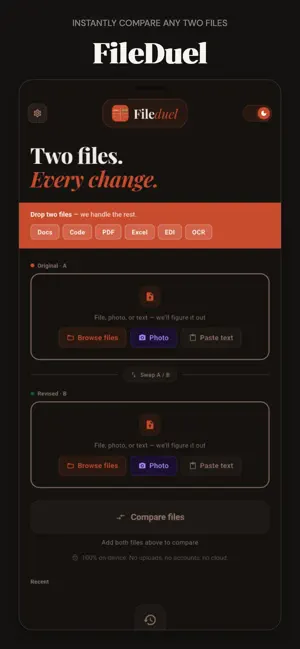
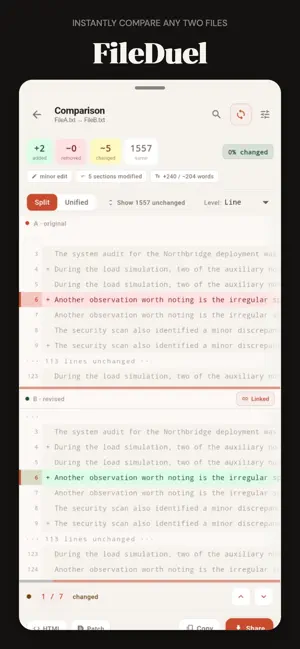
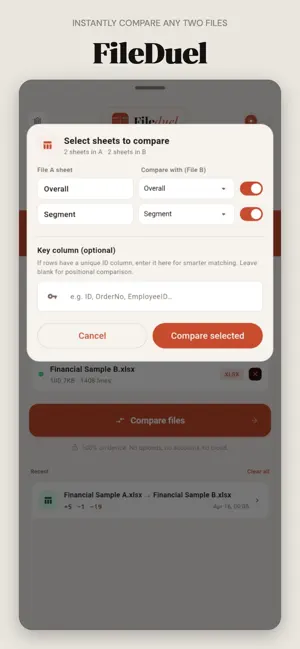
FileDuel puts two files side by side and shows you exactly what changed — every added line, every deleted word, every modified cell. No guesswork, no scrolling back and forth manually. Whether you're reviewing a contract redline, reconciling two Excel reports, tracking changes in a code file, or comparing scanned documents — FileDuel handles it in seconds. WHAT YOU CAN COMPARE Text & Documents — .txt, .docx, .md, XML, code files, EDI, and more Excel Spreadsheets — compare cells, formulas, and sheet structure across .xlsx files PDF Files — extract and compare text content across pages Photos & Scans — photograph a printed document and compare against another HOW IT WORKS 1. Pick File A and File B — from your device or paste text directly 2. Tap Compare 3. See every change highlighted — added lines in green, removed in red, modified in amber KEY FEATURES Word-level and character-level diff — see exactly which words changed, not just which lines Split view and unified view — choose the layout that works for you Portrait and landscape support — full screen real estate in any orientation Excel sheet mapping — match sheets across two files, column-by-column comparison Formula diff — see what Excel formulas changed, not just cell values PDF page navigation — jump to changed pages instantly Find in diff — search within your comparison results Export results — share as HTML, CSV, or JSON Scroll sync — both panes move together for easy line-by-line review Dark mode — full dark theme that's easy on the eyes 100% ON-DEVICE PRIVACY Your files never leave your phone. FileDuel runs entirely on-device — no uploads, no cloud processing, no accounts required. What you compare stays on your device, period. BUILT FOR → Legal & compliance teams reviewing contract versions → Finance teams reconciling Excel reports → Developers comparing config files and code → Writers tracking document revisions → Anyone who needs to know exactly what changed between two versions of anything Terms of Use: https://www.apple.com/legal/internet-services/itunes/dev/stdeula/ FileDuel. Two files. Every change.
What’s new
Version 1.1 · Updated July 23, 2026
This update focuses on making FileDuel faster, more reliable, and easier to use. We’ve improved comparison performance, refined the interface, updated core components, and resolved issues to deliver a smoother experience.
App privacy
The developer, ValueSpring LLC, reported these privacy practices to Apple.
Data Not Collected
The developer does not collect any data from this app.
Alternatives to FileDuel
Looking for apps like FileDuel? Here are 6 similar apps on the App Store. The highest rated is MarkUp - Word, Markdown, LaTeX (5.0/5), and all 6 are free to download.
-
 Banana Viewer
-
 Similar Basic
-
 Duo: Split Screen Dual Window
-
 DeciderAI: Decision Maker
-
 Redactify - Black Out PDF
1.0
Redactify - Black Out PDF
1.0
-
 MarkUp - Word, Markdown, LaTeX
5.0
MarkUp - Word, Markdown, LaTeX
5.0
| App | Rating | Price | Last updated | Compare |
|---|---|---|---|---|
| FileDuel | 5.0 / 5 (1 rating) | Free | July 23, 2026 | |
| Banana Viewer | – | Free | Sep 29, 2026 | Compare |
| Similar Basic | – | Free | Dec 23, 2025 | Compare |
| Duo: Split Screen Dual Window | – | Free | Sep 23, 2026 | Compare |
| DeciderAI: Decision Maker | – | Free | Sep 23, 2026 | Compare |
| Redactify - Black Out PDF | 1.0 / 5 (1) | Free | Apr 17, 2026 | Compare |
| MarkUp - Word, Markdown, LaTeX | 5.0 / 5 (2) | Free | Oct 3, 2026 | Compare |
Compare FileDuel with the top alternatives: ratings, updates, ASO score and keyword gaps →