

Duo: Split Screen Dual Window
Mikalai Kuts Productivity iPhoneiPadiPod touch
Duo: Split Screen Dual Window is a free Productivity app for iPhone and iPad by Mikalai Kuts. Requires iOS 18.0. Updated September 23, 2026.
- Price
- Free
- on the App Store
- Size
- 4 MB
- Age 17+
- Updated
- Sep 23
- 2026 · v1.3
Screenshots

About Duo: Split Screen Dual Window
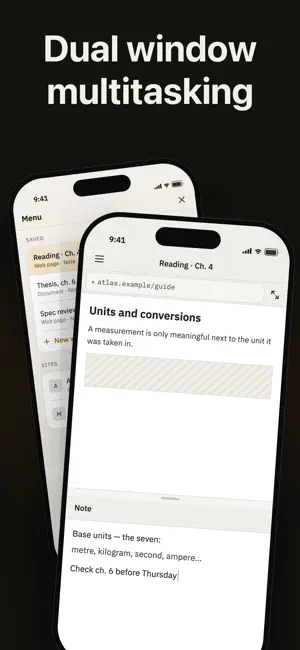
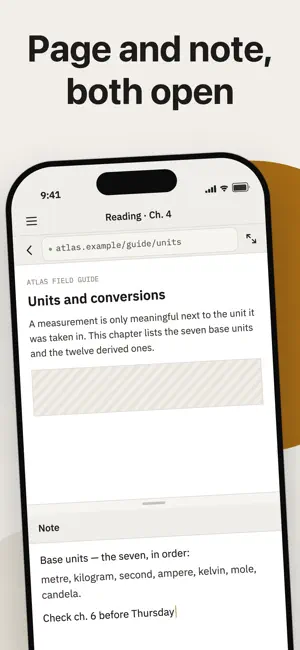
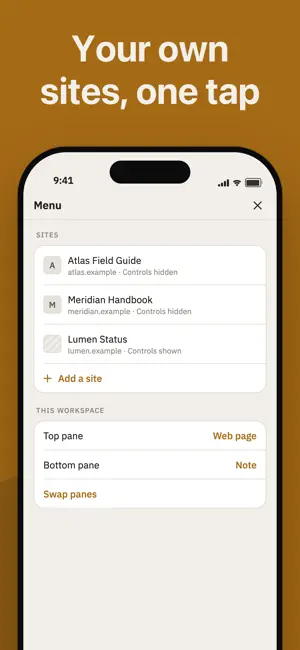
TwoUp puts two things on one iPhone screen at the same time: a web page, a PDF and a plain-text note, in any combination you need. Read a PDF above and write your notes below. Keep a reference page open beside the document you are working through. Both panes stay live — scroll one and the other keeps its place. SAVE THE PAIR A pair of panes is a workspace. Name it, and it reopens exactly as you left it: the same document, the same page, the same note text, the same divider position. MADE FOR READING Drag the divider to give either pane more room, or send one pane full screen and back. Turn the phone sideways and a PDF opens as a two-page spread, like a book, with your note still beside it. YOUR OWN SITES — WITH PRO Save the pages you keep coming back to, with their titles and icons, and open one into a pane without typing an address. IT ALL STAYS ON YOUR PHONE No account, no sign-in, and no server of ours. Your notes, your documents and your saved sites never leave the device — there is nowhere for them to go. The app asks for no permissions at all: no camera, no photos, no contacts, no location. The app sends anonymous usage statistics so we can see which screens people reach and where they get stuck. None of your content is ever included — not your notes, not the addresses you open. You can switch it off in Menu > App > Share usage data. TwoUp Pro adds two things: keeping more than one saved workspace, and saving your own sites as shortcuts. Terms of Use: https://nikolaykutsbr.github.io/twoup-support/terms.html Privacy Policy: https://nikolaykutsbr.github.io/twoup-support/privacy-policy.html
What’s new
Version 1.3 · Updated September 23, 2026
The upgrade screen now spells out what each plan works out at per month, so the two are easy to compare side by side. And there is a new switch in Menu > App: Share usage data. It is on by default and sends anonymous statistics about which screens are reached — never anything you write.
App privacy
The developer, Mikalai Kuts, reported these privacy practices to Apple.
Data Not Linked to You
The following data, which may be collected but is not linked to your identity, may be used for the following purposes:
- Identifiers: Device ID
- Usage Data: Product Interaction
Used for: Analytics
Alternatives to Duo: Split Screen Dual Window
Looking for apps like Duo: Split Screen Dual Window? Here are 6 similar apps on the App Store. The highest rated is FileDuel (5.0/5), and all 6 are free to download.
-
 FileDuel
5.0
FileDuel
5.0
-
 Banana Viewer
-
 Shopping List - BrocoList
-
 PDF Splitter - Page Extract
-
 Bookmark Manager: Latermark
-
 SplitView2026
| App | Rating | Price | Last updated | Compare |
|---|---|---|---|---|
| Duo: Split Screen Dual Window | – | Free | September 23, 2026 | |
| FileDuel | 5.0 / 5 (1) | Free | Jul 23, 2026 | Compare |
| Banana Viewer | – | Free | Sep 29, 2026 | Compare |
| Shopping List - BrocoList | – | Free | Mar 18, 2025 | Compare |
| PDF Splitter - Page Extract | – | Free | Sep 26, 2026 | Compare |
| Bookmark Manager: Latermark | – | Free | Mar 12, 2026 | Compare |
| SplitView2026 | – | Free | Apr 26, 2026 | Compare |