

Trata: Personal Finance
Dionisie Gorbuli Finance iPhoneiPadiPod touch
Trata: Personal Finance is a free Finance app for iPhone and iPad by Dionisie Gorbuli. Requires iOS 18.0. Updated October 27, 2026.
- Price
- Free
- on the App Store
- Size
- 103 MB
- Age 4+
- Updated
- Oct 27
- 2026 · v1.0.3
Screenshots
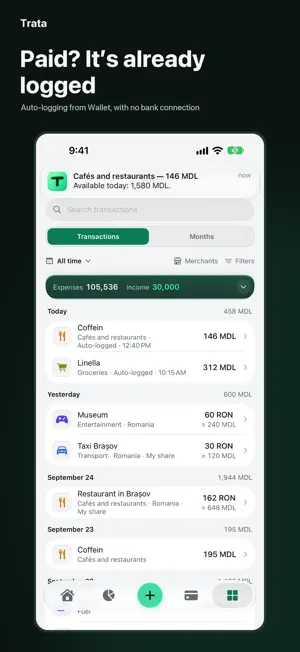

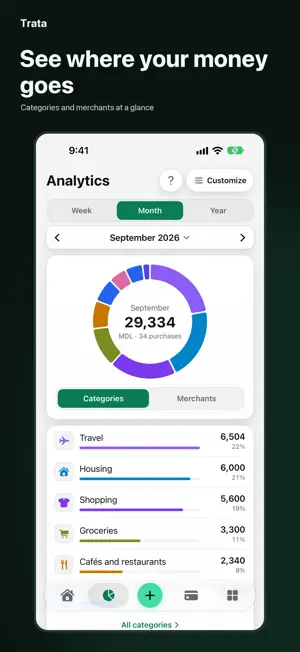

About Trata: Personal Finance
Trata shows where your money goes and how much you really spend each month. Log purchases in seconds, stick to a budget and save up for the things you want. No bank connection, no sign-up. Paid? It’s already logged A one-time setup in the Shortcuts app: after you pay at a terminal with a card in Wallet, the amount and merchant land in Trata on their own. Pick a category for a new merchant once and Trata remembers it. You can also log transactions from your bank’s text messages and, on iOS 27, from your banking app’s notifications. A step-by-step guide is built in. Online payments aren’t covered; Trata doesn’t connect to your bank or make payments. Log it your way Add expenses by hand in a couple of taps, cash included, and create a new category right on the entry screen. Scan receipts on your iPhone, import transactions from a Wallet statement screenshot or a CSV file, or use Siri and widgets. Know what you can spend Set a monthly budget and category limits. Available today shows what you can spend today, based on what you’ve logged. Analytics shows the month’s projected total, the highlights and where your money goes by category. Subscriptions in one total See exactly what your subscriptions cost each month, in the currency you’re charged. See what’s been charged and what’s still to come, with the next payment at the top. Auto-logging marks a subscription as paid. Travel and your countries map Set dates, a currency and a budget for each trip, and add tickets and bookings paid in advance. Split a shared bill equally or by shares: only your part counts as your spending, and Trata shows who owes whom. Countries you’ve visited fill in on the map, and you can mark them even without a trip. Events See what a wedding, an anniversary or a celebration cost. Add expenses you’ve already logged to an event; purchases on the same day aren’t added automatically. Organizing it together? Mark who paid and Trata works out who owes whom and how much. Family and Business Family: keep track of money together with someone close, on two iPhones, through iCloud, with no servers and no sign-up. Business: keep a small business’s money apart from your own, with orders, the cash drawer and partners’ and technicians’ shares, plus a ready-made Phone repair template. Vehicles Add a car, a motorcycle or several vehicles. Log fuel, maintenance and mileage, and see the cost per km. Keep insurance and other document expiry dates with photos; Trata reminds you a month and 14 days before they run out. Accounts, savings, debts Accounts in different currencies, each amount shown in its own currency. Savings goals, debts with repayment dates, utility bills with reminders. Exchange rates are the official National Bank of Moldova rates, and each record uses the rate of its own day. Your records stay yours No sign-up, ads or usage analytics. Data stays on your iPhone and, if iCloud is on, in your private iCloud database; the developer has no access to it. Face ID, hidden amounts, backups, export to CSV and JSON. Privacy mode shows the app with made-up data, and Face ID takes you back to your own records. Trata is available in English, Russian and Romanian. Support: [email protected] Everyday expense tracking and auto-logging are free. Trata Pro unlocks travel, events, bill splitting and debts, Family and Business, vehicles, subscriptions and utility bills, category limits, analytics for any period, unlimited accounts and savings goals. Get Pro as a monthly or yearly subscription (eligible new subscribers get the first 7 days free) or as a one-time lifetime purchase. Everything you’ve logged stays available after Pro ends: you can view, edit, delete and export it. Terms of Use: https://www.apple.com/legal/internet-services/itunes/dev/stdeula/
What’s new
Version 1.0.3 · Updated October 27, 2026
• Home: your trip now sits right in the main card, in the currency you view it in. • Countries map: tap “$” to see spending by country. • Search History by amount and date: “79”, “April 26”, “April 2026”. • Search Settings: type “currency” or “backup” and Trata shows the right row. Trata on Telegram, Instagram and Threads is there too. • Subscriptions: confirm a payment in one step. Section header cards share one calm style. • Utilities: “Paid in October” follows the payment day, and anything unpaid stands out. • Auto-logging: set up in 3 steps, with screenshots of each step and a short video. • Menu: bigger icons, and Favorites can be turned off. An empty account can be deleted. • Large text: amounts and labels are no longer cut off. My business: new forms and order card.
App privacy
The developer, Dionisie Gorbuli, reported these privacy practices to Apple.
Data Not Collected
The developer does not collect any data from this app.
Alternatives to Trata: Personal Finance
Looking for apps like Trata: Personal Finance? Here are 6 similar apps on the App Store. The highest rated is Penni: Expense Tracker (5.0/5), and all 6 are free to download.
-
 Tipid Expense Calendar
-
 Payments reminder BillsOn
-
 WalletLens: Receipt Scanner
-
 Divido: Split Bills & Budget
-
 Topf: Expense Tracker
-
 Penni: Expense Tracker
5.0
| App | Rating | Price | Last updated | Compare |
|---|---|---|---|---|
| Trata: Personal Finance | – | Free | October 27, 2026 | |
| Tipid Expense Calendar | – | Free | Sep 1, 2026 | Compare |
| Payments reminder BillsOn | – | Free | Oct 10, 2026 | Compare |
| WalletLens: Receipt Scanner | – | Free | Nov 4, 2026 | Compare |
| Divido: Split Bills & Budget | – | Free | Oct 9, 2026 | Compare |
| Topf: Expense Tracker | – | Free | Nov 3, 2026 | Compare |
| Penni: Expense Tracker | 5.0 / 5 (1) | Free | Aug 27, 2026 | Compare |